











The Crashes page lists each start of your Satisfactory server and says how it ended. Open the newest start, read the findings, and follow the fix next to each one. This works on a stopped server too.
Read a start
- Open the Crashes page.
- The list on the left shows each start, newest first, with its outcome. The panel lists the newest ten starts. The game keeps up to 15 log files.
- Choose a start. The top says what happened in one line, and shows Started, Log last written and Game version, such as
build 513885. - Under What the panel can tell are the findings. Each has a title, a fix and, often, the line from the log.
- Last 80 lines is folded below. It shows the game’s errors and warnings and the server’s own lines, and leaves out the routine lines every start prints.
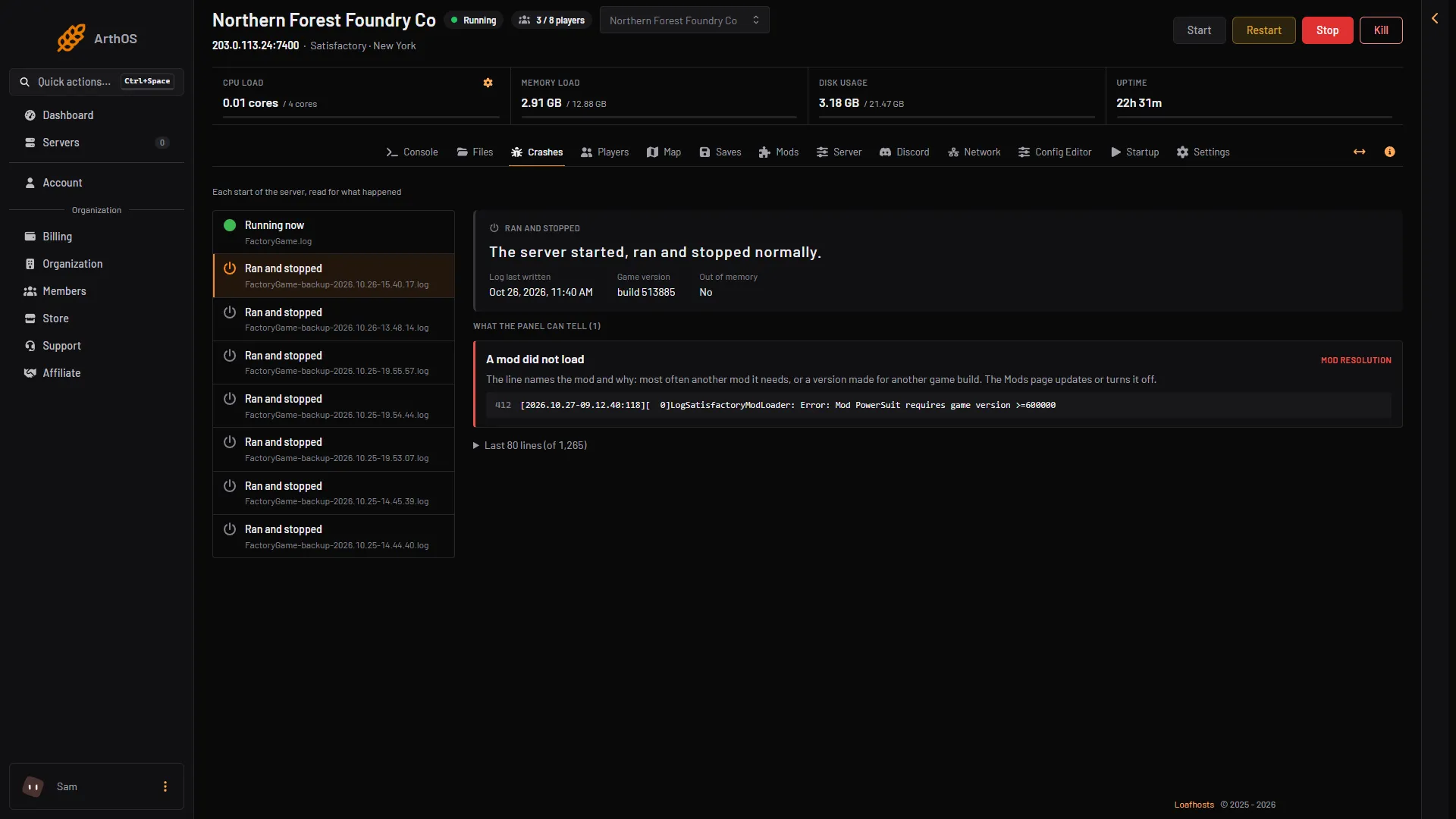
- The start running now
- The start with the finding
- The finding
- The line from the log
The outcomes mean:
- Running now: “The server is up and players can join.”
- Starting: “The server is still starting.”
- Ran and stopped: “The server started, ran and stopped normally.”
- Crashed: “The game stopped without being asked to.”
- Failed to start: “The server never got as far as letting players in.”
- Ended early: “The log ends without saying how the server stopped.”
The findings and their fixes
Each finding has a title and a fix. These are the ones for Satisfactory.
- The save could not be loaded. The game started without it. Load an older save on the Saves page, or restore a backup of the server.
- The game could not be saved. Usually a full disk. Free some space (old saves and backups count) and save again from the Saves page.
- A mod did not load. The line names the mod and why: most often another mod it needs, or a version made for another game build. The Mods page updates or turns it off.
- A player joined without the Server Manager. A Satisfactory server only lets players in through the game’s Server Manager. Players add the server there (address and port), then press Join Game. This is not a crash.
- The server ran out of memory. Big factories and mods need more. Remove a mod you do not need, or raise the server’s memory. See out of memory.
- A port the game needs was in use. Choose Restart at the top right of the server page. If it happens again, ask support to check its ports.
- The game crashed inside its engine. Choose Restart. If it happens again at the same moment, the last mod added is the first to remove.
- The engine wrote a crash report. The lines below are the engine’s own report. If it repeats with mods, search them from the Mods page.
Memory has two signs. One is the finding The server ran out of memory, read from the game’s log. The other is Out of memory Yes in the start’s details, with the start marked Crashed: the node stopped the server for using more memory than its size, and the game’s log may say nothing. Either means memory. Only when both are missing is it something else.
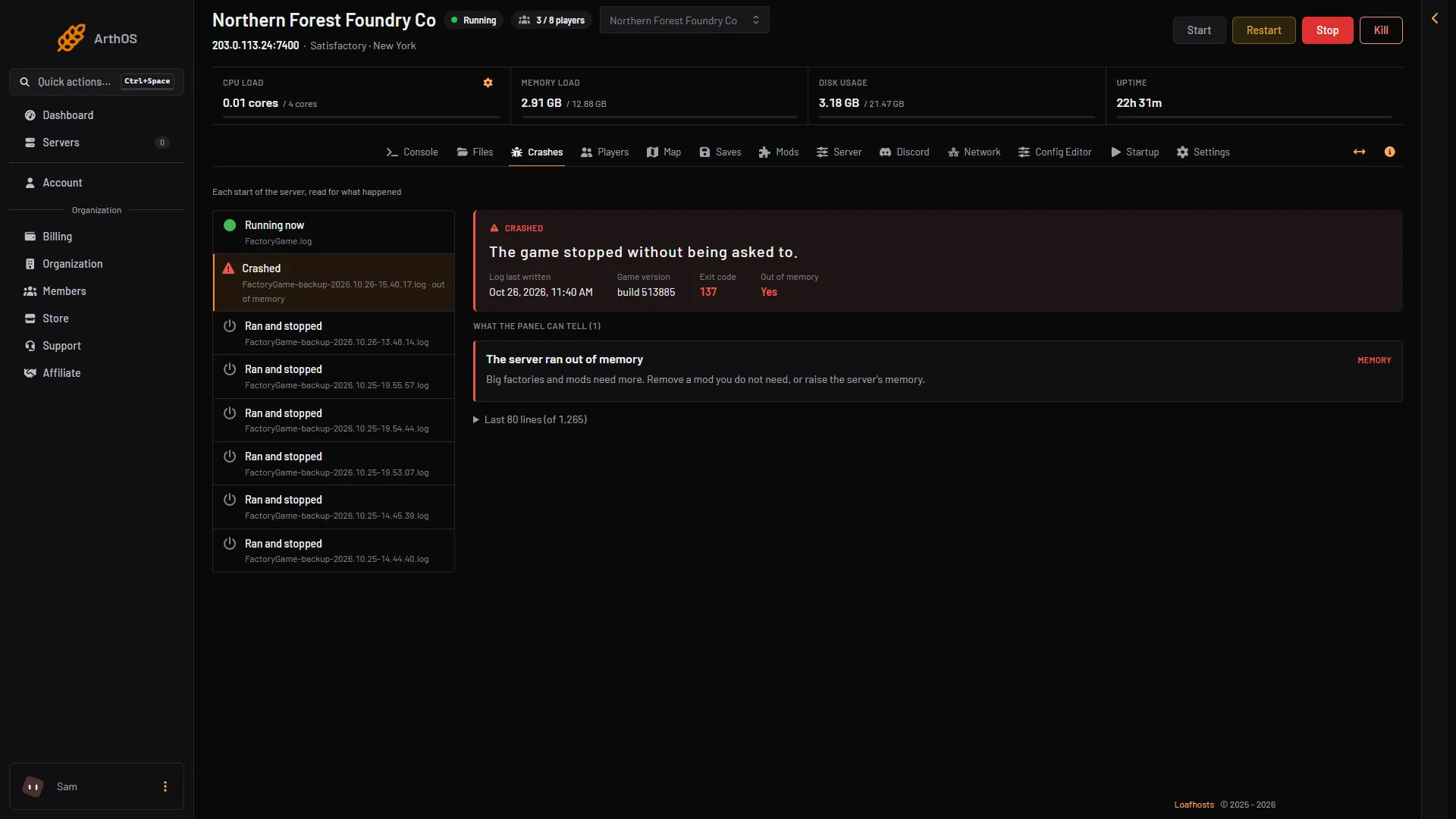
- The start that was stopped
- Out of memory: Yes
- The finding
If none of these appear, the page says “None of the known causes are in this start’s log. The last lines below may still show what happened.”
The engine crash report
When the game crashes, it writes its own report. The panel shows it as a finding. The game also keeps crash reports in FactoryGame/Saved/Crashes and its logs in FactoryGame/Saved/Logs. The log of the start in progress is FactoryGame.log, and earlier starts are FactoryGame-backup-(time).log. Open Files to see them.
A mod is the likely cause
On the Mods page, choose Find the mod. The panel starts the server with fewer mods each time until it finds the one that stops it. Each try is a start, so it takes a few minutes. Every mod is put back as it was afterwards.
What to send support
Send:
- The time of the crash and the Started time of that start.
- The Game version shown for the start.
- The titles under What the panel can tell.
- The last lines of the log from that start.
- Whether you added a mod or changed a setting just before.
Join passwords and player tokens are hidden in what the panel shows.
If it does not work
- Nothing in the list. The server has not started yet. Start it.
- The server crashes at the same moment every time. Remove the last mod added on the Mods page, with the server stopped, then choose Start.
- A start shows Failed to start with no finding. Read the last lines on the page, and send them to support.
Not checked on 1.2 as of 27 October 2026: every kind of crash report the engine can write.
More about the game: Satisfactory servers.