











A player needs the same mods as the server, and SML, the mod loader. The easy way is the Satisfactory Mod Manager, a free app that installs both. Players on the Steam version and on the Epic Games Store version can use it and can join the same server.
This is for PC only. Console players cannot use mods or dedicated servers.
You, the server owner
- Open the Mods page, then the Installed tab.
- Find For players near the bottom. It lists each mod players need, with its version.
- Choose Copy the list to paste it into a chat, or Download the list to get a file named after your server, ending in
-mods.json. The file is a plain list for reading and sharing. Players add the mods by hand in the Mod Manager. Not checked on 1.2 as of 27 October 2026: that the Mod Manager can open this file. - Send the list to your players with a link to this guide.
The list holds only mods marked Players need it, and SML. A mod marked Server only is not in it. A mod that is turned off is not in it either.
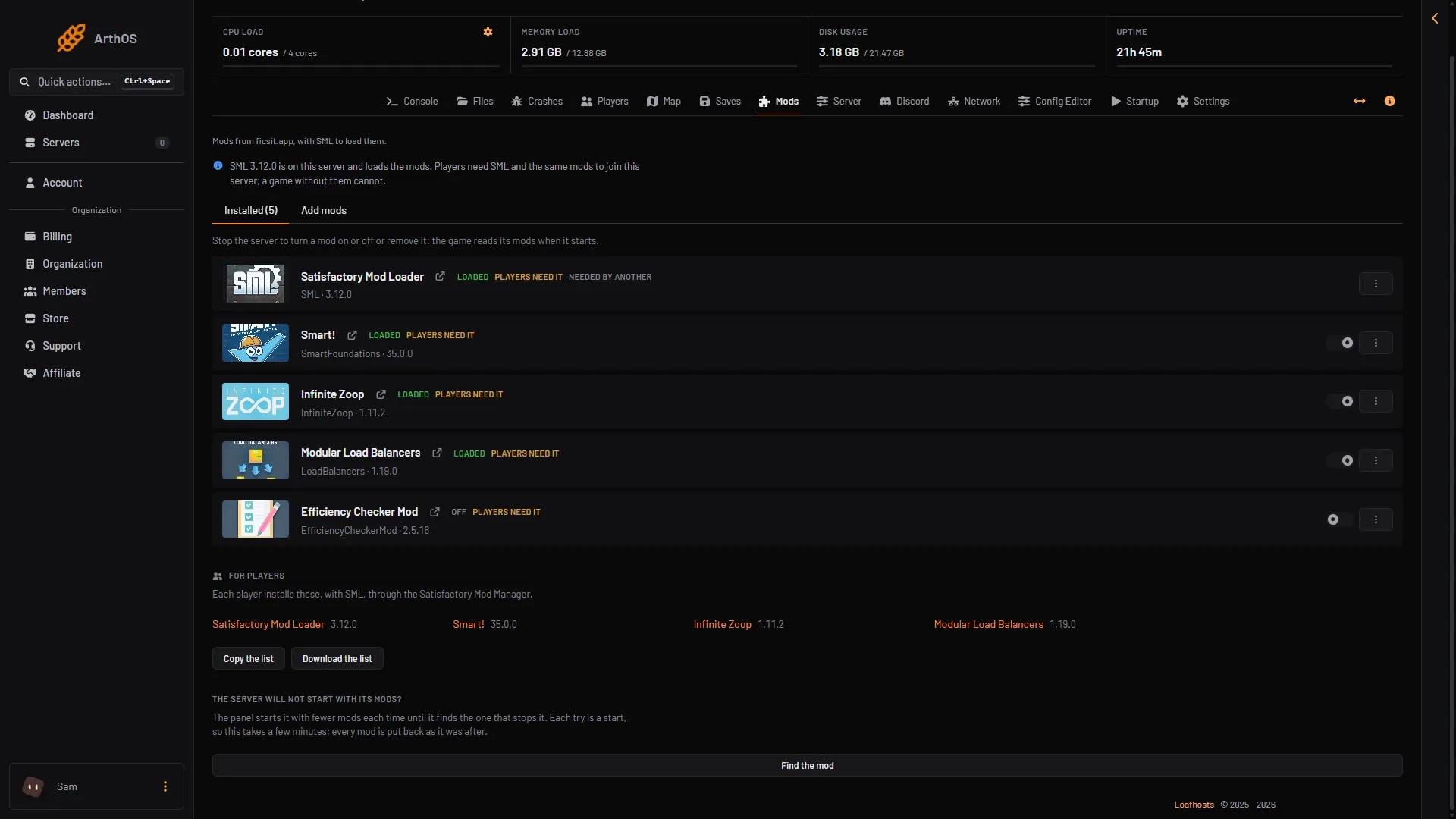
- For players
- Copy the list
- Download the list
The copied list has one mod per line: the name, the version, then the mod’s page on ficsit.app. For example:
Ficsit Remote Monitoring 1.5.4: https://ficsit.app/mod/FicsitRemoteMonitoringEach player
- Download the Satisfactory Mod Manager from ficsit.app, or from its GitHub page.
- Open it and pick the Steam or Epic install of the game.
- Search for each mod on your list and download it. The Mod Manager downloads the mods it needs, and SML.
- Match the version in the list. If the Mod Manager offers another version, choose the one in the list.
- Start the game from the Mod Manager.
- In the game, open the Server Manager and choose Add Server. Type the address (the part before the colon, for example
203.0.113.24) and the port (the number after it, for example7400). Then choose Join Game. See connect to a Satisfactory server.
Not checked on 1.2 as of 27 October 2026: the names of the boxes in Add Server, and the Mod Manager’s menus, install choices and profiles.
Check it matches
The game must be the same version as the server too, and on the same branch. A branch is a release line: the normal release or experimental. The mods only work on the game version they were made for.
If it does not work
- The player is refused. SML or a mod is missing, or the player’s game is not modded at all. The server only takes players whose game has SML.
- A mod in the list cannot be found in the Mod Manager. Search for it by the name in the list, or open its page on ficsit.app from the link in the copied list.
- The game will not start after a mod install. A mod may not fit the game version. Start the game without mods, then remove the mod.
- The player’s game updated and the server did not. They can no longer join until the server updates too.
More about the game: Satisfactory servers.
Sources: docs.ficsit.app: SatisfactoryModManager.html, github.com: SatisfactoryModManager, satisfactory.wiki.gg: Modding