











A Satisfactory server uses two ports. The game port carries the game, the server’s query and its web API. The next port up carries “reliable messaging”. Players type only the address and the game port. On Loafhosts you do not forward any port. For a server you run yourself, see “By hand” below.
The two ports
The official wiki lists these (its defaults are 7777 and 8888):
| Port | Protocol | Used for |
|---|---|---|
| Game port | UDP | Game traffic and the Lightweight Query API |
| Game port (the same number) | TCP | Server traffic and the HTTPS API |
| Reliable messaging port | TCP | Game traffic: reliable messaging |
Both TCP and UDP use one game port number. The reliable messaging port is a separate number, TCP only.
On a Loafhosts server the reliable messaging port is the next number after the game port. For example, a game port of 7400 goes with 7401. Your server’s real numbers are different, so read them from the panel as shown below.
Find your ports in the panel
- Open the Players page. The Joining card shows your address and game port with a Copy button. Under it the panel says “The game also uses port (number) for its own messages. Players never enter it.”
- Open the Network page to see the ports the server owns. The Port column lists them.
- On Startup, Reliable messaging port holds the second number. The panel sets it for you. Leave it alone.
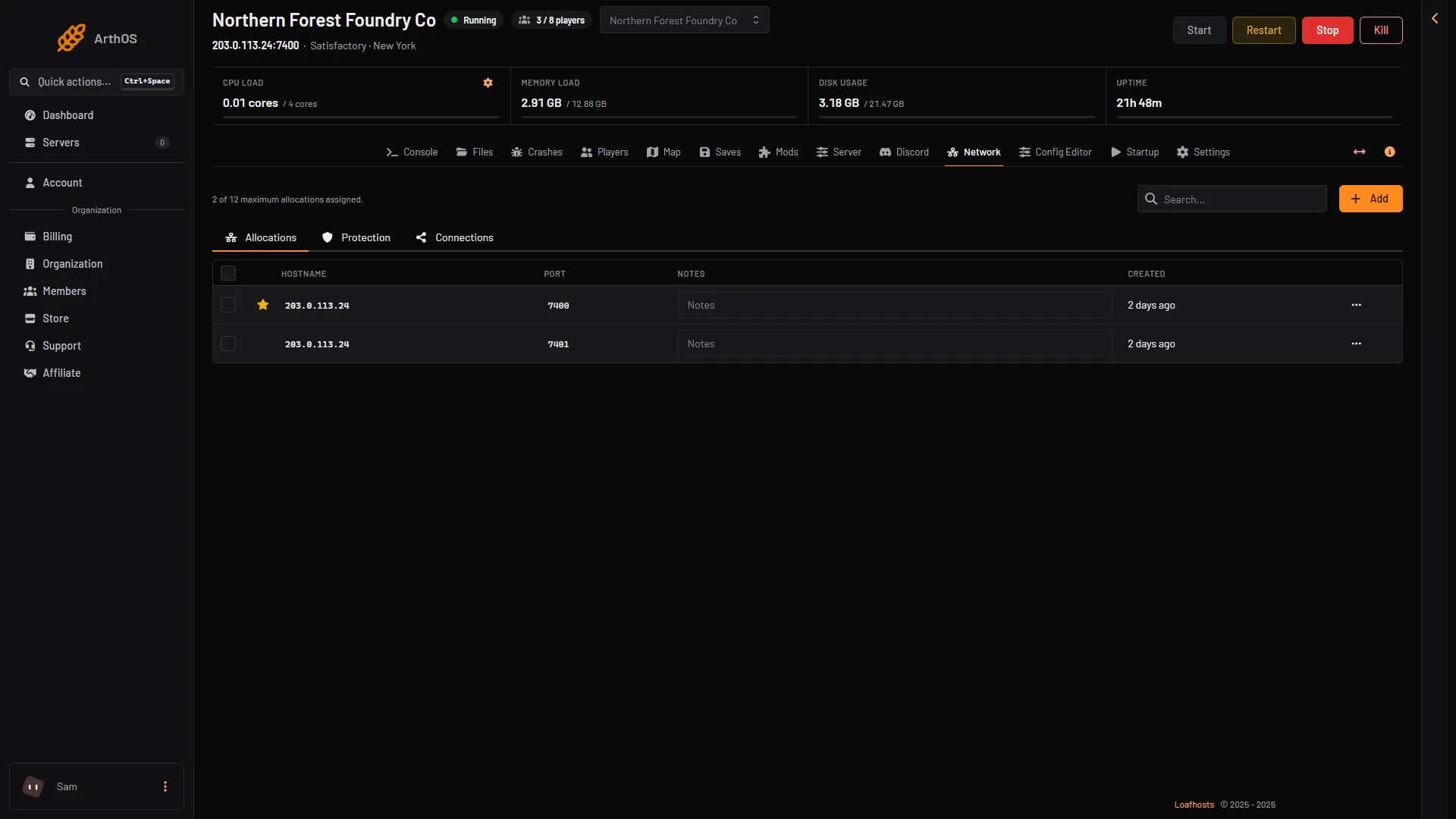
- Game port
- Reliable messaging port
The first row (1) is the game port, marked with a star. The second row (2) is the reliable messaging port.
What players enter
In the game, a player opens the Server Manager and chooses Add Server. They type the address (the part before the colon, for example 203.0.113.24) and the port (the number after it, for example 7400). Not checked on 1.2 as of 27 October 2026: the names of the boxes in Add Server. The game works out the reliable messaging port by itself. The wiki says so: “The game takes care of communicating the correct reliable messaging port for you.” See connect to a Satisfactory server.
No port forwarding on Loafhosts
The wiki’s port forwarding steps are for people who host at home. On Loafhosts the ports are already open to the internet. There is no router to set up.
The Protection page, under Network, shows no game filter for Satisfactory. That is normal. Nothing is wrong with the server.
By hand
On a server you run yourself, the wiki gives the defaults above. Set them with the start flags -Port= (game port) and -ReliablePort= (reliable messaging port). If the game port is in use, the game tries the next higher number. If the reliable port is in use, the server fails to start. Open both ports in the firewall and forward them on the router. For firewalld on Linux, the wiki gives sudo firewall-cmd --permanent --add-port=7777/tcp, the same for 7777/udp and 8888/tcp, then sudo firewall-cmd --reload. On Loafhosts the numbers are on the Network page.
If it does not work
- A player waits on the loading screen for ever. The game needs the reliable messaging port as well as the game port. Without it a player stays on the loading screen. Check that the player’s network lets TCP through.
- A player types the wrong number. Copy the address from the Joining card instead of typing it.
- A player is refused with “Encryption token missing”. The player did not join through the Server Manager. See Server Manager.
More about the game: Satisfactory servers. If nobody can reach the server, see cannot connect.