






Two settings control recording on a Squad server: Record demos and Players may record. Both are in the Config Editor, and both are off on a new server. A demo is a replay of a match, so you can watch it again later.
Which setting does what
- Record demos records every match on the server. The panel’s help for this setting says demos take disk space.
- Players may record lets players record replays on their own computer. Leave it off and nobody can, except players you give the
clientdemosaccess level.
Squad’s stock Admins.cfg explains the difference between two access levels, which it writes in lower case:
demosallows the admin commands for recording demos on the server.clientdemosonly allows recording on the player’s own computer. It gives no admin commands.
In the ArthOS panel
- Open your server and go to Config Editor.
- Type
recordin Search to find the Recording rows. - Turn on Record demos to record every match on the server.
- Turn on Players may record only if you want every player to be able to record. Leave it off if you want to choose who can.
- Choose Save. The server reads these settings when it starts, so choose Restart now, or restart it later. The page says “Saved. Restart the server to apply the changes.” while the server is running.
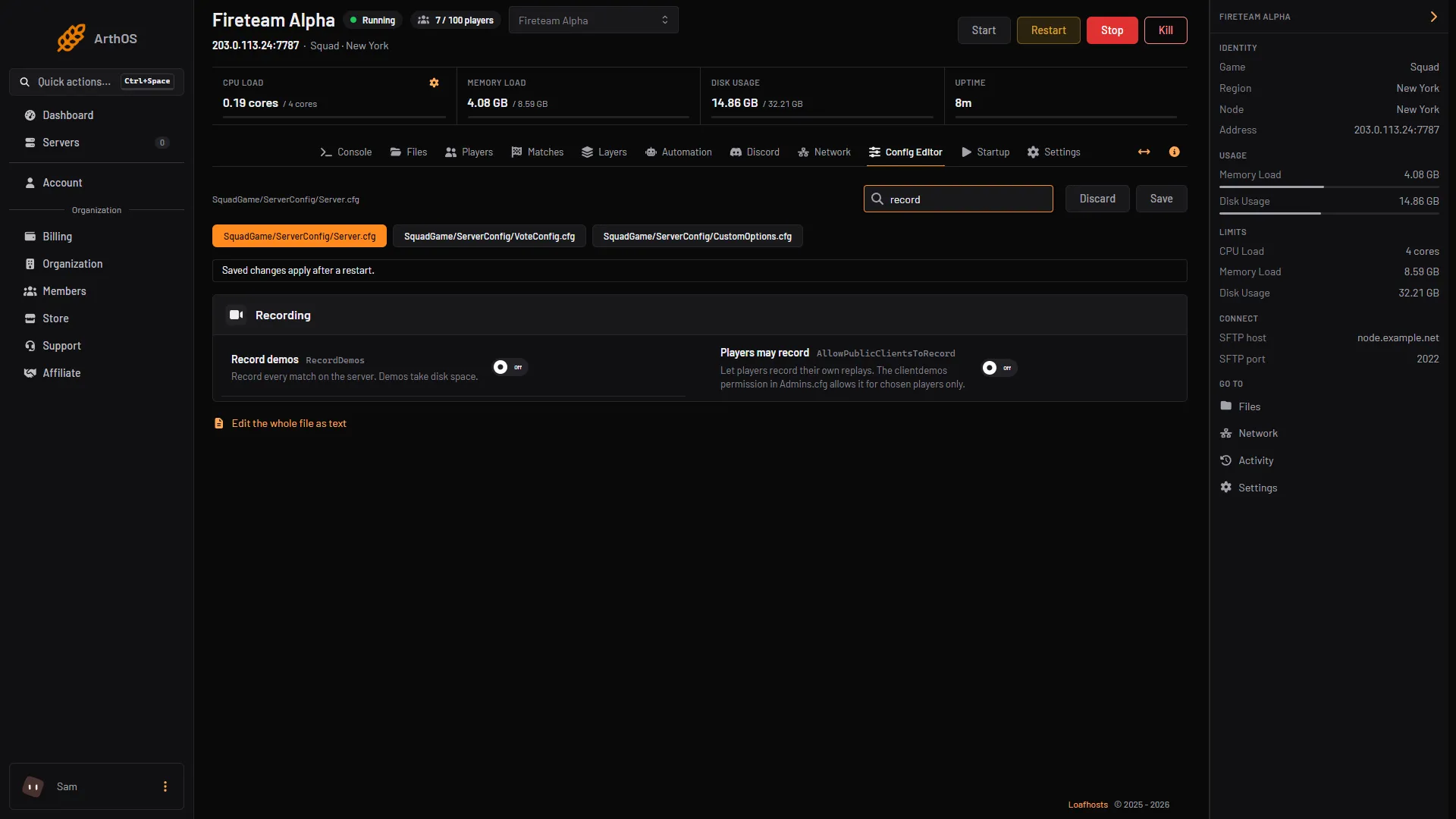
- Record demos
- Players may record
In the picture, box 1 is Record demos and box 2 is Players may record.
Let chosen players record
Give them the clientdemos access level in Admins.cfg. The panel’s Players page adds a person to a group that already exists, but it does not create groups or change what a group may do. So you edit the group line by hand.
- Open Files, then
SquadGame/ServerConfig/Admins.cfg. - Add a group line, for example:
Group=Recorder:clientdemos- Add each person under it with their 17-digit Steam ID:
Admin=76561198000000001:Recorder // Example Player- Save the file. Then run
AdminReloadServerConfigfrom an RCON tool (see Squad RCON), or restart the server between matches.
You can also add the person on the Players page, under Admins, by choosing the group in Group and choosing Add admin. That reloads the list at once.
By hand
- In
SquadGame/ServerConfig/Server.cfg, set:
RecordDemos=true
AllowPublicClientsToRecord=false- Restart the server.
What the wiki says about the demo access levels
Squad’s wiki lists demos as “Record demo’s (currently broken)”. The stock file’s header says the admin must be on the server while it records, and must have Enable auto record multiplayer games switched on in the game’s Replay settings, or the file is not saved on their computer. Player names cannot be viewed in these demos.
If it does not work
- The settings are missing. The Config Editor shows the file only after the game has created it. Start the server once, then open it again.
- Nothing is recorded. Check that Record demos is on and that you restarted the server after saving.
- A player cannot record. Check that Players may record is on, or that their Steam ID is in a group with
clientdemos. Then check their Replay settings in the game.
More about the game: Squad servers.
Sources: squad.fandom.com: Server Configuration, squad.fandom.com: Server Administration, store.steampowered.com: 393380