






Three settings decide whether players can change team on your Squad server: Allow team changes, Keep teams balanced and Most players between teams. On the Players page you can also shuffle everyone or move one player yourself.
The three settings
Open Config Editor, then Server.cfg, and type “team” in Search… to show them.
- Allow team changes: off, nobody can change team except admins with the
balancepermission. On is Squad’s default. - Keep teams balanced: on, a team change is refused if it would leave the teams further apart than the limit below. Off, players can change team whatever the numbers are.
- Most players between teams: the biggest gap in player count a team change may leave. Squad’s default is 3. The game counts both sides of the move: the team the player leaves and the team the player joins.
Example: with a limit of 3, if one team has 40 players and the other 37, a player on the bigger team may move across. A player on the smaller team may not.
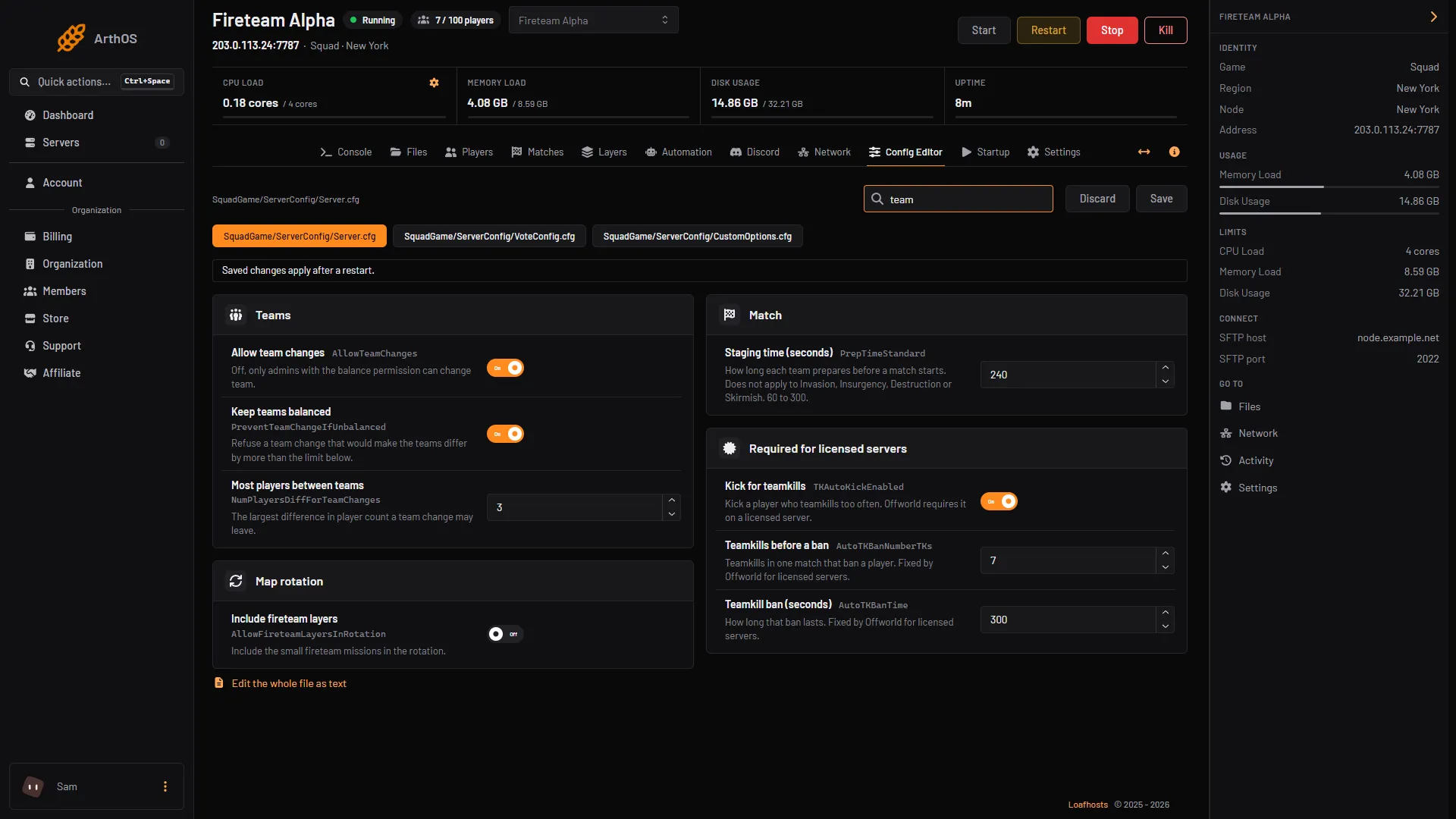
- Allow team changes
- Keep teams balanced
- Most players between teams
Set the three rows (boxes 1, 2 and 3 in the picture) and choose Save. Restart the server after you save so the game reads Server.cfg again.
Admins who can ignore balance
An admin whose group has the balance permission can switch team whatever the numbers are, and even when Allow team changes is off. Add admins and their groups on the Players page under Admins. See Squad admin permissions.
Shuffle teams
Shuffle teams splits every player between the two teams at random. Use it when one side is much stronger.
- Open Players. The server must be running, and your role needs the game control permission.
- Choose Shuffle teams, next to Restart match and End match (the box in the picture below).
- The panel asks “Shuffle all N players?” and explains that players are split at random and told the teams were shuffled. Choose Shuffle teams to confirm.
The panel cuts the shuffled list in half and only moves the players whose team changes. Everyone is sent a message saying the teams were shuffled. It needs at least two players on the server.
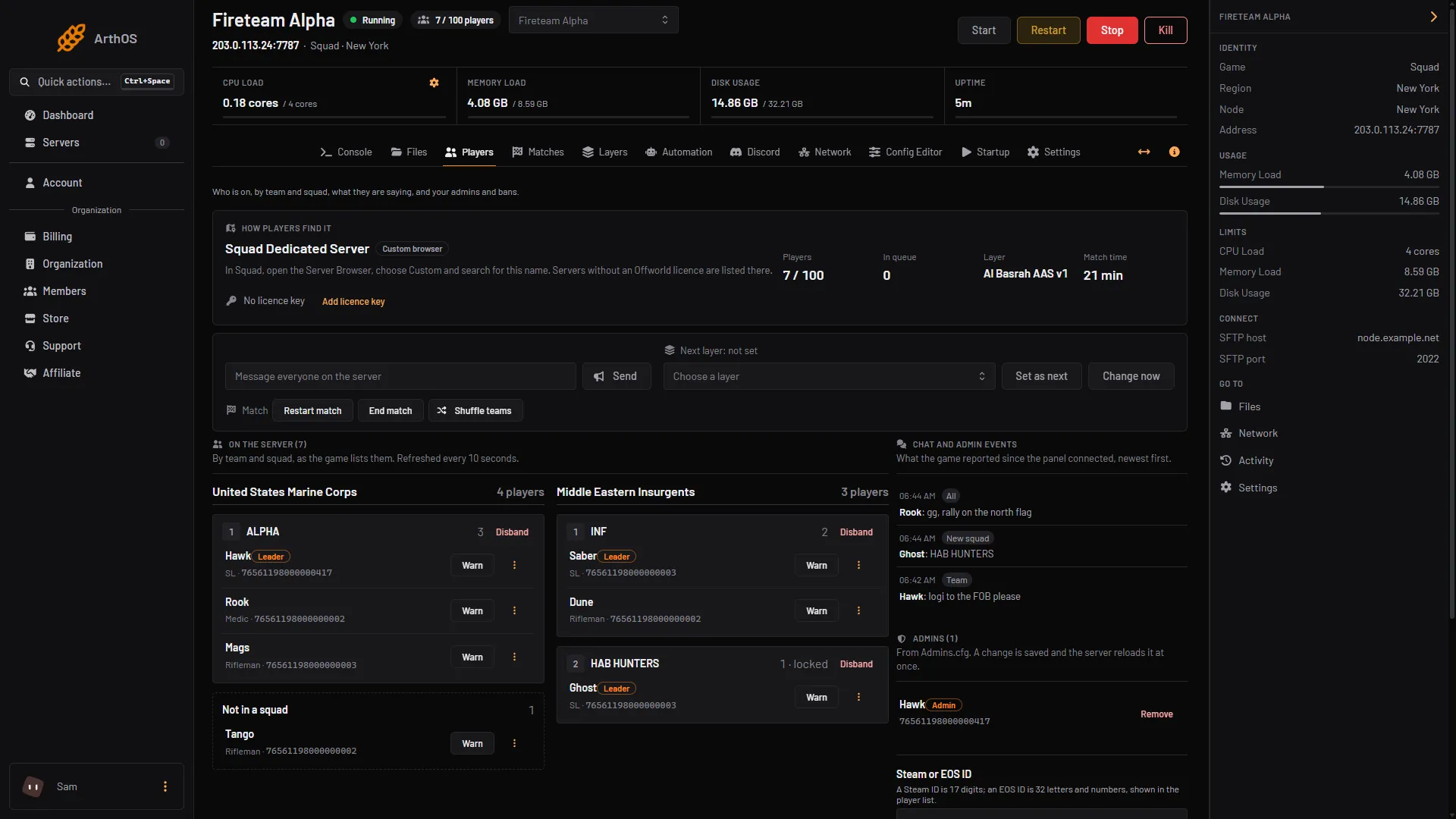
- Match buttons
Move one player to the other team
- Open Players and find the player in their team and squad.
- Open the three-dot menu (⋮) on that player’s row.
- Choose Move to the other team.
By hand
In SquadGame/ServerConfig/Server.cfg:
AllowTeamChanges=true
PreventTeamChangeIfUnbalanced=true
NumPlayersDiffForTeamChanges=3
An admin with the forceteamchange permission can send AdminForceTeamChange <NameOrSteamId> from an RCON tool to move a player (see Squad RCON). The Console box in the panel does not answer admin commands.
If it does not work
- A player says they cannot change team. Keep teams balanced may be refusing it. Raise Most players between teams or turn Keep teams balanced off.
- Nobody can change team at all. Check Allow team changes is on.
- The shuffle button is grey. The server is stopped, or your role lacks the game control permission. The page says “Changing the match needs the game control permission.”
Sources: squad.fandom.com: Server Configuration, squad.fandom.com: Server Administration, store.steampowered.com: 672881728134580384