
















To join a Terraria server, open Multiplayer on the main menu, pick a character, choose Join via IP, and type the server’s address and port. If the server has a password, the game asks for it next.
Get the address and port
The server owner can copy both from the panel.
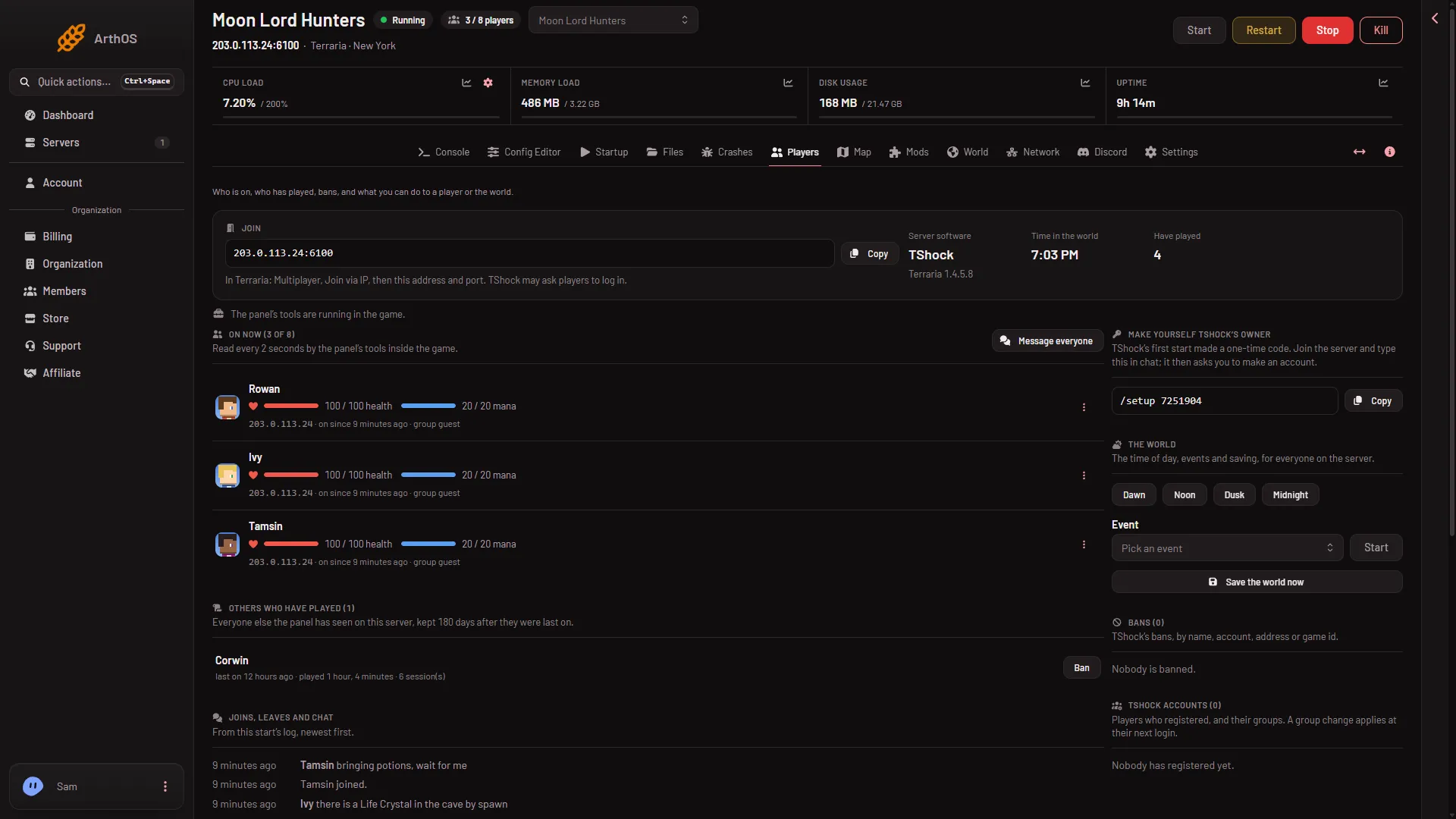
- Open the server and go to the Players page.
- Find the Join box at the top.
- Choose Copy. It copies the address and the port.
- Send them to your friends.
- Copy the address
- How to join
The box also shows a how-to line for the program the server runs. If it says “The server has no address yet.”, the server has not been given one. Ask the owner to check the Network page.
The port is not the game’s usual 7777. Each Loafhosts server has its own, for example 6100. See the address and port guide.
Join in the game
- Start Terraria and choose Multiplayer.
- Pick the character you want to play. You can make a new one here.
- Choose Join via IP.
- Type the address. The game then asks for the port. Type that too.
- If the server has a password, type it when the game asks.
You are then in the world. A server with nobody on it is paused: time does not pass until the first player is fully connected.
Which game do you need
What you start the game with depends on the program the server runs. The owner chooses it on the World page.
- Vanilla. The normal game. Your game version must match the server’s version, or the game refuses you.
- TShock. The normal game too. TShock may ask you to log in. After a Terraria update, you can join only once there is a TShock version for the new game version.
- tModLoader. You need tModLoader, which is free on Steam. Choose Multiplayer and then Join via IP inside it. It downloads the server’s mods as you join.
The Players page shows the right line for your server, so the owner can read it out.
Joining a server that has a password
A new Loafhosts server has no password. If the owner has set one, the game asks for it before you enter. It is the owner’s to give you. The owner sets it as Server password under Passwords in the Config Editor: see set a server password.
If it does not work
- The game cannot reach the server. Check the address and the port, character by character. The port is the number after the colon. The server must be running, and the Players page shows when it is offline.
- The game says the version is wrong. On Vanilla, your game must be the same version as the server’s. The owner can read the version on the World page.
- tModLoader will not open the world. A world saved by Terraria 1.4.5 does not open on tModLoader’s current release, which runs 1.4.4. Ask the owner to choose another world on the World page.
More about the game: Terraria servers.
Sources: terraria.wiki.gg: Server, store.steampowered.com: TModLoader