
















Terraria plans come in three sizes. Small has 1 core, 2 GB of memory, 10 GB of disk and 8 players. Standard has 2 cores, 4 GB, 20 GB and 16 players. Large has 3 cores, 6 GB, 30 GB and 32 players.
The three sizes
| Size | Cores | Memory | Disk | Players |
|---|---|---|---|---|
| Small | 1 | 2 GB | 10 GB | 8 |
| Standard | 2 | 4 GB | 20 GB | 16 |
| Large | 3 | 6 GB | 30 GB | 32 |
A new server starts with the player limit of its plan. You can change it on Startup under Max players, from 1 to 255. The plan’s memory and cores stay the same, so a higher limit on a small plan means more players share the same memory.
See what the server uses
Open the server page. The resource strip shows CPU Load, Memory Load and Disk Usage, each against the plan’s limit. Memory Load is the number to watch. The panel shows memory and disk a little higher than the plan’s size in the table, so read them as “about”.
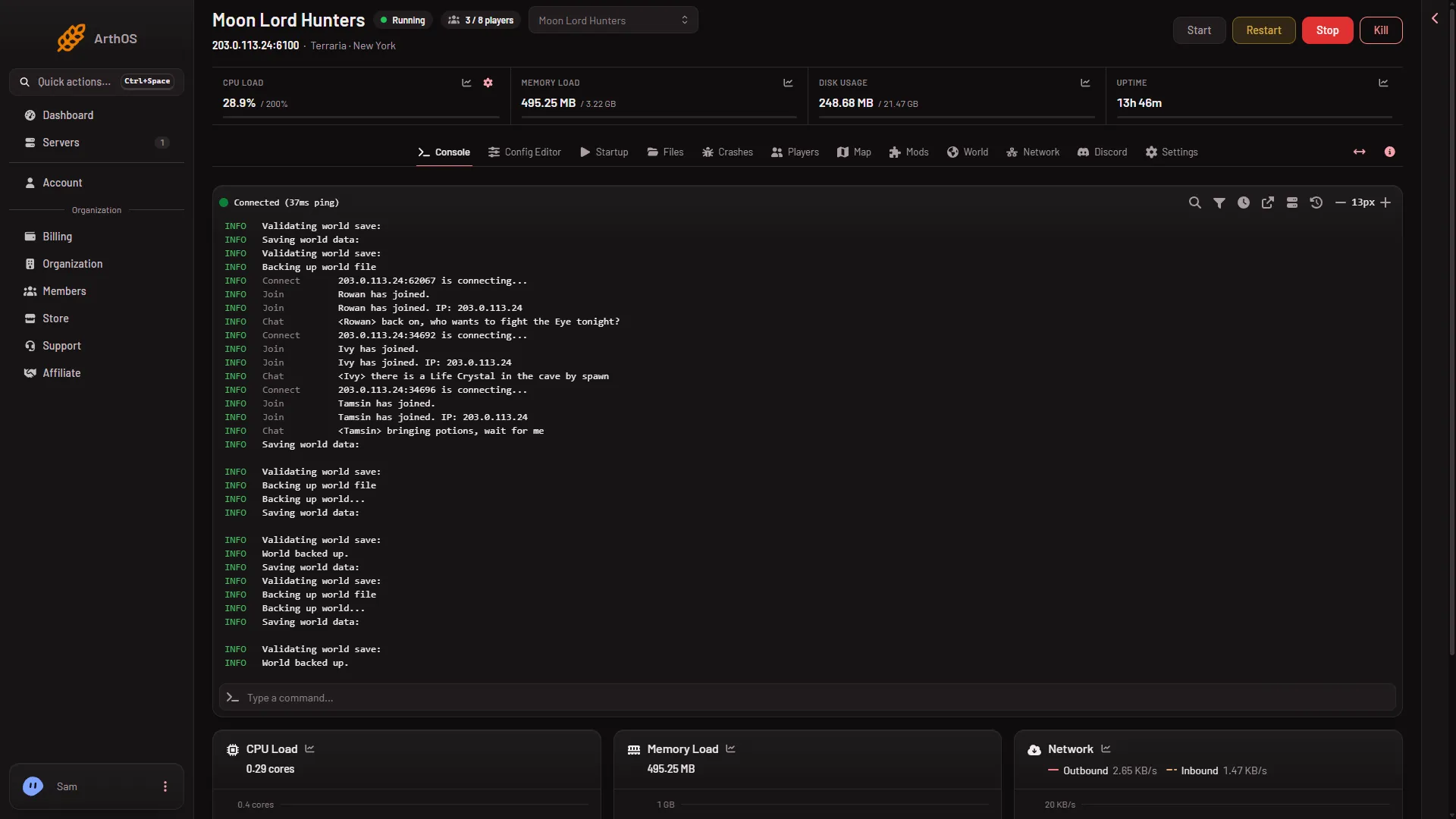
The game does not run the world while nobody is connected, so an empty server is quiet. Read the numbers while players are on.
Which size for which server
Small holds 8 players, so it fits a group of five. Memory use of each program has not been measured on Loafhosts’ servers. Not checked on 1.4.5.8 as of 13 November 2026. Use the panel’s own readings instead of a guess:
- A vanilla world. Start on the size that holds your players, then watch Memory Load with the whole group on.
- A TShock world. TShock runs the same game with accounts, groups and tools added. Watch Memory Load the same way, and again after you add plugins.
- A big modpack. The panel’s own advice is that large worlds and big mods need more memory. Add mods a few at a time and watch Memory Load after each apply.
Choose the world’s size on the World page when you make it: Small, Medium or Large. A larger world is more for the server to hold.
When the server runs out of memory
The Crashes page lists one entry per start. Two findings point at memory:
- When the game’s own log shows it ran out, the page says: “Large worlds and big mods need more. Take off a mod you do not need, or raise the server’s memory.”
- When the machine ends a server that reached its plan’s memory, the start shows Crashed, Out of memory says Yes, and the finding is “The server used all its memory and was stopped”. The machine ends it without letting it save or write why, so its own log usually has no line about it.
- Take off a mod you do not need on the Mods page, then apply.
- Use fewer plugins, fewer players at once or a smaller world.
- If that is not enough, use a bigger plan.
Disk
Worlds, backups and mods share the plan’s disk. The game keeps earlier saves as .bak files beside each world, and TShock keeps its own backups. If Disk Usage is near its limit, the Crashes page can report “The disk is full”: free some space, including old world backups, and start again.
More about the game: Terraria servers.
Sources: terraria.wiki.gg: Server