
















Standby stops a Terraria server by itself when nobody has played on it for a set time. Nothing is deleted. You start it again with the Start button, or players start it with a wake link.
Standby is on by default on every new server, and After nobody plays for is 10 days. A server that nobody joins for 10 days stops by itself, so check the switch and the time.
Why it helps
A Terraria server with nobody on already does nothing. The game pauses the world until someone joins. It still uses the server’s memory while it runs. Standby stops it so it is not running for nothing.
Check or change it
- Open Settings, then the Standby card (1).
- Check the switch (2) at the top right of the card, Stop the server when nobody plays on it. It is on by default. Turn it off if you want the server to keep running.
- Set After nobody plays for. This is how long the server must be empty before it stops.
- Email the owner each time sends an email whenever it goes into standby.
The card has no Save button. It saves as you change it, and says “Standby settings saved.”
If the time you chose has already passed, the panel asks “Go into standby now?”. Read it and choose Save. The server then goes into standby within a few minutes.
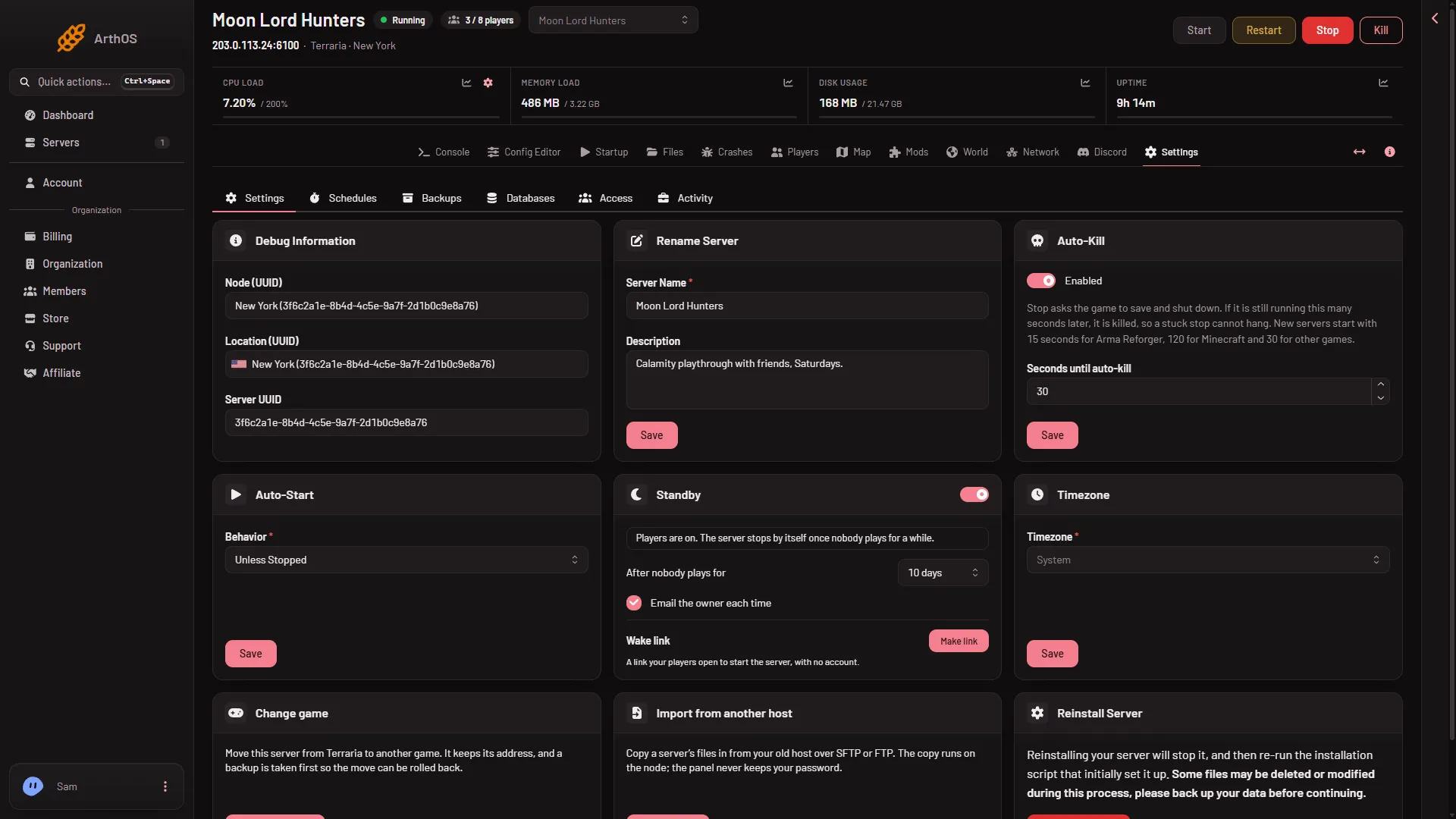
- The Standby card
- Turn standby on or off
- The wake link
The wake link (3) is covered below.
The card shows where the server is. While players are on it says “Players are on. The server stops by itself once nobody plays for a while.” When nobody is on, it says how long the server has been empty and when it will go into standby unless someone joins. After a stop it says that the server went into standby and “Nothing was deleted. Start it here or from its wake link.”
If you turn the switch off, the card says “Off. The server keeps running when nobody plays.”
What counts as nobody playing
The panel counts players in two ways. It uses the count from its own tools inside the game (TShock and tModLoader), or else the joins and leaves it reads in the start log. Before it stops the server, it checks the count the other way too. If the two disagree, the clock starts again.
- A Vanilla server counts from the log.
- If the panel cannot read the count, it never counts the server as empty. The card says: “Waiting: the panel cannot read how many players are on, and a count it cannot read never counts as empty.”
- The server also waits while a change, a backup or a wipe is running.
The wake link
A stopped server cannot be joined. The wake link fixes that.
- In the Standby card, find Wake link.
- Choose Make link, then Copy link.
- Give the link to your players.
Anyone with the link can start the server and nothing else: no stop, no settings, no files. The card shows how many times a day the link can start it. A new link replaces the old one at once, and Turn off ends it.
If it does not work
- The server never goes into standby. The switch is off, the time in After nobody plays for has not passed yet, or the panel cannot read the player count, or someone is still on. Read the status line on the card.
- The server stopped while players were on. Check the Players page. Standby counts players the panel can see. If this happens, tell support what time it was.
- Players cannot join. The server is in standby. Start it from the panel or the wake link, wait until it is ready, then join.
See Terraria servers for the rest of the game.
Sources: terraria.wiki.gg: Server