
















A Terraria server on Loafhosts runs one of three programs: Vanilla, TShock or tModLoader. Run Vanilla for the plain game. Run TShock for accounts, groups and anti-cheat. Run tModLoader for Steam Workshop mods. You choose on the World page, and you can change your mind later.
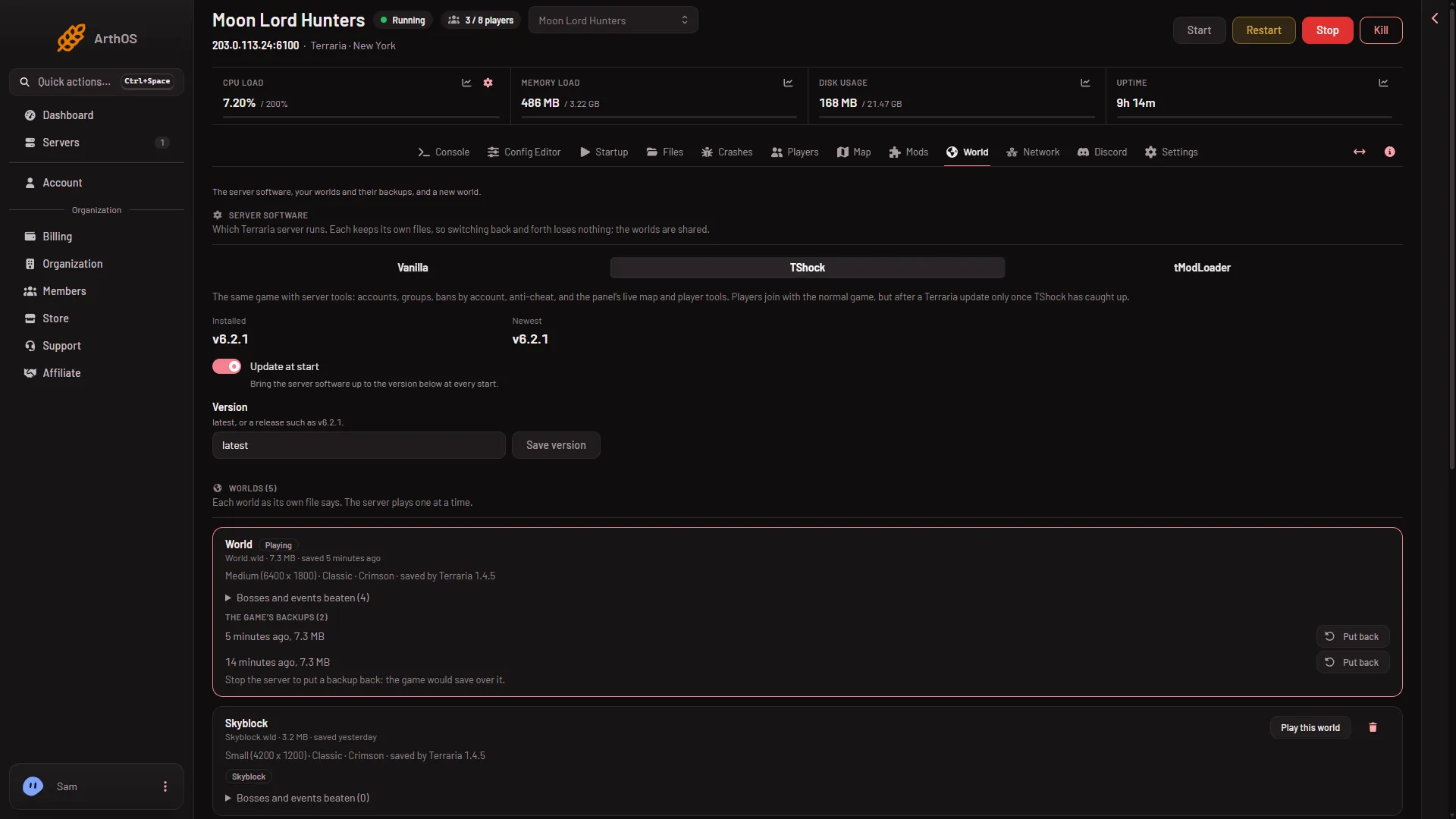
- Vanilla
- TShock
- tModLoader
- Update at start
Pick the program with the three choices (1, 2, 3).
Side by side
| Vanilla | TShock | tModLoader | |
|---|---|---|---|
| What it is | The game’s own server | The same game with server tools | Terraria’s modding framework |
| Players join with | The normal game | The normal game | tModLoader (free on Steam) |
| Terraria version | The newest, 1.4.5.8 when checked | The newest, once TShock has caught up | 1.4.4 |
| Mods | No | No | Steam Workshop mods |
| Accounts and groups | No | Yes | None built in |
| In-game admin | Console only | Owner and groups | Not checked |
| Bans | By name and address | By account, name, address or game id | By name and address |
| Panel player tools | No | Yes | Yes |
| Live map positions | No | Yes | Yes |
| World evil choice | Random | You choose | Random |
Who can join
- Vanilla and TShock. Players use the normal game. The game version must match the server’s.
- TShock after a game update. Players on the new game version are refused until a TShock version exists for the new game version.
- tModLoader. Players need tModLoader, which is free on Steam. It downloads the server’s mods as they join.
World version
tModLoader’s stable release runs Terraria 1.4.4. A world made or saved by 1.4.5 does not open on it. The World page marks such a world Too new for tModLoader. On Vanilla or TShock, every world opens, unless you pin an older version with Terraria version or TShock version on Startup. This was the case on 12 November 2026.
Worlds are shared between the three programs. You can switch back and forth without losing a world, but a world that tModLoader opens and saves keeps a tModLoader part beside it.
Mods and plugins
Only tModLoader loads mods, on the Mods page. Vanilla and TShock show “Mods need tModLoader” there.
Accounts, groups and bans
TShock has its own accounts and groups. The Players page lists them, and a role can change a group. TShock’s ban covers the account, the character and the address. On Vanilla and tModLoader a ban is a name and an address in banlist.txt.
The panel’s tools
The panel puts its own tools inside TShock and tModLoader. They give the Players page what a player carries, health and mana, and actions such as Heal, Give an item, Send to the world’s spawn and events. They also give the Map live positions of players. Vanilla runs none of them. There, kicks, bans, the time and messages still work.
Which one
- You want the plain game with friends. Vanilla.
- You run a public server and want accounts, groups and anti-cheat. TShock.
- You want mods. tModLoader. Your world must not be from 1.4.5: make a new one or upload a 1.4.4 world.
- You want to be an admin in the game. TShock. Vanilla has no in-game admins: see set up TShock.
- You want the panel’s player tools without mods. TShock.
Not checked on tModLoader v2026.09.3.1 as of 13 November 2026: a join with a real player.
Switch
- Open the World page.
- In Server software, choose the program, then choose Continue in the box.
- Restart. The change applies at the next start, and the new program downloads first. A restart disconnects everyone who is on, so warn them with Message everyone on the Players page.
For tModLoader, pick a world it can open before you restart: see host a tModLoader server.
See change the server software and what Vanilla gives. More about the game on Loafhosts: Terraria servers.
Sources: terraria.wiki.gg: Server, github.com: TShock, store.steampowered.com: TModLoader