
















At every start, tModLoader checks its mod list. It drops any mod it cannot find, and it turns off any mod that cannot load. Then it starts with the rest. The Mods page shows which mod was dropped and why, so you can fix it.
This is for a Terraria server that runs tModLoader. The server keeps running when a mod is dropped. It just runs without that mod.
Where the panel tells you
Open the Mods page, tab On this server. Look above the list and on each row.
- A note above the list. “At its last start the game found no mod for (names), so it took them off its list.” The game had a name on its list but no mod to go with it.
- A line on a row. “The game turned it off at its last start: (reason)”. The game read the mod and refused it. The reason is the game’s own. Without a reason the line stops after “last start”.
- A green line on a row. “Loaded at the last start.” This mod is fine.
- A note about names with no mod. “Also on the game’s list, with no mod on this server: (names). The game drops them at its next start.”
The game’s own log of its last start is bin/tml/tModLoader-Logs/server.log in Files. It names each mod and the reason. The Crashes page also reads it: a report titled A mod did not load says “tModLoader names the mod and why (most often another mod it needs, or a mod for another tModLoader).”
Common reasons
- The warning on the row
- Add the missing mod
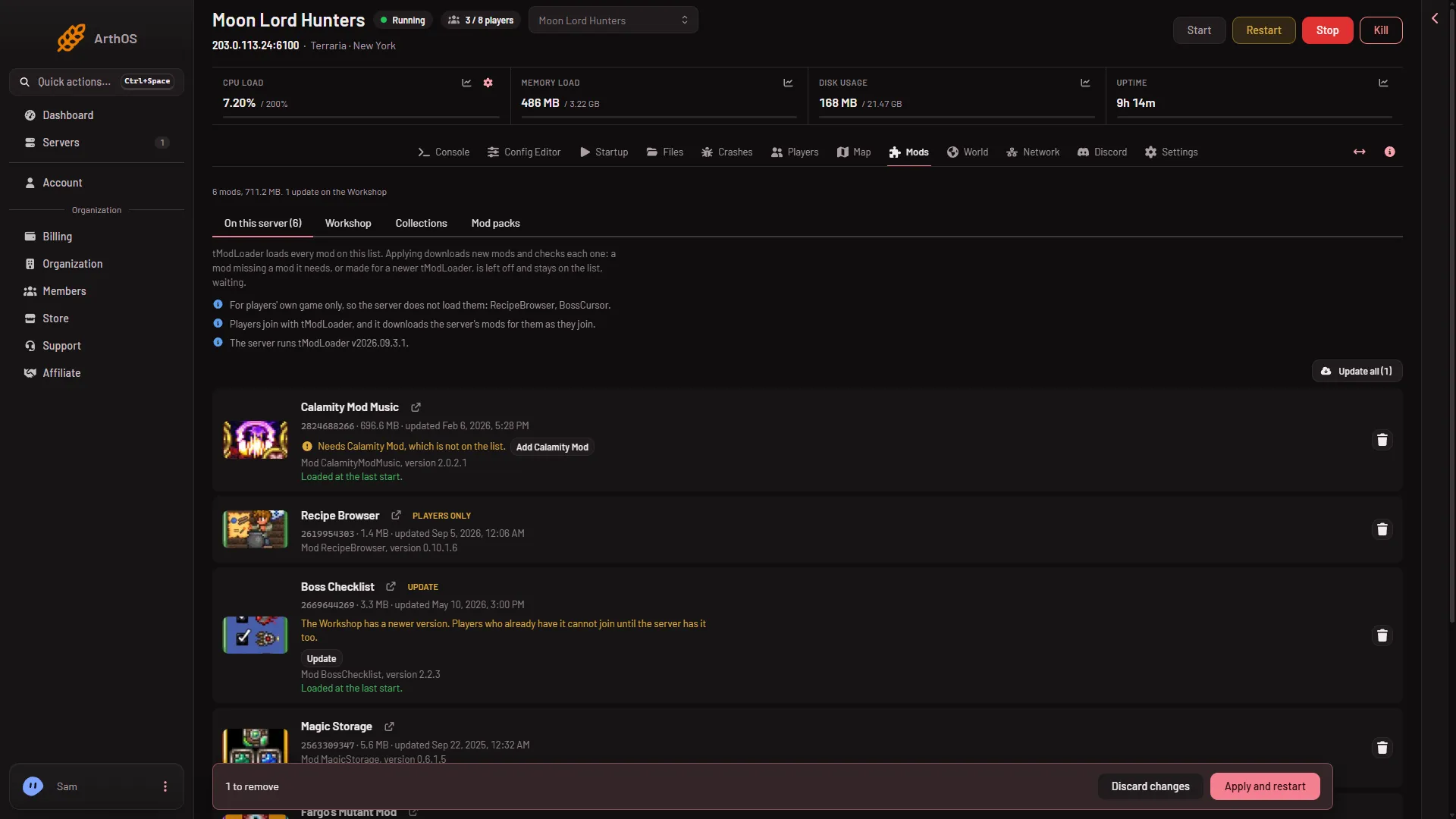
A row like this one warns that the mod needs another mod that is not on the list (1). The button next to it (2) adds that mod. This picture shows a mod waiting for what it needs; a mod the game turned off shows its own line on the row in the same place.
- A mod it needs is missing. Add the needed mod. See a mod needs another mod.
- The mod is made for a newer tModLoader. The row says “Made for tModLoader (version), newer than this server’s, so it cannot load until the server’s tModLoader is updated.” See update tModLoader.
- The file cannot be used. The row says “Its file cannot be used: (reason).” Download the mod again, or take it off the list.
- A download failed. After Apply, the panel says “(name) could not be downloaded (reason), so it was left off. It is still on the list, waiting.”
What the panel leaves waiting
When you apply, the panel reads each mod’s file first. A mod that cannot load is left off, but it stays on the list, waiting. The rest loads. The box Apply the mod changes? names each one under Left off when you apply. A mod that needs a left-off mod is left off too.
Fix the cause, then Apply again. The waiting mod loads at the next start.
If it does not work
- The row has no reason. Open
bin/tml/tModLoader-Logs/server.logand search for the mod’s name. - Many problems at once. The page folds the extra ones under “(count) more problem(s) with this list.”
- The note still shows after a fix. It describes the last start. Restart the server so the game checks again.
- You do not need the mod. See remove a mod.