
















Many tModLoader mods need another mod to work. If that other mod is not on the list, the server does not load the first mod. Press Add on its row, then Apply. Both mods then load.
This guide is for a Terraria server that runs tModLoader. On Vanilla or TShock the Mods page only shows Mods need tModLoader: switch the server software on the World page first.
What you see
Open the Mods page and the On this server tab. A mod that needs another one shows a line on its row:
- Needs (name), which is not on the list. The needed mod is on the Steam Workshop. A button, Add (name) (2), sits beside the line (1).
- Needs (name), which the Workshop no longer offers. The needed mod cannot be downloaded any more. There is no button. See “If it does not work”.
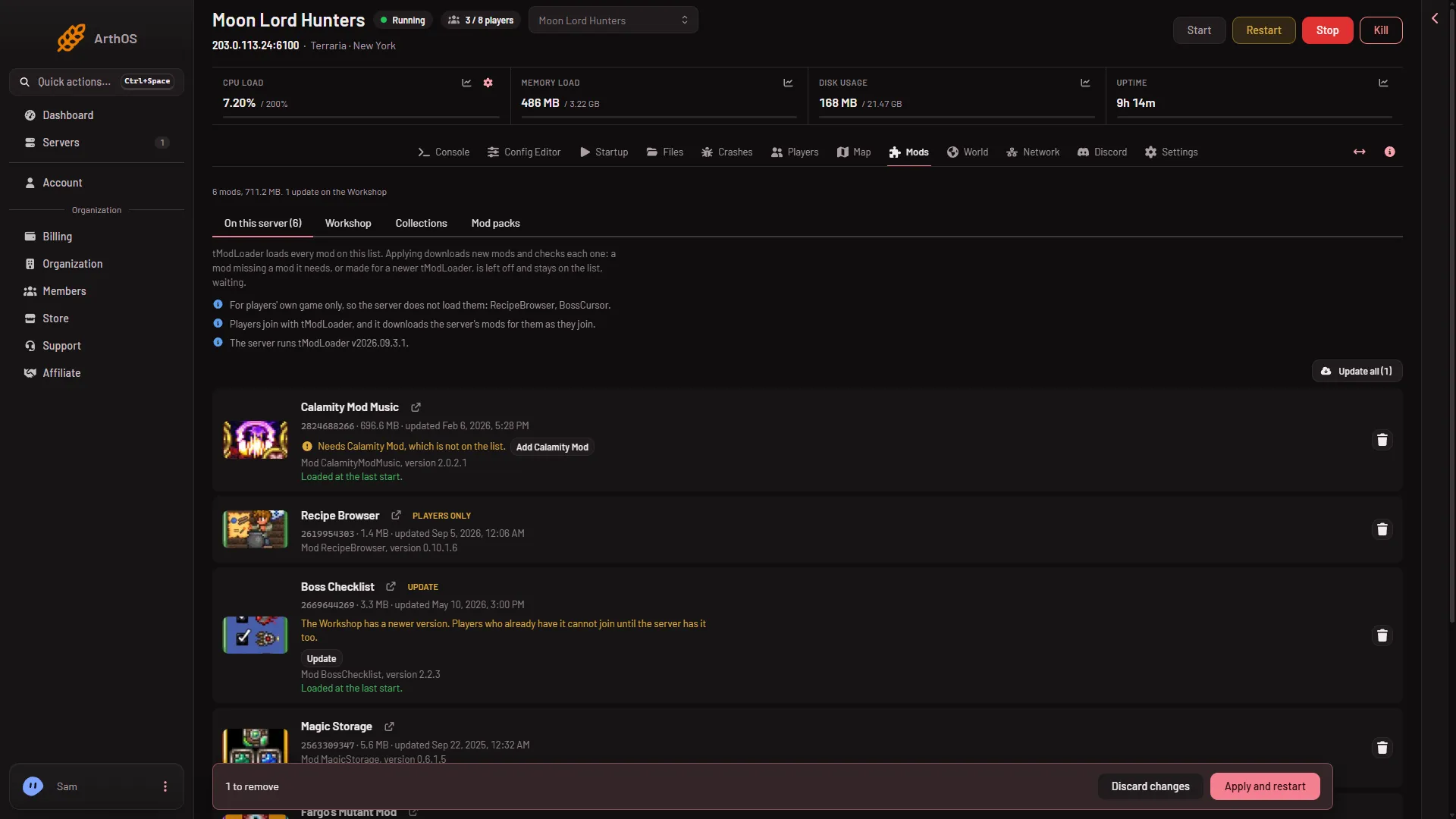
- The Needs line
- Add the needed mod
Add the missing mod
- On the row, choose Add (name). The mod goes on the list with the tag New.
- The page says the mod is on the list and that you must apply it. A bar at the bottom of the page shows “1 to add”.
- Choose Apply. If the server is running, choose Apply and restart instead. It disconnects everyone who is on the server, so warn them first with Message everyone on the Players page.
- Read the box Apply the mod changes?. Downloads lists what will come down. Under Left off when you apply, a mod that still cannot load is named with the reason.
- Confirm.
A running server stops, downloads, starts again and disconnects the players on it. An offline server downloads and stays offline. If a download fails, the copy the server had stays.
When you add a mod by its Workshop link, a box named Add these mods? may open first. It lists the mod and the mods it needs, marked “needed by (name)”. Choose Add (count) to put them all on the list at once.
How the server decides
The panel reads each mod’s own file. A mod loads only when every mod it needs is on the list. If a mod needs a certain version, the list must hold that version or a newer one. When a mod cannot load, any mod that needs it cannot load either. The panel repeats this until nothing changes.
A mod that cannot load is not lost. It stays on the list, waiting, and the rest of the mods load. Once the missing mod is on the list and applied, the waiting mod loads at the next start.
Players need the mods too
Players join with tModLoader. It downloads the server’s mods for them as they join, needed mods included.
If it does not work
- The row says the needed mod is no longer offered. The Workshop has removed it. Find a newer mod that does the same job, or take the first mod off the list. See remove a mod.
- The reason says the list has an older version. The needed mod is on the list but too old. See update mods.
- The mod is still off after Apply. Read the reason under Left off when you apply. Another mod it needs may also be missing. See a mod did not load.
- There is no Add button. Find the needed mod on the Steam Workshop yourself and add it with Add by link or ID.