









This is a list of popular Valheim mods, grouped by what they do. Each line gives the mod’s name as its Thunderstore page shows it, and what its page says it does. Install any of them from the Mods page. The list is not a ranking, and it is not advice on which to choose.
Not checked on 1.0.20 as of 21 October 2026: whether each mod works on the current game. Before you install one, open its page and read which game version it supports.
How to find these in the panel
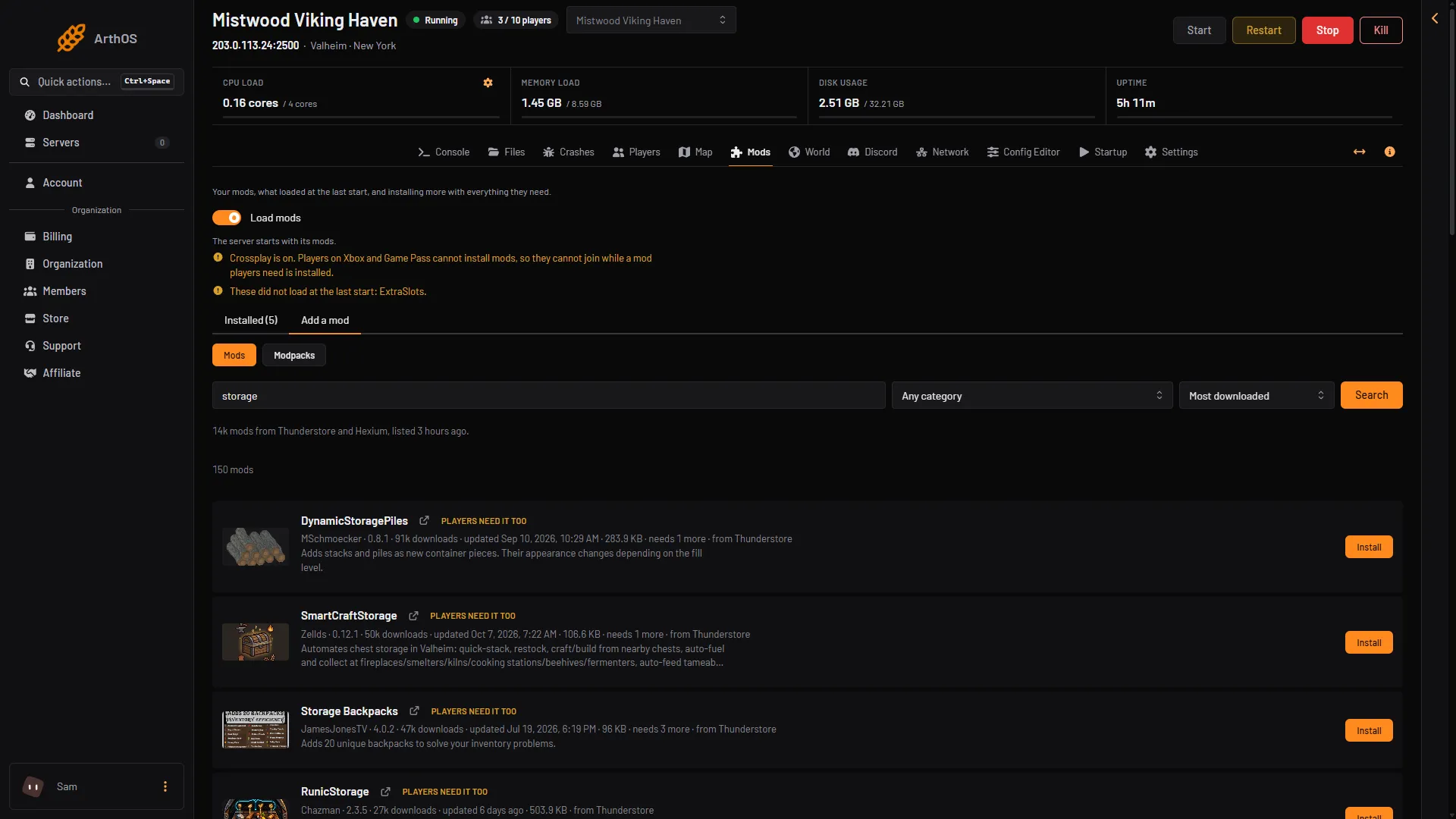
- Open the Mods page and the Add a mod tab.
- Type the name into the search box, or set the sort to Most downloaded to see the popular ones first.
- Open the mod and choose Install. The box lists everything it needs.
- Search box
- Search
- A mod
- Install
Type a name in the search box (1) and choose Search (2). Pick a mod from the list (3) and choose Install (4).
Thunderstore has its own list, sorted by most downloaded, at thunderstore.io/c/valheim/. The order there can differ from the panel’s.
Players need it too
On the Installed tab, a mod shows Players need it too or Server only. The panel shows Server only when the mod’s page marks it Server-side and not Client-side. That is a label from the mod’s categories, not a test, so the mod’s own page has the last word. Everyone who joins a server with a Players need it too mod must install the same version. See how players install the same mods. Players on Xbox and Game Pass cannot install mods.
Libraries
- Jotunn: a library that makes the work of mod makers easier. Other mods can need it. If one does, the panel installs it for you.
Tools for admins
- Server devcommands: “Enables devcommands and utilities for server admins.” Not checked on 1.0.20 as of 21 October 2026: what it does on a server. See Valheim devcommands.
Inventory and storage
- ExtraSlots: more inventory slots for equipment, food, ammo and other items, plus quick slots.
- MultiUserChest: allows several players to use the same chest at the same time.
- Quick Stack Store Sort Trash Restock: quick stacking, sorting, trashing and more in one package.
- AdventureBackpacks: adds a set of backpacks to the game.
Farming and loot
- PlantEverything: lets the cultivator plant berry bushes, thistle, dandelions, mushrooms, more trees and other plants.
- PlantEasily: plants crops in even rows and columns, harvests in bulk and can replant. Its page marks it Client-side only.
- EpicLoot: adds loot drops, magic items and enchanting.
Combat and creatures
- BetterArchery: adds many features and changes to bow play.
A mod that only the server runs
A mod marked Server-side without Client-side should need nothing on the player’s PC, but the mod’s own page has the last word. Use the Thunderstore category Server-side to browse them, and read the page of each one first.
If it does not work
- The mod shows Did not load. It may need another mod, or may not support the game version. See mods not loading.
- Players cannot join after you installed one. They need the same mod and version. See the guide above for players.
- Crossplay is on. Players on Xbox and Game Pass cannot join while a mod they need is installed. The panel asks you to agree before it installs one.
More about the game: Valheim servers.
Sources: thunderstore.io: Valheim, valheim.thunderstore.io: R2modman