









The Valheim cheat commands, such as god, fly and spawn, do not work on a dedicated server. The game’s wiki says they are for singleplayer and for a world you host from your own game. On a Loafhosts server, the panel tools do much of the same. More about the game: Valheim servers.
What devcommands are
The game has a console you open with F5. The console is off until you start the game with the launch option -console. In Steam: right-click Valheim, open Properties, and type -console in the launch options.
Some commands work for everyone. The cheat commands work only after you type devcommands and press Enter. Type it again to turn them off.
Do they work on a dedicated server
No. The wiki says the cheat commands “are available in singleplayer or manually hosted mode only. They do not work on a dedicated server.” A Loafhosts server is a dedicated server.
What an admin can do in the console on a server is the short list of admin commands in the game’s manual: Kick, Ban, Unban and Banned. They work only for players on the server’s admin list. See make yourself admin. The wiki also lists save, setworldpreset, setworldmodifier and resetworldkeys. Not checked on 1.0.20 as of 21 October 2026: those four commands.
A mod called Server devcommands, listed in popular Valheim mods, says it enables devcommands for server admins. Not checked on 1.0.20 as of 21 October 2026: that mod.
Not checked on 1.0.20 as of 21 October 2026: whether the wiki’s note still holds on this version.
The cheat commands, and what to use on a server
Here are the wiki’s cheat commands people ask for, and the panel tools that do the same job from the server.
| Command | What it does in the game | On a Loafhosts server |
|---|---|---|
god | You take no damage. | No panel tool. Heal restores health once. See heal and effects. |
ghost | Enemies ignore you. | No panel tool. |
fly, debugmode | Fly, and build for free. | No panel tool. |
spawn | Spawns an item or a creature. | Give item and Spawn creatures. See give items. |
pos | Shows your coordinates. | The Map page shows where each player is. |
goto, recall | Teleports you, or players to you. | Teleport: click the map and To another player. See teleport players. |
tod, skiptime | Sets the time of day, skips time. | Skip to morning. See skip the night. |
event, randomevent | Starts a raid. | Start a raid. See spawn creatures and raids. |
killall, removedrops | Kills nearby creatures, clears drops. | No panel tool. Kill acts on a player only. |
raiseskill | Raises a skill. | Not possible. A player’s skills live in their own game. |
save | Saves the world. | Save the world now. |
With the panel tools
The panel tools are a small plugin of Loafhosts that runs in the server. Players install nothing. Turn them on with Turn on panel tools on the Players page. The server stops and starts when you do. See the Valheim panel tools.
Then open a player’s Actions on the Players page. In the picture, Give item (1), Spawn creatures (2) and Start a raid (3) are marked. The actions are Give item, Heal, Give effect, Message, Teleport: click the map, To another player, Spawn creatures, Start a raid and Kill. Kick and Ban are buttons on the same row. The world has Skip to morning, Save the world now and Message everyone.
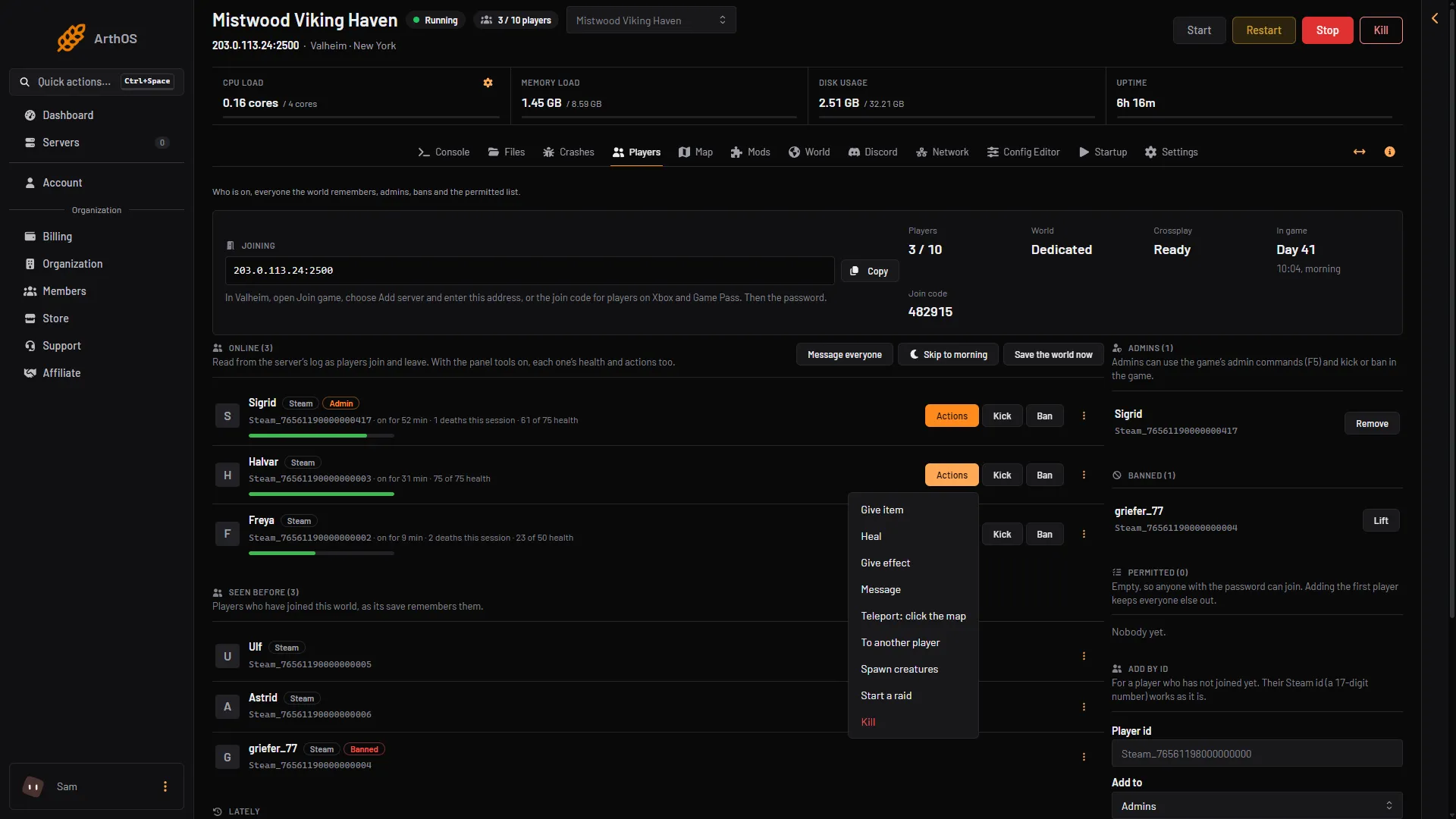
- Give item
- Spawn creatures
- Start a raid
No server can read or change what a player carries, eats or has learned. That is kept in the player’s own game.
If it does not work
devcommandsdoes nothing. Expected on a dedicated server.- The console does not open. The game was not started with
-console. - An admin command is refused. The player is not on the admin list. Use Make admin in the player’s row menu (three dots) on the Players page.
- The panel buttons are missing. The tools are off, or the server needs a restart to load them. Choose Restart at the top of the server page.