
















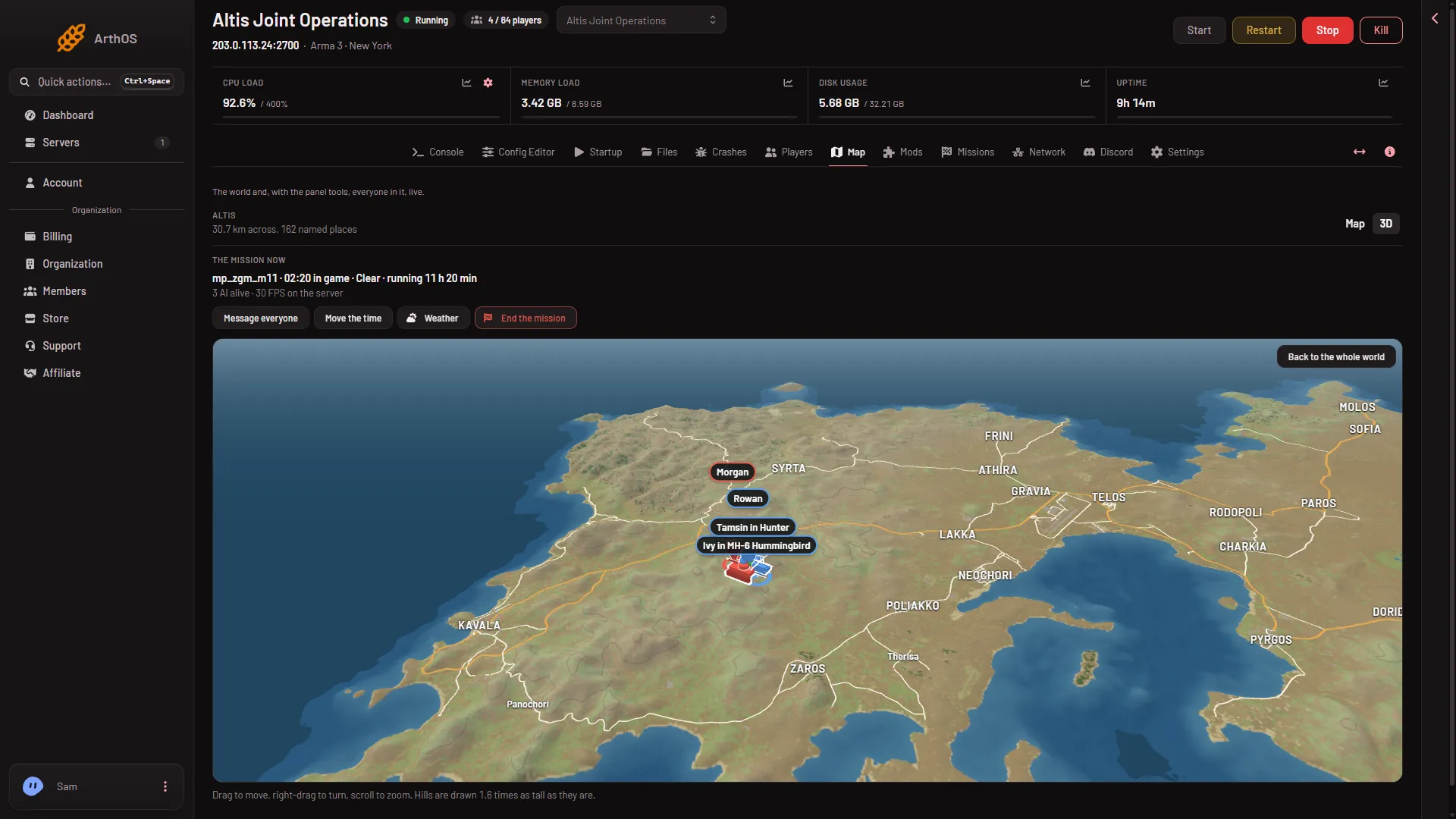
The 3D view on the Map page shows your Arma 3 world as a landscape you can fly around. Open the Map page and, under How the world is shown, choose 3D. The address of the page then ends in ?view=3d, so you can bookmark it.
What you see
The panel builds the ground from the game’s own answers about the world, not from Bohemia’s pictures. It samples the heights as a grid of at most 512 by 512 points. On Altis the points are about 60 metres apart. So hills are smooth, but small bumps between the points are not drawn.
- Ground. It is coloured by surface, with contour lines.
- Roads. Drawn on the ground.
- Buildings. Drawn when you are close, inside about 9 km of them.
- Towns. Named by their rank, so the large ones show first.
- Players. Each is a pin. A player inside a vehicle is named on it, as “(name) in (vehicle)”.
- Vehicles. Drawn as small models by kind: car, tank, helicopter, plane, ship and static weapon.
Players, groups and vehicles need the panel tools. See turn on the panel tools. Without them you still get the ground, roads, buildings and towns.
- How to move
- Back to the whole world
Controls
The hint line (1) under the picture says it:
- Drag to move.
- Right-drag to turn.
- Scroll to zoom.
- On a touch screen, one finger moves, and two fingers turn and zoom.
Choose Back to the whole world (2) to return to the view of the whole world.
Hills look taller than they are
The hint line ends with: “Hills are drawn 1.6 times as tall as they are.” The panel stretches the heights by 1.6 on purpose, so the shape of the land is easy to read from far away. A real hill is lower than the picture shows it.
When it needs time
The first time you open it for a world, the page says “Building the ground in 3D…” while it works. The world must also have been drawn once, as the Map guide explains: see the live map.
If it does not work
- The page says the browser cannot draw in 3D. WebGL is off or not supported in your browser. The page says the map shows the same world. Use the Map view instead, or try another browser.
- The ground is missing. The world has not been drawn yet. Run a mission on it with the panel tools on, then try again after a few minutes.
- No pins or vehicles. The panel tools are off, or no mission is running.
Not checked on 2.22.154089 as of 13 November 2026: the 3D view with many real players moving at once.
More about the game: Arma 3 servers.