
















The setting allowedFilePatching decides whether the players who join your server may load files from outside their mods. It has three choices: No clients, Headless clients only and Every client. The game’s own default is 0, which is No clients. Leave it there unless a mod or mission tells you to change it.
What the three choices mean
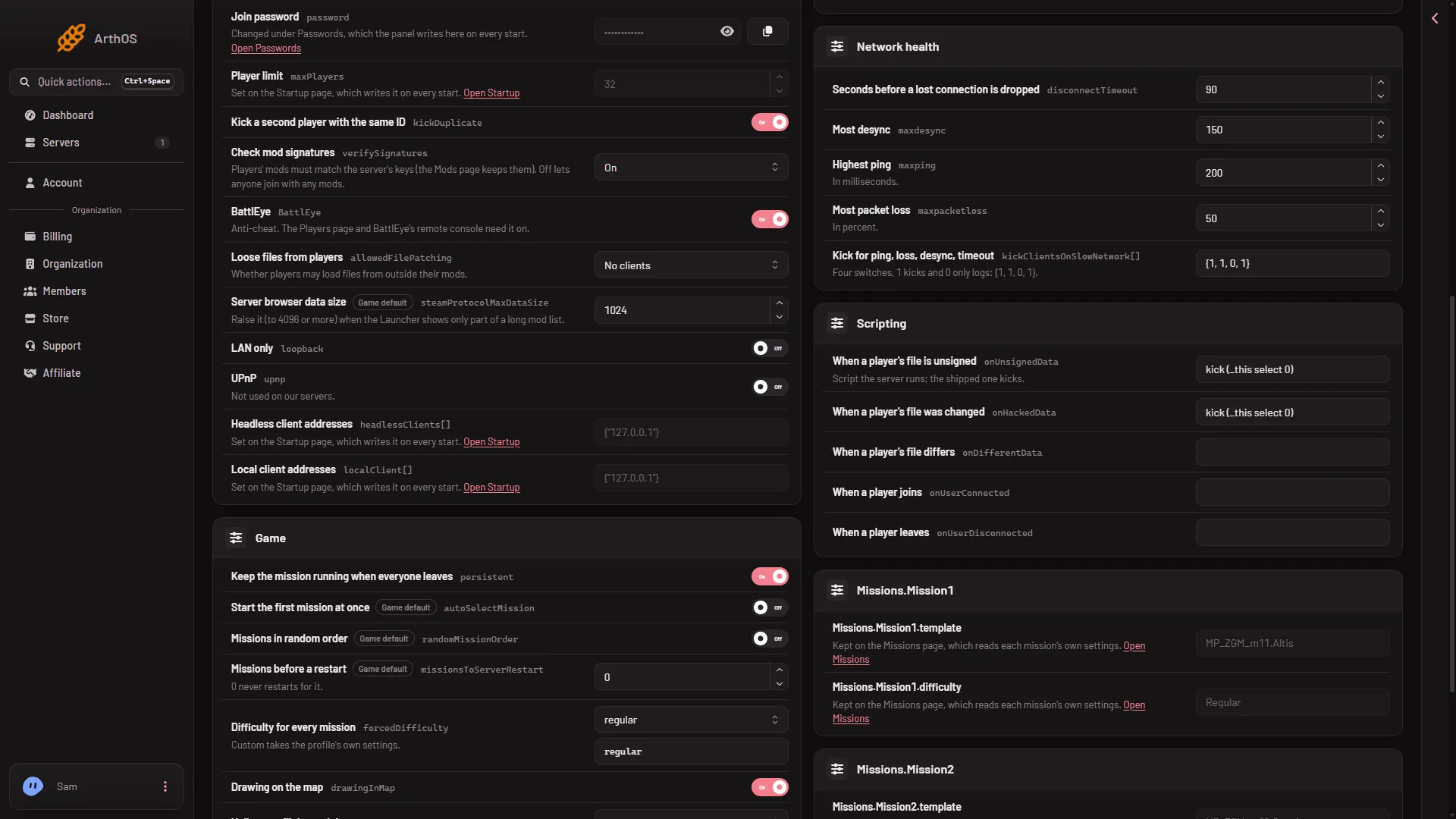
The panel shows the setting as Loose files from players. Its help text reads “Whether players may load files from outside their mods.”
| Choice | Value in server.cfg | Who may load loose files |
|---|---|---|
| No clients | 0 | Nobody. |
| Headless clients only | 1 | Only headless clients. |
| Every client | 2 | Every player, and headless clients too. |
A headless client is an extra game client that runs AI for missions built for it. You start them with Headless Clients on the Startup page. See headless clients for how they work.
The setting was added to the game in version 1.50. The game’s own description says it prevents or allows file patching for the clients, headless clients included. A client only has loose files to offer if it starts the game with the -filePatching option. This setting decides whether the server lets such a client join.
Change it in the panel
- Open the Config Editor page of your server.
- Choose server.cfg in the list of settings files.
- Find the Joining card and the field Loose files from players (1).
- Pick No clients, Headless clients only or Every client.
- Choose Save.
- Loose files from players
The page then says “Saved. Restart the server to apply the changes.” when the server is running. Choose Restart now, or restart it later. The game reads server.cfg once, when it starts, so nothing changes for the running server. A restart drops everyone who is on, so pick a quiet moment and warn players first with A message to everyone on the Players page (type the text, then choose Send).
Each field in the Config Editor also shows its Game default. Use it to put the setting back to the game’s own value.
Change it by hand
You can also open Files, open server.cfg and write the line yourself:
allowedFilePatching = 0;Use 0, 1 or 2, and keep the semicolon. Save the file, then restart the server. If the Config Editor has the same file open, reload it first so you do not save over your edit.
Which choice to pick
- No clients is the safe default and the right choice for most servers.
- Headless clients only fits a mission that tells you its headless clients need loose files.
- Every client lets every joining player load such files. Choose it only when a mod or mission asks for it.
This setting is separate from mod signature checks. Signatures are covered in check mod signatures, and the other server.cfg settings are in server.cfg explained.
If it does not work
- The choice did not change. The server was not restarted after you saved. Restart it.
- The field is not on the page. Look in the Joining card of
server.cfg, notbasic.cfg. - The save is refused. Your role on the panel may not allow changing files. Ask the server owner to change your role.
- Players still cannot load a mod’s files. This setting does not fix a missing mod. Check the mods on the Mods page.
More about the game on Loafhosts: Arma 3 servers.
Sources: Bohemia wiki: Server Config File