
















A headless client is an extra copy of the game that runs on the server and does the AI’s thinking, so the server itself has less to do. To use one, set a number from 0 to 5 under Startup, Headless Clients, and restart. The mission must be built to use them, or they do nothing.
What it is
On a big mission with many AI units, the server can run slowly. Arma 3 can hand some of that AI work to headless clients. They have no screen and no player. They join the server like a player and run AI for the mission.
The game’s own documentation says the same: a headless client “is used to offload AI calculations from the server instance”.
Set the number
- Open Startup.
- Find Headless Clients (1). The panel describes it as extra game clients that run AI on the server for missions built for them, 0 to 5.
- Type the number. 0 means none, and 0 is the setting a new server starts with.
- Save, and restart the server.
The change applies at the next start. The panel sets the server’s two address lists for you, headlessClients[] and localClient[], every time the server starts, each as {"127.0.0.1"}. If you run a server yourself, put those two lines in server.cfg and start each headless client with the -client and -connect=127.0.0.1 launch parameters, as Bohemia documents. In the Config Editor those two settings are shown but locked, with the note that they are set on the Startup page.
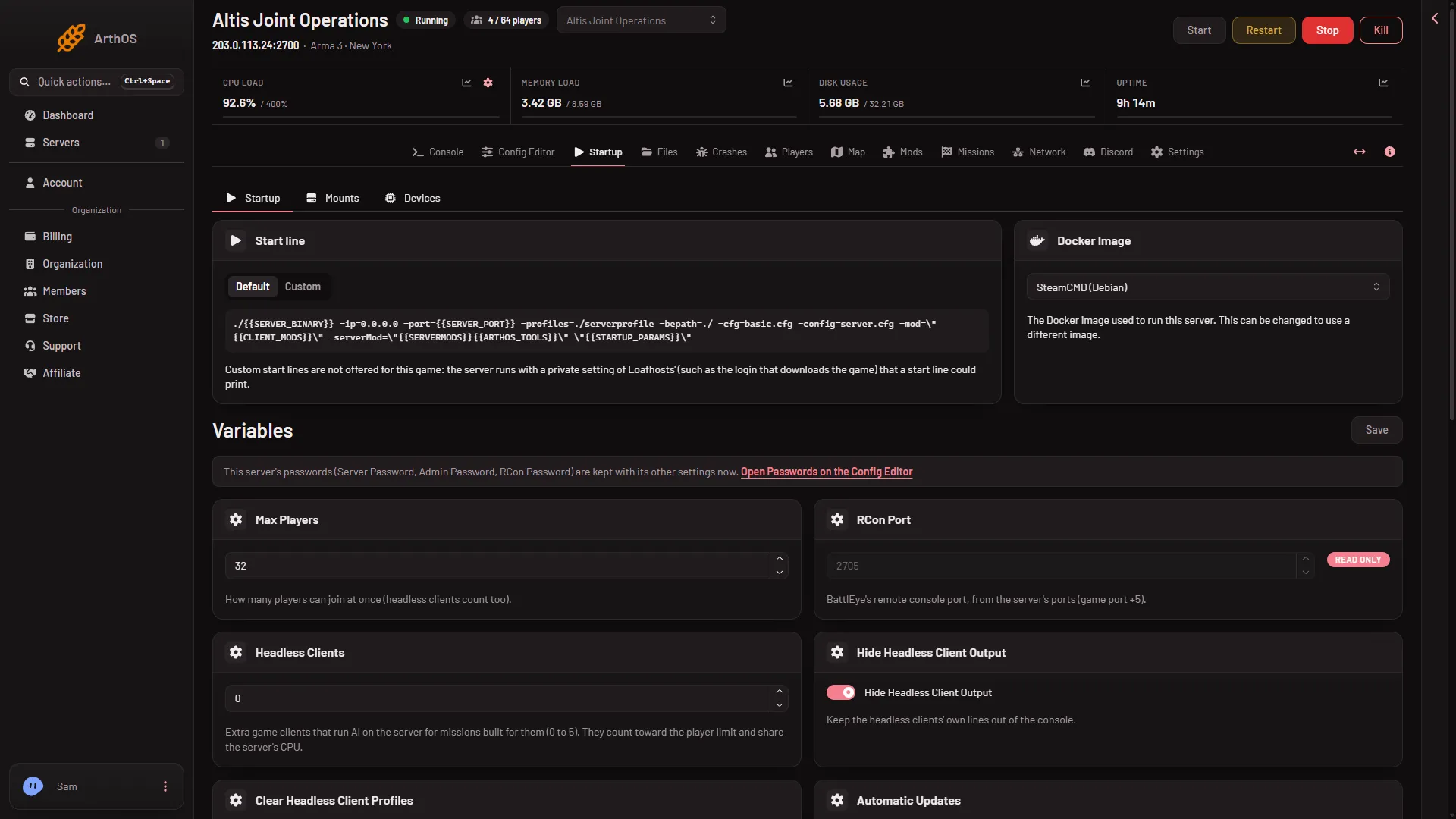
- Headless Clients
- Max Players
Two more switches sit beside it on the same card:
- Hide Headless Client Output keeps the headless clients’ own lines out of the console. It is on by default.
- Clear Headless Client Profiles starts the headless clients with clean profiles. It is off by default.
The mission must support them
Headless clients do nothing for a mission that does not know about them. The game’s documentation lists what the author changes:
- Place a Headless Client unit in the mission (side Game Logic, class Virtual Entities, unit Headless Client, control Playable) and give it a name. Each unit adds one headless client slot.
- Move the AI spawning into its own script.
- Start that script on the headless client, for example from
init.sqfwith a check such as!hasInterface && !isServer.
Check the mission’s own notes for headless client support, and for how many it can use.
What it costs
- Player slots. Headless clients count toward the player limit. The Max Players variable (2) says “headless clients count too”. With 3 headless clients and a limit of 32, 29 slots are left for players.
- CPU. They share the server’s CPU. Not checked on 2.22.154089 as of 13 November 2026: how much a headless client helps.
Not checked on 2.22.154089 as of 13 November 2026: how much CPU and memory each headless client uses on a Loafhosts plan with a real mission.
Other things to know
Not checked on 2.22.154089 as of 13 November 2026: whether they load the same mods as the server, or how an admin sees them in the game. To change the player limit, see the player limit.
If it does not work
- Nothing seems to change. The mission does not support headless clients. Ask its author, or leave the setting at 0.
- The setting did not apply. Startup changes need a restart.
- Fewer player slots than expected. Headless clients take slots. Lower Headless Clients or raise Max Players.
- The server is slower. More clients share the same CPU. Try fewer, or 0.
- The console is noisy. Turn on Hide Headless Client Output.
More about the game: Arma 3 servers.
Sources: Bohemia wiki: Headless Client, Bohemia wiki: Startup Parameters