
















The Players page says: “BattlEye refused the panel’s RCon password: it was changed after the server started, and the game keeps the old one until it restarts.” The fix is the one the page gives. Restart the server. The panel then writes the new password for BattlEye at the start.
Why it happens
BattlEye (the game’s anti-cheat) reads its remote console password once, when the game starts. The RCon password is stored in two places: the setting you edit, and a file BattlEye reads. The panel writes that file at every start, never while the server runs. So if you change the password while the server is on, the panel’s setting and BattlEye’s copy no longer match. BattlEye refuses the panel until the next start.
Nothing is broken. Only the Players page loses its link to BattlEye until the restart.
Fix it
- Open the Players page and read the message.
- Restart the server. A restart drops everyone who is on, so choose a quiet moment and warn players first with A message to everyone on the Players page, then Send. Restart from the top of the server page, or use Restart now that the Config Editor offers after a save.
- Wait for the console line
Host identity created. - Open Players again. The list loads. The page refreshes by itself every 10 seconds.
Changing the RCon password the right way
- Open Config Editor, then Passwords (1).
- Edit RCon Password (2). Use letters and digits only, at most 40 characters.
- Choose Save.
- Restart the server, with the warning to players described above. The change applies at the next start.
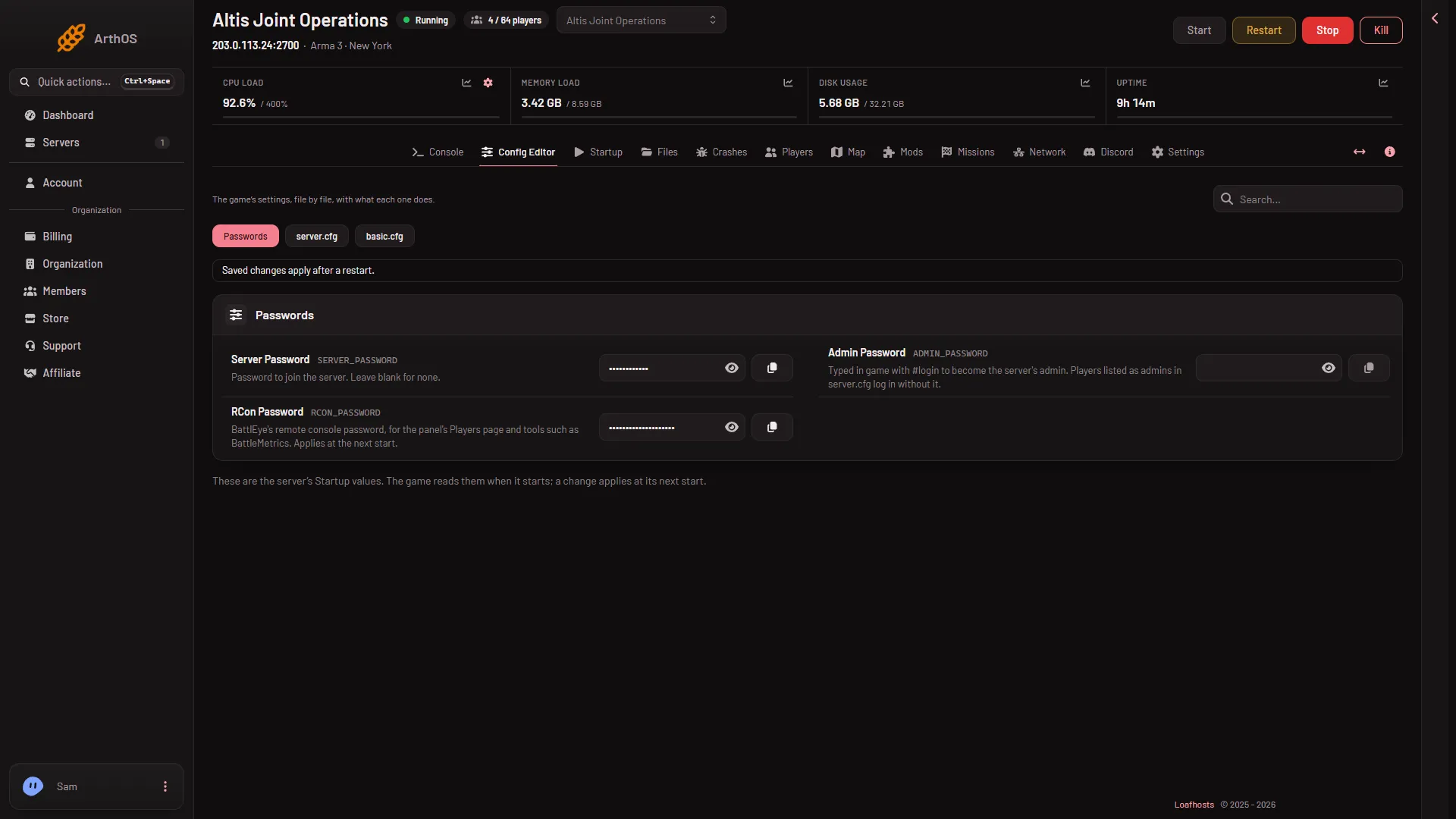
- Passwords
- RCon Password
Do not edit beserver_x64.cfg in Files. The panel rewrites it at every start, so a hand edit does not last.
If you do not want to pick one
Leave RCon Password empty, or use characters other than letters and digits. At the next start, the panel replaces it with a random password and the Players page keeps working. You do not need to know the value, because the panel uses it for you.
If it does not work
- The message returns after a restart. Check that the RCon Password has a value, and that it has only letters and digits. Then restart once more (and warn players first, as above).
- The page says BattlEye is not answering yet. The server may still be starting. See BattlEye is not answering.
- You cannot open Passwords. Your role may not allow it. Only people who may change passwords can see the values.
More about the game: Arma 3 servers.
Sources: Bohemia wiki: BattlEye