
















Each mod on an Arma 3 server is loaded one of two ways. Players too means every player must load the same mod to join. Server only means the mod runs on the server and players never need it. You choose on each row of the Mods page.
The two kinds
Arma 3 has two start options for mods. -mod loads a mod on the server and makes players load the same mod. They must already have it installed: the server does not send mod files. -serverMod loads a mod on the server only. For example: -mod=@client_mod -serverMod=@server_mod. The game’s own documentation says server-side mods are “not broadcasted to clients”.
On Loafhosts you do not type either option. The page writes them for you from your choices.
Use Players too for anything a player sees or uses: maps, weapons, units, vehicles, radios, interface changes. Use Server only for a mod that works only behind the scenes, when its own page says it needs no copy on the player’s side.
Change it on a row
- Open the Mods page and stay on the On this server tab.
- Find the mod’s row. Two buttons at its right end show the current choice.
- Choose Players too (1) or Server only (2).
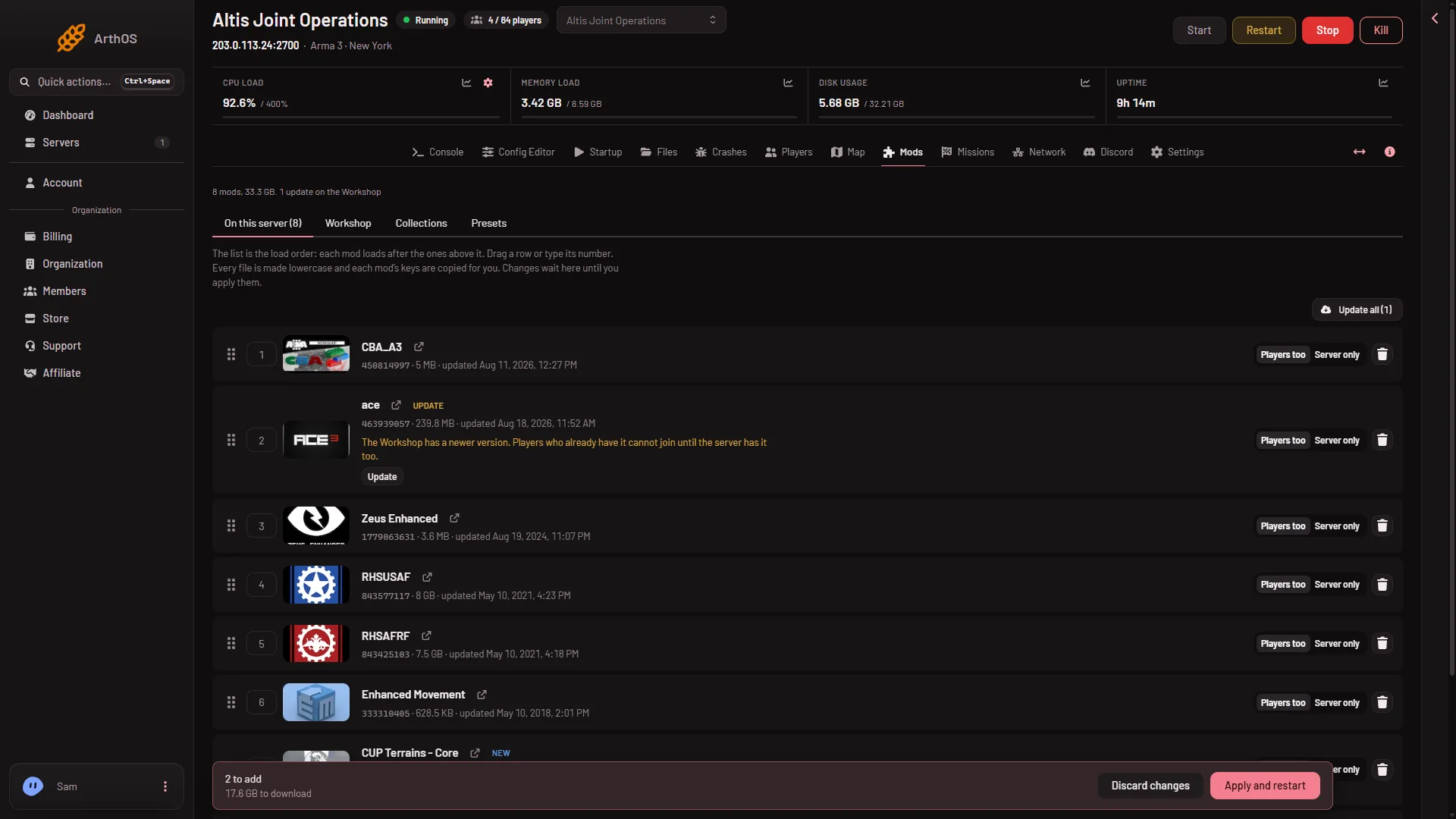
- Players need it
- Server only
A row set to server only carries the chip Server only.
Apply it
The change waits as a draft. The bar Changes not applied yet counts it as “(count) moved between players and server only”.
- Choose Apply (server off) or Apply and restart (server running).
- Confirm in the box Apply the mod changes?.
The new choice is used from that start.
What players must do
Players need every mod set to Players too, in matching versions. Give them the list with the Presets tab: the button Download the preset makes a Launcher preset, and players drag the file onto the Arma 3 Launcher. The preset leaves server only mods out, because players never need them. See give players the preset.
Other things you may see on a row
The Startup page has a read-only line Optional Mods: mods players may load, where only their keys are on the server. The Mods page sets it. A row can also carry the chip For players too. Its text says the mod also has a part for players’ own games, and whether players need it to join depends on the mod, so check its Workshop page. The chip Players only also exists. Not checked on 2.22.154089 as of 13 November 2026: what Players only does on an Arma 3 server.
The panel tools
The panel’s own tools addon is not on this list and has no picker. It is turned on from the Map page. Players install nothing for it.
If it does not work
- Players are refused after you set a mod to Server only. The mod was one they needed. Set it back to Players too, apply, and send them the preset.
- A player is refused with a signature problem. Their mod version differs from the server’s. See mod keys and signatures.
- Players still see an old mod list. They need a fresh preset after any change.
More about the game: Arma 3 servers.
Sources: Bohemia wiki: Startup Parameters