
















On a Loafhosts Arma 3 server, the mod list on the Mods page is the load order. A mod loads after every mod above it. Put the mods other mods depend on at the top. Change the order by dragging a row or typing a new number, then apply.
Why order matters
Many mods are built on another mod, such as a framework. The framework has to load first. If a mod loads before the one it needs, the game can refuse the mod or report missing addons. The mod’s Workshop page usually says what it needs.
Change the order
- Open the Mods page.
- Stay on the On this server tab.
- Drag a row by its handle (1), or type a new number for the row in the number box (2).
- Repeat until the list reads top to bottom in the order you want.
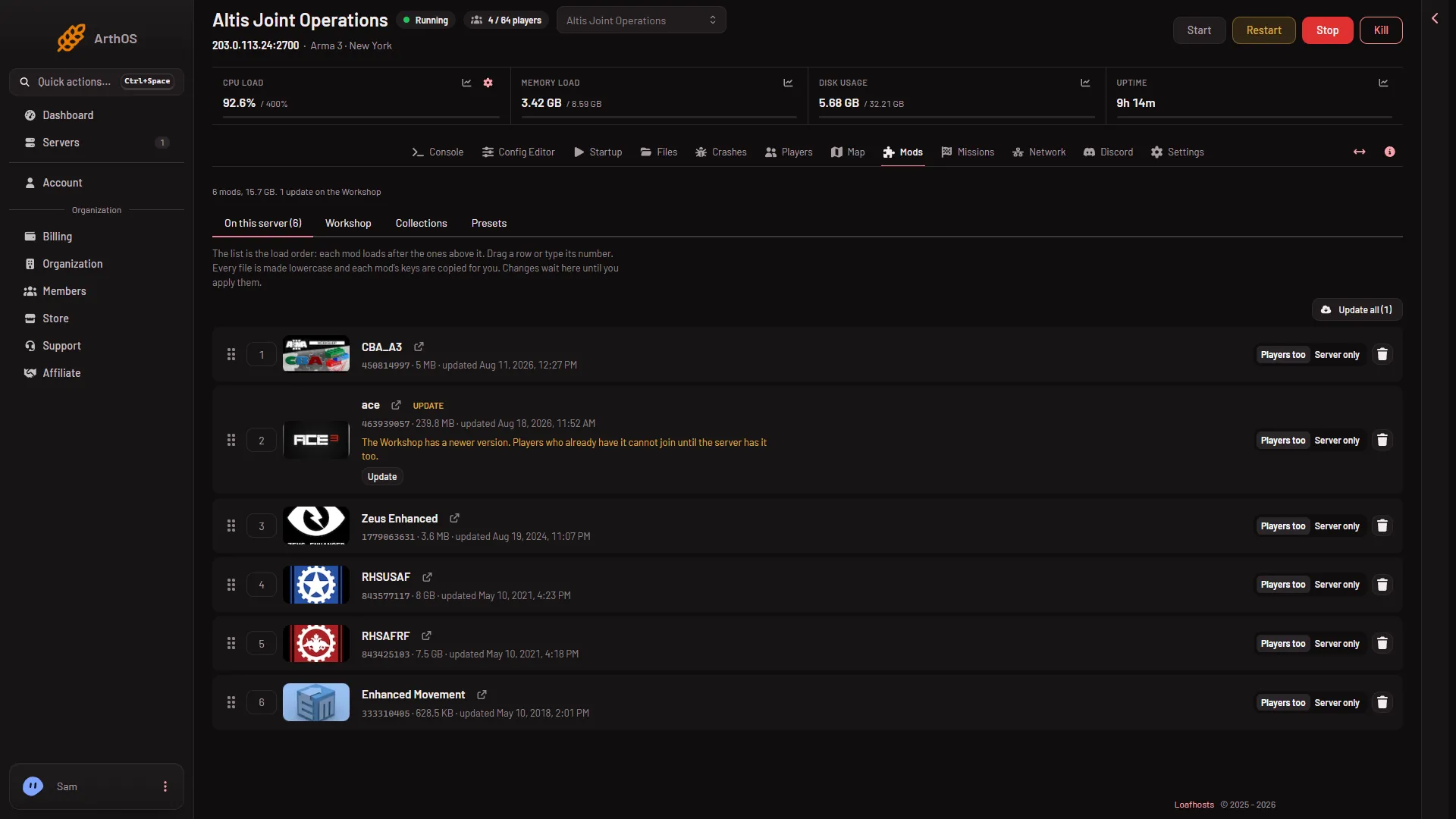
- Drag to change the order
- Type a number
A change does not touch the server yet. The page keeps it as a draft and shows Changes not applied yet with a new order in the list of changes.
Let the panel sort it
If a row says “Loads before (names), which it needs. Drag it lower, or sort by what each needs.”, the order is wrong for that mod. Choose Sort by what each needs. The page answers “Sorted: every mod now loads after the mods it needs.” Check the list once more after, so you know where each mod landed.
Apply the new order
- Choose Apply (when the server is off) or Apply and restart (when it is running).
- Read the box Apply the mod changes?. It says “The load order changes to the one on this page.” and “The server’s start line changes so it loads this list, in this order.”
- Confirm.
The new order is used from that start. See apply mod changes.
By hand
On any Arma 3 server the order is the order of the -mod= list in the start line, with semicolons between mods: -mod=@first;@second. Each mod loads after the one before it. The panel builds that part of the start line from this list. A Custom start line is not allowed on Arma 3, so you change the list here, not the line.
A server that loaded mods by ID
An older server may show a note that it “loads its mods in order of their IDs, whatever order they were listed in”. Apply once. After that, the order on the page is the load order.
Players
Players need the same mods as the server, in the same versions. The Presets tab can give them the list as a Launcher preset. See the Mods page guide.
If it does not work
- A mod still reports a missing addon. Look for a row note “Needs (name), which is not on the list.” and choose Add next to it. See a mod that needs another mod.
- The new order did nothing. It was not applied. Look for Changes not applied yet and choose Apply.
- Apply does not work. Your role may not allow it. The page says: \
More about the game: Arma 3 servers.
Sources: Bohemia wiki: Startup Parameters