
















Players need the same mods as your server, in the same versions. Do not send them a list of links. Download one preset file from the panel. (A preset is a small file that lists mods; the Arma 3 Launcher reads it.) Players drag it onto the Launcher, and the Launcher sets up the mods.
Download the preset
- Open the Mods page.
- Open the Presets tab.
- In the card Give players the server’s mods, choose Download the preset (1).
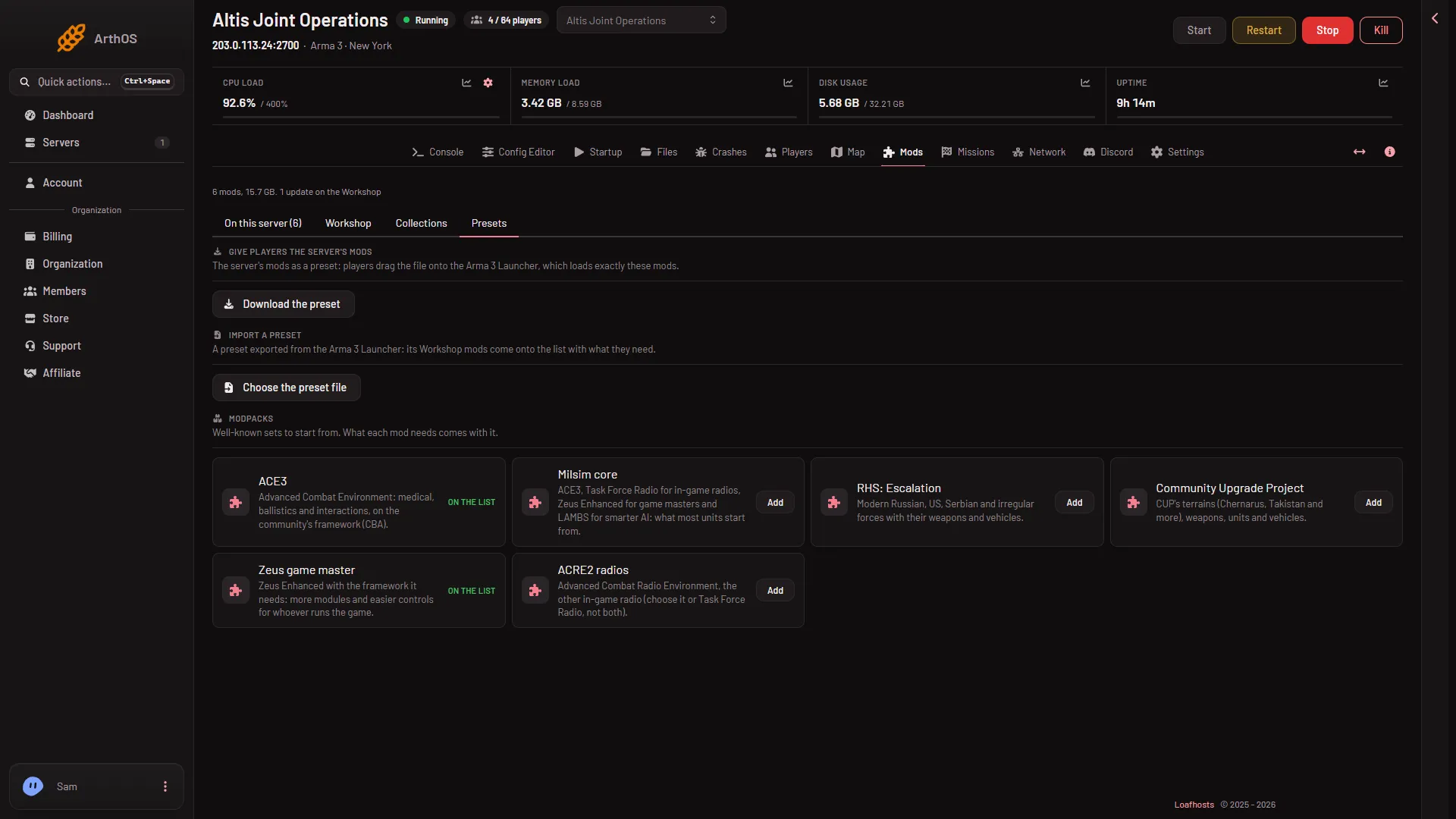
- Download the preset
The card explains it: “The server’s mods as a preset: players drag the file onto the Arma 3 Launcher, which loads exactly these mods.”
The same file is also on the Players page, in the Joining band, under the name Download the server’s preset. Anyone whose role can see the Startup settings can download it from either place.
If the server has no mods yet, the card says “The server has no mods yet.”
What is in the file
- Every Workshop mod the server loads for players, in the server’s load order.
- The Creator DLC folders that are on the list.
- Not the server-only mods. Players never need those, so the file leaves them out.
The file is a web page with the mods named in it. Its own text says: “Drag this file onto the Arma 3 Launcher, or open MODS, then PRESET, then IMPORT and choose it.”
The file name comes from the preset’s name. If there is none, it is server-mods.html.
What players do
- Save the file you send them.
- Drag it onto the Arma 3 Launcher, or in the Launcher open MODS, then PRESET, then IMPORT, and choose the file.
- Let the Launcher download the mods and switch them on.
- Join the server. The panel’s line on the Players page says: “In the Arma 3 Launcher: Servers, then Direct Connect with this address, or find the server by its name.”
Players must own Arma 3. If the list holds a Creator DLC, they must own that DLC too.
Keep it current
The file shows the list as it was when you downloaded it. When you add, remove or update mods and apply them, download the preset again and give players the new file.
If it does not work
- There is no file to download. The server may have no mods, and the card says so. Add some on the Mods page and apply them first.
- A player is refused with a signature message. Their mod is a different version. Have them update it in the Launcher. See mod keys and signatures.
- A mod you uploaded yourself is missing from the file. The file lists Workshop mods and Creator DLC. Send hand-made mods to players on their own.
- Players cannot see the whole mod list in the server browser. The browser may cut long lists. See mod list too long in the Launcher.
More about the game: Arma 3 servers.