
















The player limit of an Arma 3 server is the Max Players setting on the Startup page. Change it, save, and restart the server. The new limit applies at the next start.
Change it
- Open the Startup page.
- Under Variables, find Max Players (1). The help text says: “How many players can join at once (headless clients count too).”
- Type a whole number from 1 to 256. A new server starts at 32 unless the plan sets another number.
- Choose Save.
- Restart the server. The panel writes the number into
maxPlayersinserver.cfgat every start, so nothing is picked up while the server runs.
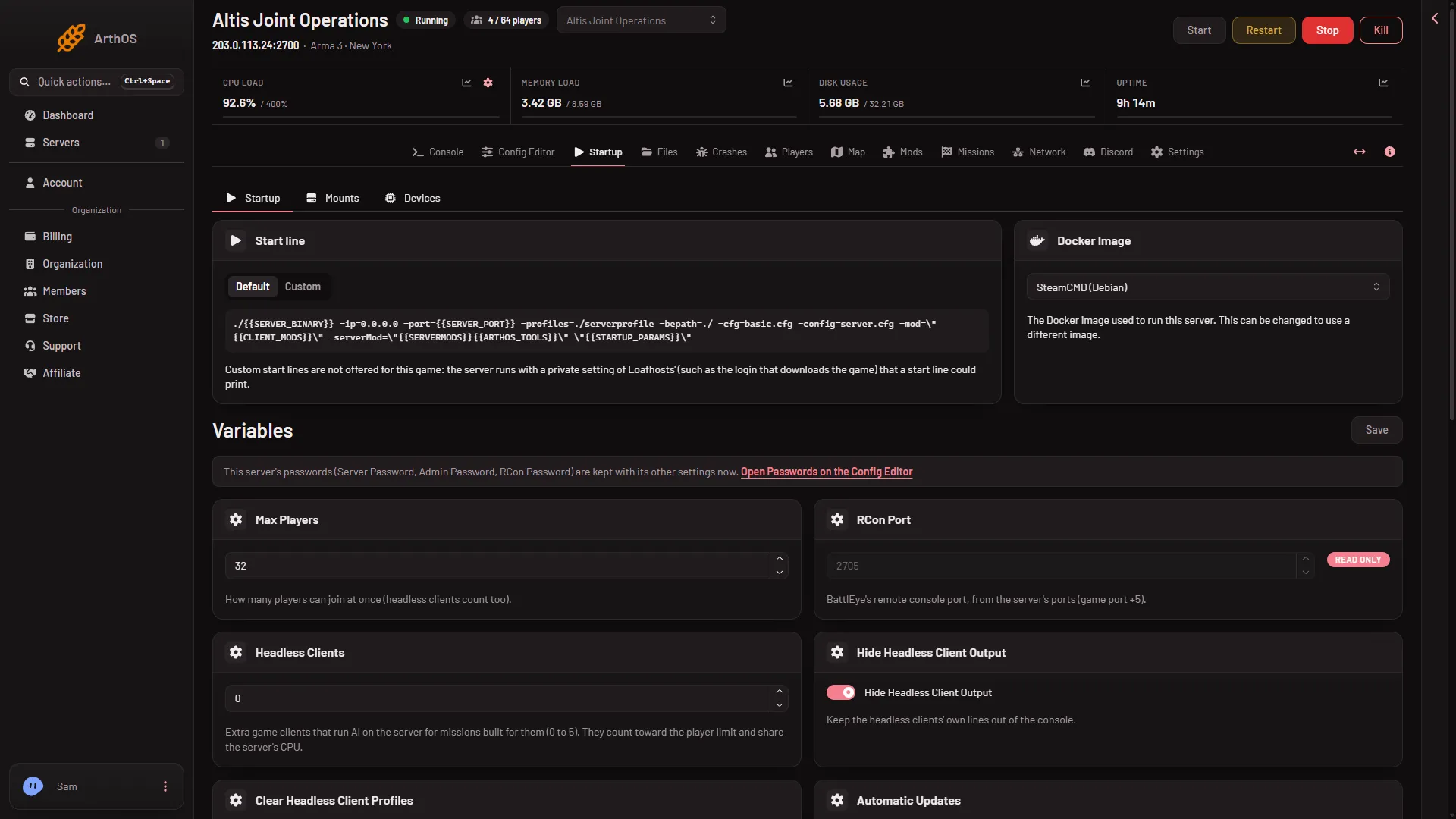
- Max Players
- Headless Clients
The limit is also shown in the Config Editor, in server.cfg, as Player limit. It is locked there. The editor says it is set on Startup, because the panel writes it on every start. Change it on Startup, not in the file.
What counts toward the limit
Everything that takes a slot on the server counts:
- Human players.
- Headless clients. These are extra game clients that run AI for missions built for them. You set how many with Headless Clients (2) on Startup (0 to 5). The help text says they count toward the player limit and share the server’s CPU. So 3 headless clients on a limit of 32 leave room for 29 players.
- Players on any side, including civilians and spectators. The game counts everyone who is connected, whatever they do.
The mission can lower it
The game’s own manual says about this setting: “The final number will be lesser between number given here and number of mission slots.” If a mission has 20 player slots and Max Players is 64, 20 players can take a role. Check the slot count in the mission itself, not only here.
The plan has a ceiling
Each plan has a most players it allows. The limit you set is held to it. If you need more players than your plan allows, move to a bigger plan.
A bigger limit also asks more of the server. More players mean more work for the processor and the network. Raise the number in steps, and watch the server’s load.
See who is on
The Players page shows how many are on, as “(number) / (limit)”. See see who is online.
If it does not work
- The old limit is still there. The server has not restarted since you saved. Restart it.
- The number is refused. It must be a whole number from 1 to 256.
- Fewer players fit than the number. The mission has fewer slots, or headless clients take some. Check Headless Clients and the mission.
- You edited
server.cfgand it changed back. The panel writesmaxPlayersfrom Max Players at every start. Change it on Startup.
More about the game: Arma 3 servers.
Sources: Bohemia wiki: Server Config File