
















The Missions page is where you choose what your Arma 3 server plays. It shows every mission the server can play, the order it plays them in, three switches, and the saves of campaign missions. Its subtitle says it: “What the server can play, the order it plays them in, and campaign saves.”
You find it in the server’s tab row, between Mods and Network.
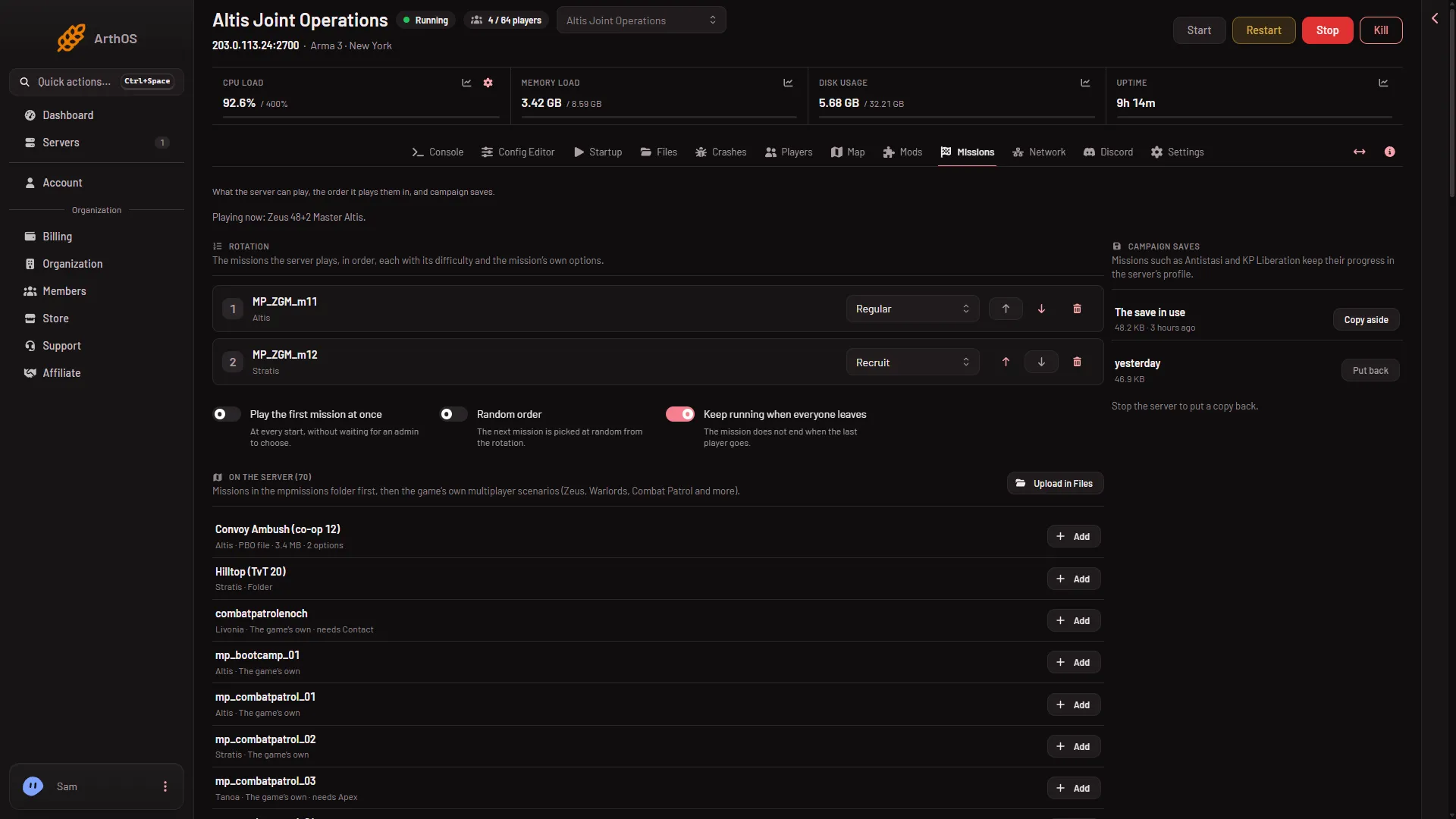
- On the server
- Rotation
- Play the first mission at once
- Campaign saves
On the server
The list titled On the server (1) has every mission the server can start. It shows missions in the mpmissions folder first. Then it shows the game’s own multiplayer scenarios, such as Zeus, Warlords and Combat Patrol.
Each row shows the mission’s title, its name and world written as name.world, and a chip for where it comes from:
- PBO file: a mission file (a packed mission) in
mpmissions. - Folder: a mission folder in
mpmissions. - The game’s own: a scenario that comes with the game.
Some rows add (number) options, which means the mission has settings of its own. Some say needs followed by a name, such as a Creator DLC or expansion that owns the world. Every player must own it to join.
To add a mission to the order, choose Add on its row. A mission that is already there shows In the rotation. If the list is empty, the page says: “No missions found. Upload a .pbo or a mission folder into mpmissions.” with a link Upload in Files.
Rotation
The Rotation list (2) is the missions the server plays, in order. Zeus missions are the ones where one player runs the mission live as game master. For each one you can:
- Choose its difficulty in Difficulty for (the mission’s name): Server’s difficulty, Recruit, Regular, Veteran or Custom.
- Set the mission’s own options, when it has them.
- Move it with Move (name) up or Move (name) down.
- Remove it with Take (name) out.
An entry whose file is gone says not on the server. If the rotation is empty, the page says: “No missions in the rotation: an admin chooses one in game after joining.”
Three switches
- Play the first mission at once (3): “At every start, without waiting for an admin to choose.”
- Random order: “The next mission is picked at random from the rotation.”
- Keep running when everyone leaves: “The mission does not end when the last player goes.”
Save your changes
When you change the rotation or a switch, the page says “The rotation has changes that are not saved.” Choose Save, or Discard to throw them away.
What the page says after a save:
- If the server is stopped, the page says: “Saved. The server plays this rotation from its next start.”
- If it runs, it says: “Saved. The server plays this rotation from its next restart.”
To switch the mission that is playing now, use the Players page. See change the mission now.
If another change reached server.cfg after you opened the page, the panel refuses and asks you to reload. A server.cfg with a class or list that does not close is refused too. Fix it in the Config Editor.
The -autoInit notice
If -autoInit is in Extra Start Parameters on Startup, the page shows a notice. With it, the game plays the first mission at once and ignores the missions’ parameters (the panel’s own notice). Take it out of Extra Start Parameters to use them. When a mission is running, the page shows “Playing now:” with its name.
Campaign saves
The Campaign saves card (4) is for missions such as Antistasi and KP Liberation. They keep their progress in the server’s profile. The card shows The save in use. If no mission has saved yet, it says “No mission has saved anything yet.”
- Copy aside keeps a copy of the save. The panel keeps the newest 10 copies.
- Put back replaces the save in use with a copy. It asks “Put this copy back?” and copies the current save aside first. It works only while the server is stopped. A running game would write over the copy. The copy is used from the next start.
See campaign saves.
If it does not work
- The page is missing. Your role may not allow seeing it, or changing it. Ask the owner.
- A mission is not in the list. Check that its file is in
mpmissionsand is namedname.world. See add a mission to the rotation. - Mission options are ignored. Look for the
-autoInitnotice above.
More about the game: Arma 3 servers.
Sources: Bohemia wiki: Server Config File