
















This error means the mission, or a mod, uses content that your server has not loaded. The log line names the addon it needs. Add the mod that holds it on the Mods page, or for a Creator DLC turn its server files on. Apply the change and restart.
See the error
Open the Crashes page and pick the start. The finding is titled “A mission or mod needs content the server does not load”. It shows when the log holds one of these:
it is dependent on downloadable content that has been deletedmissing addons detectedrequires addon
The log names the content that is missing. Those are the game’s own names for it, not always a mod’s title, so a Workshop search for them can come back empty. Search for the mod you expect to hold it, or read the mission’s own page for the mods it lists.
One line looks like this error and is not. When the only name is a3_characters_f, the panel ignores it. It is a known false message and needs no fix.
Fix it with a mod
- Open the Mods page. The On this server tab lists what the server loads now.
- Find the mod that holds the addon. Open the Workshop tab and search for it, or read the mission’s own page for the mods it lists.
- Choose Add on the mod. Not checked on 2.22.154089 as of 13 November 2026: whether Add on a search result also adds the mods it needs. Look up and a preset import list them in a box, “Add these mods?”. A row on the list that says “Needs (name), which is not on the list.” has a button for the missing one (2), as in the picture below. The row itself is (1).
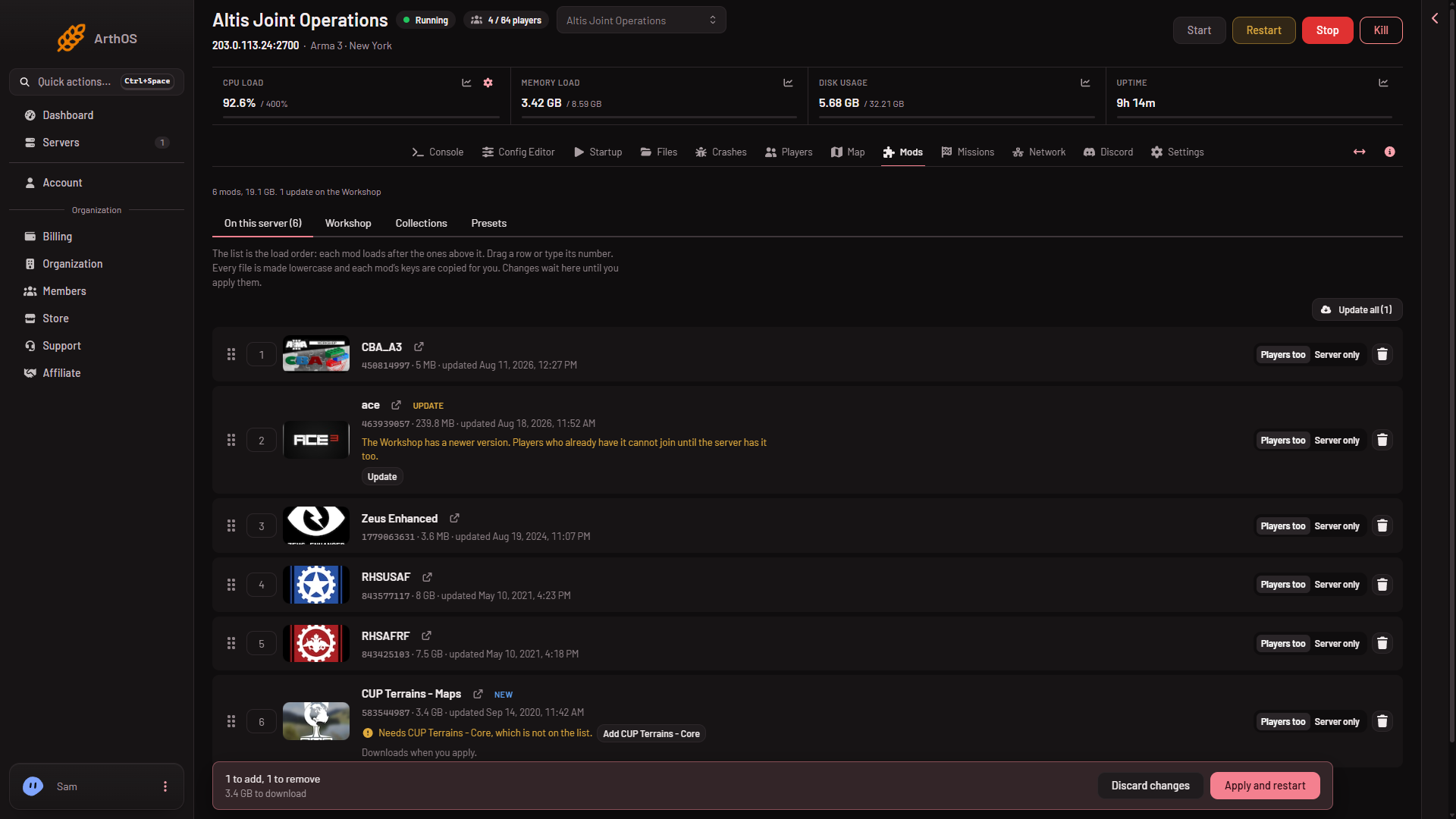 4. Check the mod’s Who loads picker. A mission needs its mod on the players’ side too, so choose Players too. Server only is for mods players do not need.
5. Choose Apply and restart. The server stops, downloads the mod and starts again. Players online are disconnected, so warn them first with A message to everyone on the Players page, then choose Send. If the server is off, the button is Apply and the server stays off.
The mod’s keys are copied for you. Players must load the same mods. Give them the list: on the Presets tab choose Download the preset and send them the file. They drag it onto the Arma 3 Launcher.
Fix it with a Creator DLC
If the missing addon belongs to a Creator DLC, such as Global Mobilization or S.O.G. Prairie Fire, the server needs that DLC’s server files.
- Open Startup.
- Turn on Creator DLC Server Files.
- Restart the server. The files arrive at the next update, so Automatic Updates must be on.
- The DLC’s own folder must also be on the Mods list, like a mod.
Every player must own the DLC. The server cannot lend it. A restart drops everyone who is on, so warn them first as above.
If it does not work
- The error comes back after applying. The mod may need another mod. Look for a row on the Mods page that says it needs one. See a mod needs another mod.
- You cannot find the mod. The addon may come from a mod that is not on the Workshop. Upload it by hand to the server and to your players.
- The mod downloaded but did not load. A mod that ships only a Windows
.dllcannot run on this Linux server. The Crashes page shows “A mod’s extension did not load”. - Players still see the error. They are missing the mod. Send them the preset.
More about the game: Arma 3 servers.
Sources: Bohemia wiki: Dedicated Server