
















Some mods only work with another mod loaded first. When the other mod is not on your list, the Mods page warns you on the row: “Needs (name), which is not on the list.” Press Add next to the name, then apply.
Fix it on the Mods page
- Open the Mods page and the On this server tab.
- Find the row with the warning (1).
- Press Add (name) (2) in the warning. The needed mod goes on the list.
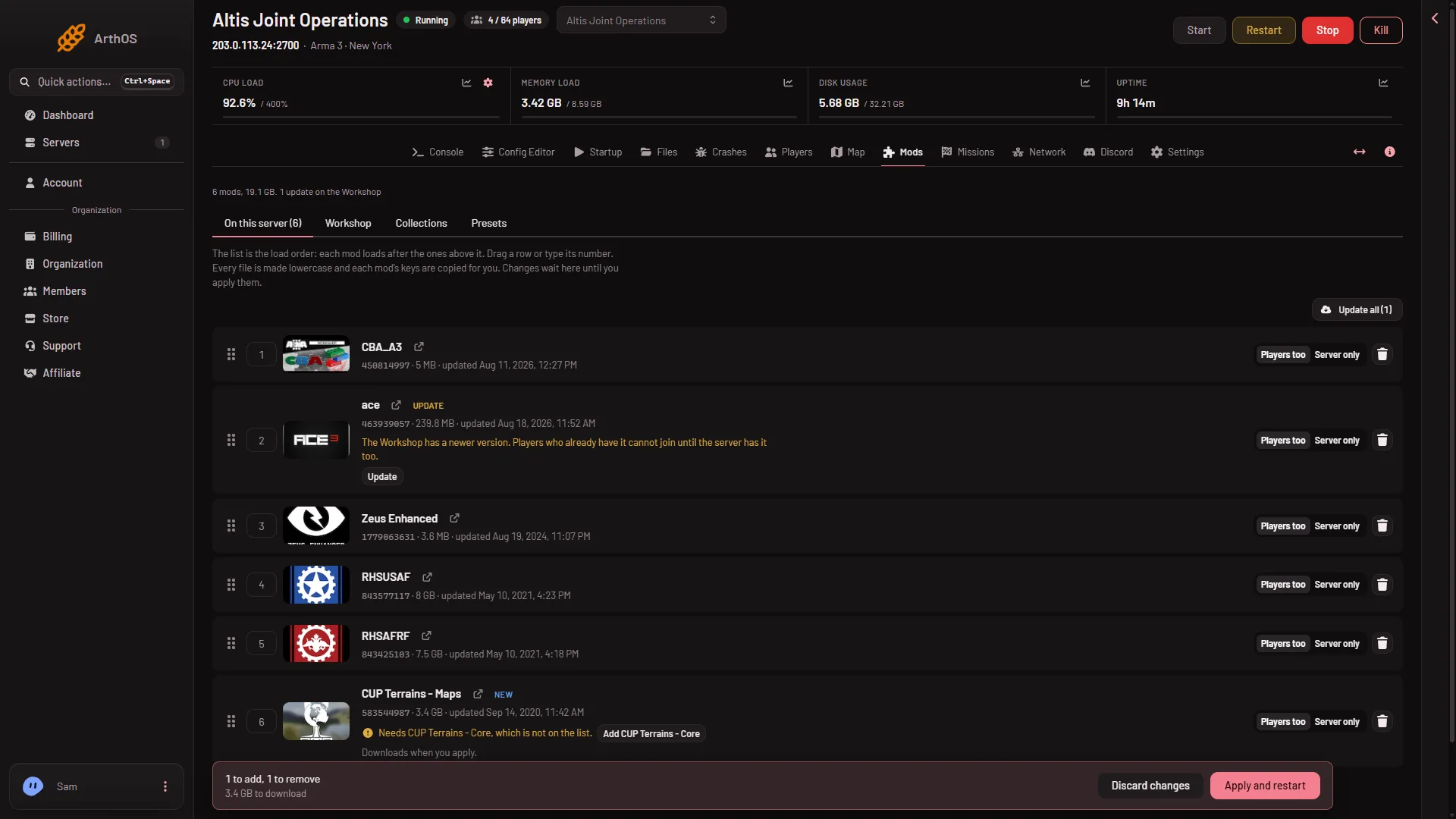
- Needs another mod
- Add it
- Check the order. The list is the load order: each mod loads after the ones above it. A mod must come after the mods it needs. If the row says “Loads before (names), which it needs”, drag it lower.
- To fix the order for every mod at once, use Sort by what each needs. The page says “Sorted: every mod now loads after the mods it needs.”
- The page now shows Changes not applied yet. Choose Apply (or Apply and restart if the server is running; that restarts the server and drops everyone who is on, so warn players first with A message to everyone on the Players page).
If you use Look up or import a preset, the page opens a box named Add these mods?. It lists what the mod needs, with “needed by (name)” on each, and the size to download. Choose Add with the count to put them all on the list. They download when you apply. Whether Add on a Workshop search result adds the mods it needs too is not checked on 2.22.154089 as of 13 November 2026; if the row shows “Needs”, use the steps above.
A mod the Workshop no longer offers
The row may say “Needs (name), which the Workshop no longer offers.” Then it cannot be added. Take the mod that needs it off the list, or find a replacement for the missing one.
Players need them too
Mods in the Players too setting are loaded by every player. Players need the same mods. A mod that is only Server only stays on the server. If you add a needed mod, give players the new list. See export a preset for your players.
If it does not work
- The warning stays after you added the mod. Reload the page. Check that the mod is on the list and that you applied.
- The server says a mission or mod needs content it does not load. The Crashes page names the addon. Add the mod that has it. See missing addons error.
- A Creator DLC is the missing piece. Turn on Creator DLC Server Files on the Startup page, and see that every player owns the DLC.
- The download failed. The mod stays on the list, waiting. See mod download failed.
More about the game: Arma 3 servers.
Sources: Bohemia wiki: Startup Parameters