
















Open the Players tab. The Online list shows everyone on your Arma 3 server right now: name, GUID, ping and more. The page reads BattlEye, the game’s anti-cheat, so BattlEye must be on. It refreshes every 10 seconds while the server runs.
Open the list
- Open your server and choose Players in the tab row.
- Look at the strip at the top. Players shows how many are on, as in 12 / 32. Mission shows the mission and its world. State shows the mission’s stage: Choosing a mission, Loading, Briefing, Playing, Debriefing or Starting. Choosing a mission is normal for a healthy server that waits for an admin.
- Find the card Online with a number beside it. That is the count.
- Side tag
- Admin tag
- BattlEye GUID
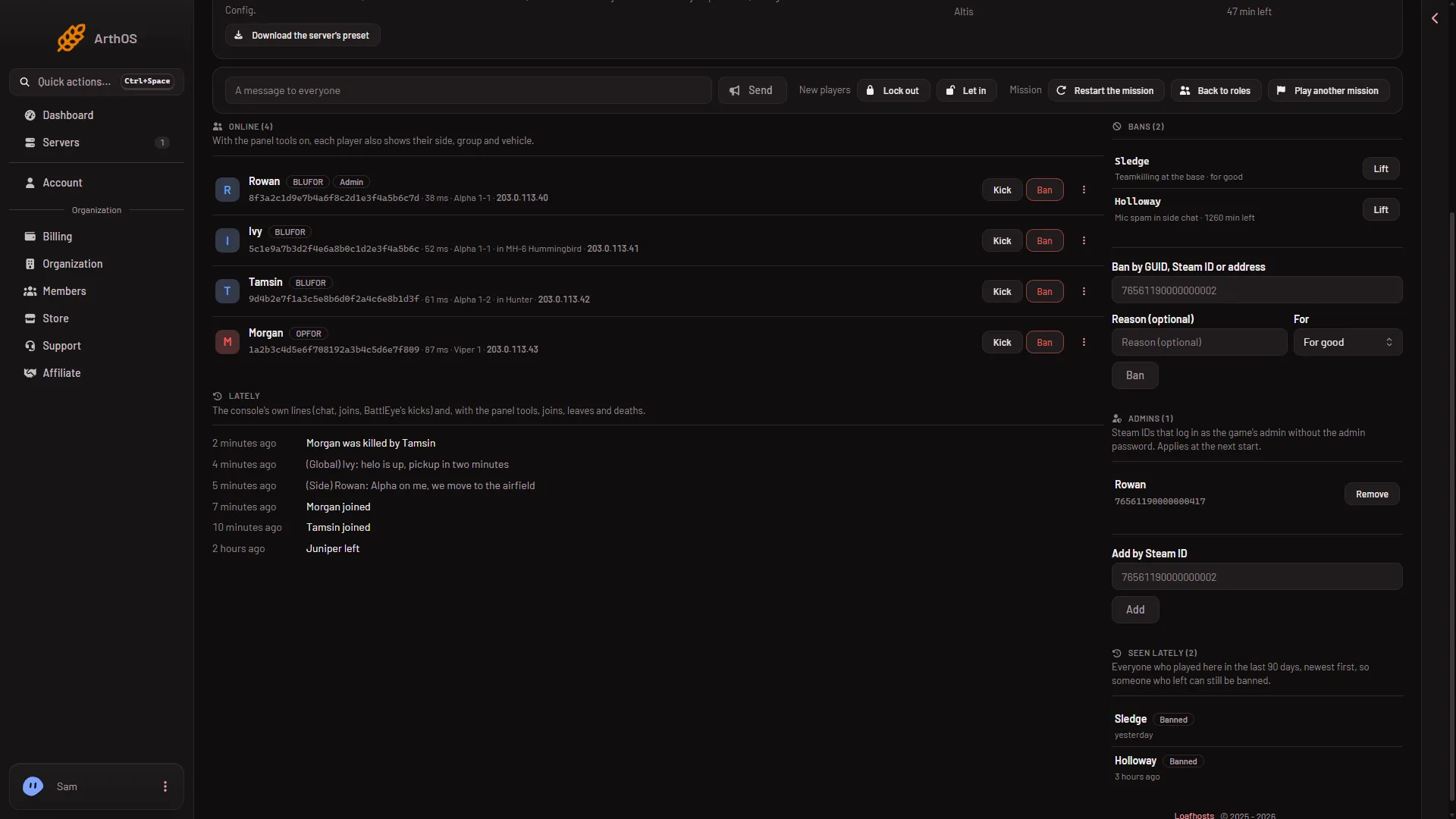
In a row, the side tag (1) and the Admin tag (2) follow the name, and the GUID (3) sits under it.
If nobody is on, the card says Nobody is online.
What a player row shows
- Name. The name the player uses in game.
- Tags. Admin shows for a player who is logged in as admin or whose Steam ID is on the Admins list. In the lobby means they are still choosing a role. Dead means their unit is dead. GUID not checked yet means BattlEye has not finished identifying them.
- GUID. A 32-character code that BattlEye gives each player. It stays the same between visits. Click it to copy it.
- Ping. Shown as a number of ms. A low number is a good connection.
- Group and in (vehicle). The player’s group, and the vehicle they sit in.
- Side. BLUFOR, OPFOR, Independent, Civilian or Other.
Group, vehicle and side come from the panel tools. They only show when the panel tools are on. Without them, the page says: “Side, group, Steam ID and where everyone is come from the panel tools.” Use the link Turn them on on the Map page. See turn on the panel tools. Players install nothing for this, and the tools load at the next start.
A player’s address is hidden unless your role allows seeing addresses.
Why the GUID, not the Steam ID
BattlEye works with GUIDs. The GUID is worked out from the player’s Steam ID, so one Steam ID always gives the same GUID. Kicks and bans on this page go by GUID.
See find a player’s GUID.
If it does not work
- The page says BattlEye is not answering yet. The server is running, but BattlEye has not started answering. Wait a minute. Players show once the server is up.
- The page says the server is starting or stopped. The list fills when the server runs. While it is stopped, bans, admins and Seen lately are still below.
- BattlEye refused the panel’s RCon password. The password was changed while the server ran, and the game keeps the old one until it restarts. Restart the server. A restart disconnects everyone who is on, so choose a quiet moment and send A message to everyone from the Players page first.
- A player has no buttons. A player who is still joining has no GUID yet, so you cannot act on them. Wait for the tag GUID not checked yet to go.
- You do not see the Players tab. Your role may not allow it. Ask the owner of the organization.
Sources: Bohemia wiki: BattlEye