
















Open Settings, then Schedules, and choose Create Schedule. Add a Daily trigger, create the schedule, then add a Send Power Signal step set to Restart. A scheduled restart drops everyone without a warning.
A restart ends the mission that is playing. The restart is a stop followed by a start: the server asks the game to save and shut down, then starts again.
Make the schedule
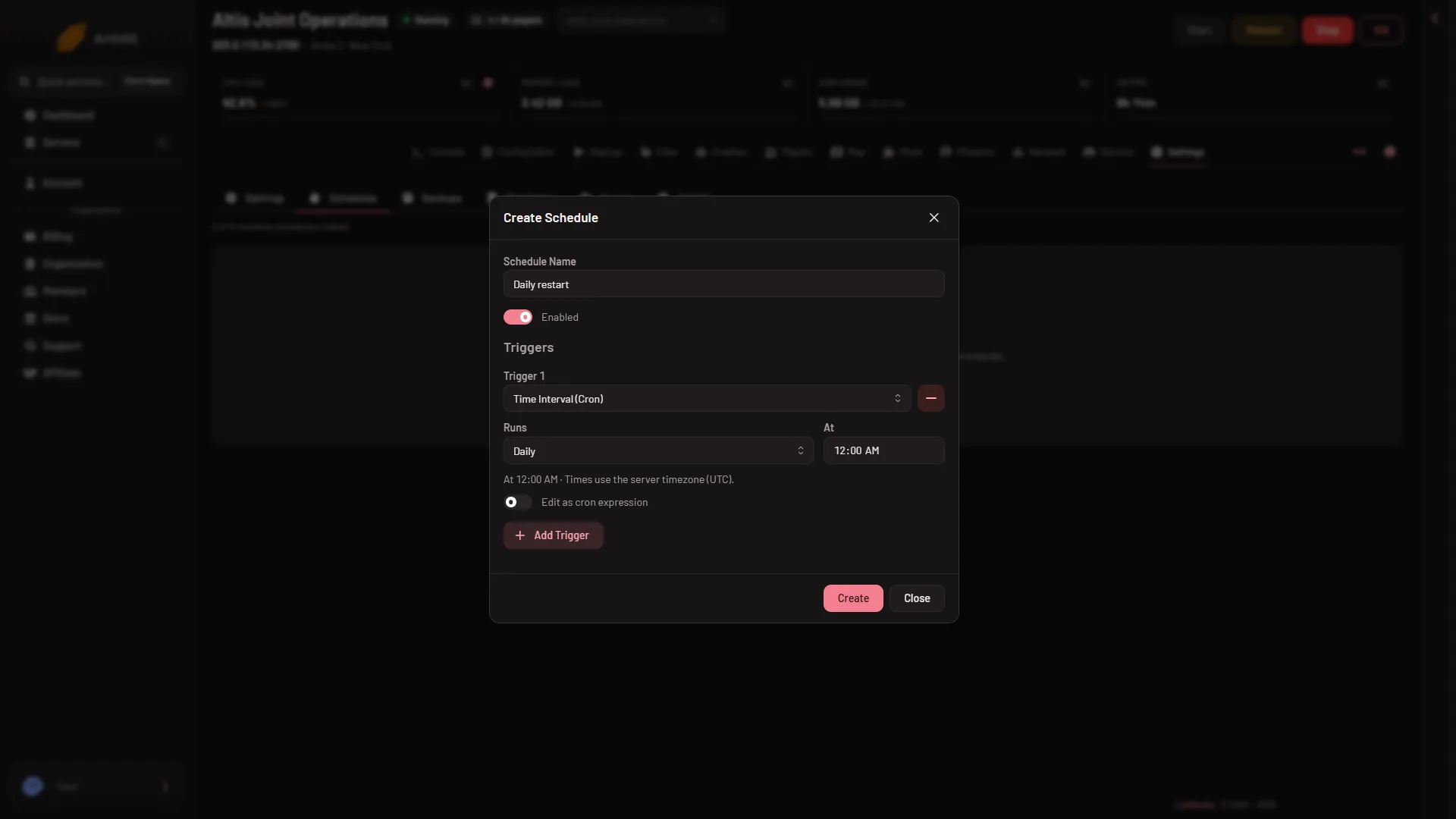
- Open the Settings page of your server, then the Schedules tab.
- Choose Create Schedule.
- Type a Schedule Name (1), for example
Daily restart. Leave Enabled on. - Under Triggers, choose Add Trigger. Pick Time Interval (Cron), check that Runs (2) reads Daily (the picture shows it already set) and set the time in At (the picture shows 12:00 AM). The dialog says “Times use the server timezone (UTC).” unless you changed Timezone on the Settings tab.
- Choose Create (3).
- Schedule Name
- Runs
- Create
The schedule now exists but has no steps, so it does nothing yet.
Add the restart step
- Open the new schedule from the list.
- Choose Add Step and pick Send Power Signal.
- Choose the Restart signal. It “stops the game and starts it again, and goes on to the next step at once.”
Two other steps help:
- Create Backup, placed before the restart, so every restart has a fresh backup. See backups.
- Sleep, to wait between steps.
The other step is Send Command, which sends a command to the server console.
Warn players
To warn them by hand, use A message to everyone on the Players page: type the text in the box and choose Send.
Which time zone
The time is the server’s own time, not yours. It follows the Timezone card on the Settings tab, and reads UTC when that card says System. If the restart runs at the wrong hour, change the Timezone card, not the schedule.
Good to know
- Players who are in the game are disconnected at the restart. A mission that does not save its own progress starts again from the beginning.
- A restart stops the server with the same stop as the Stop button. If the game has not shut down after the number of seconds on the Auto-Kill card, it is killed, and a kill does not save. Read Seconds until auto-kill on the card to see your number.
- Send Power Signal with Kill ends the game at once and saves nothing. Do not use it for a daily restart.
If it does not work
- It did not restart. The schedule has no restart step, or Enabled is off. Open the schedule and check.
- It restarted at the wrong hour. Check the Timezone card on Settings.
- You cannot add another schedule. Your plan has a limit, shown at the top of the Schedules page.
- You want it every few hours instead. Open the schedule and change Runs under Triggers to Every few hours.
More about the game: Arma 3 servers.
Sources: Bohemia wiki: Dedicated Server