
















An Arma 3 server has three different passwords. Most “wrong password” problems come from using one where another is needed. The join password lets a player into the server. The admin password gives a player admin rights once inside. The RCon password is for the panel only. BattlEye is the game’s anti-cheat.
Which password goes where
| Password | Panel name | Who types it |
|---|---|---|
| Join password | Server Password | Players, when the game asks as they join |
| Admin password | Admin Password | An admin, in game chat, as #login followed by the password |
| RCon password | RCon Password | Nobody. The panel uses it for the Players page |
If a player types the admin password at the join prompt, it is refused. If an admin types the join password after #login, it is refused too.
A server made from the store starts with a random join password that its owner never chose. If nobody gave players a password, set a new Server Password below and send it to them.
Find or change them
- Open the Config Editor.
- Choose Passwords (1) in the list of settings files.
- Read or change Server Password (2), Admin Password (3) and RCon Password (4).
- Choose Save in the “Unsaved changes” bar. The page then says “Saved. Restart the server to apply the changes.” (or, on a stopped server, that the changes apply when it starts).
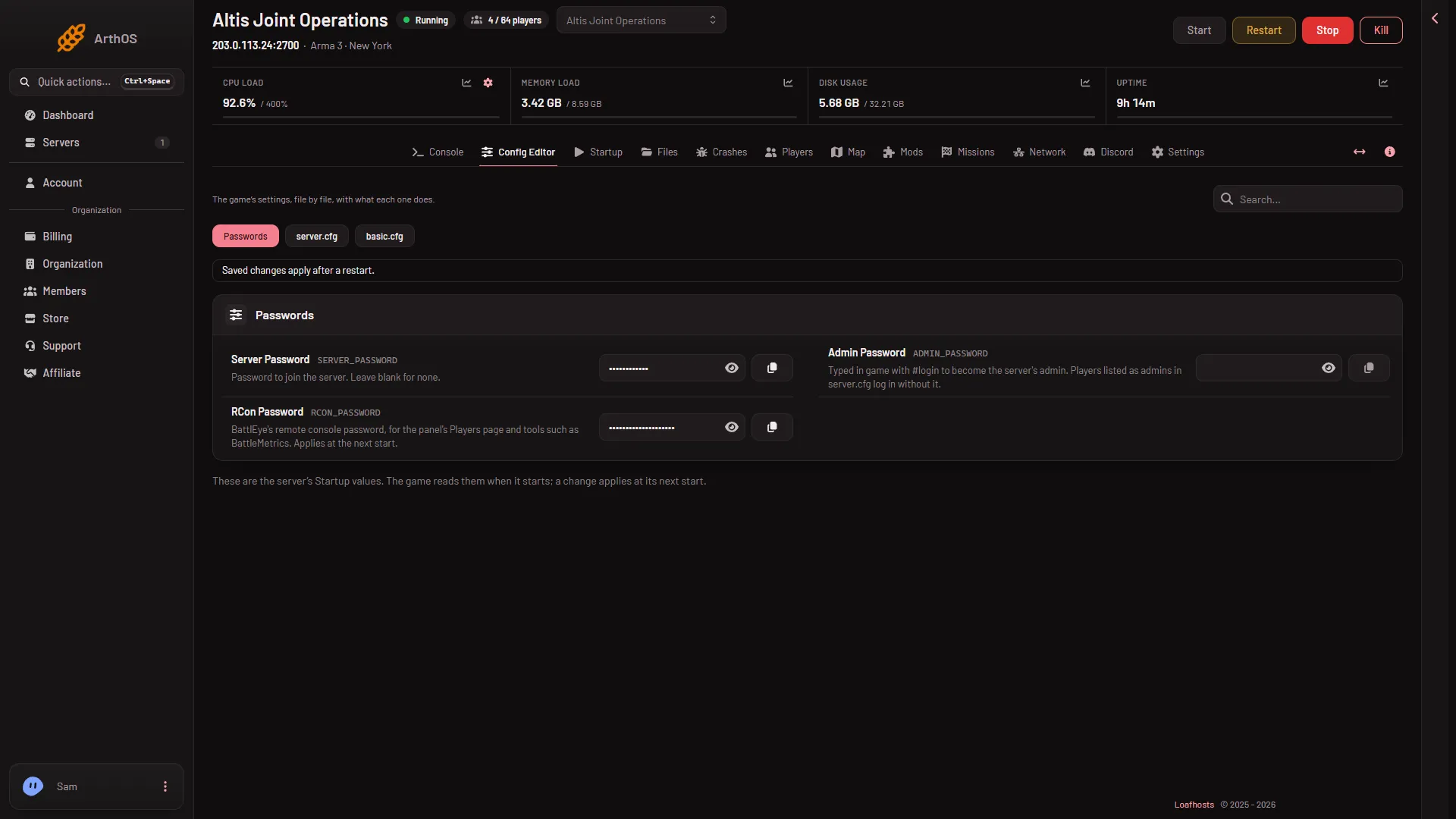
- Passwords file
- Server Password
- Admin Password
- RCon Password
The values are shown only to people whose role allows changing them. The Startup page does not hold them: it only points to Passwords.
Changes apply at the next start. A restart drops everyone who is on the server: choose a quiet moment, and warn players first with A message to everyone on the Players page. The panel writes the new passwords into the game’s files every time the server starts, so editing server.cfg by hand does not stick.
Limits: the join and admin passwords hold up to 64 characters. The RCon password holds letters and digits only, up to 40 characters. An empty Server Password means anyone can join.
On the Players page, the Joining card says “It has a join password, changed under Passwords on Config.” (the Config Editor tab) or “It has no join password.” It shows this only while the server is running and answering.
Logging in as admin
The game’s manual describes it: press / to open the chat, then type #login and the admin password. Players can also be given admin without a password: add their Steam ID under Admins on the Players page. That applies at the next restart.
If it does not work
- Players say the password is wrong but you just changed it. The change applies at the next start. Restart the server.
- You cannot tell which password players have. Set a new Server Password, save, restart, and send the new one.
#loginis refused. Use the Admin Password, not the join password. Check that the server was restarted after the last change.- The Players page says “BattlEye refused the panel’s RCon password”. The RCon password was changed after the server started, and the game keeps the old one until it restarts. Restart the server.
More about the game: Arma 3 servers.
Sources: Bohemia wiki: Dedicated Server, Bohemia wiki: Server Config File