



Your server was fine yesterday and crashes today. A mod may have updated at the last start. Open the Mods tab and choose History (1). It lists what changed in your mods, newest first.
Open it
- Open your server and choose the Mods tab.
- Choose History (1).
- Read from the top. The newest change is first.
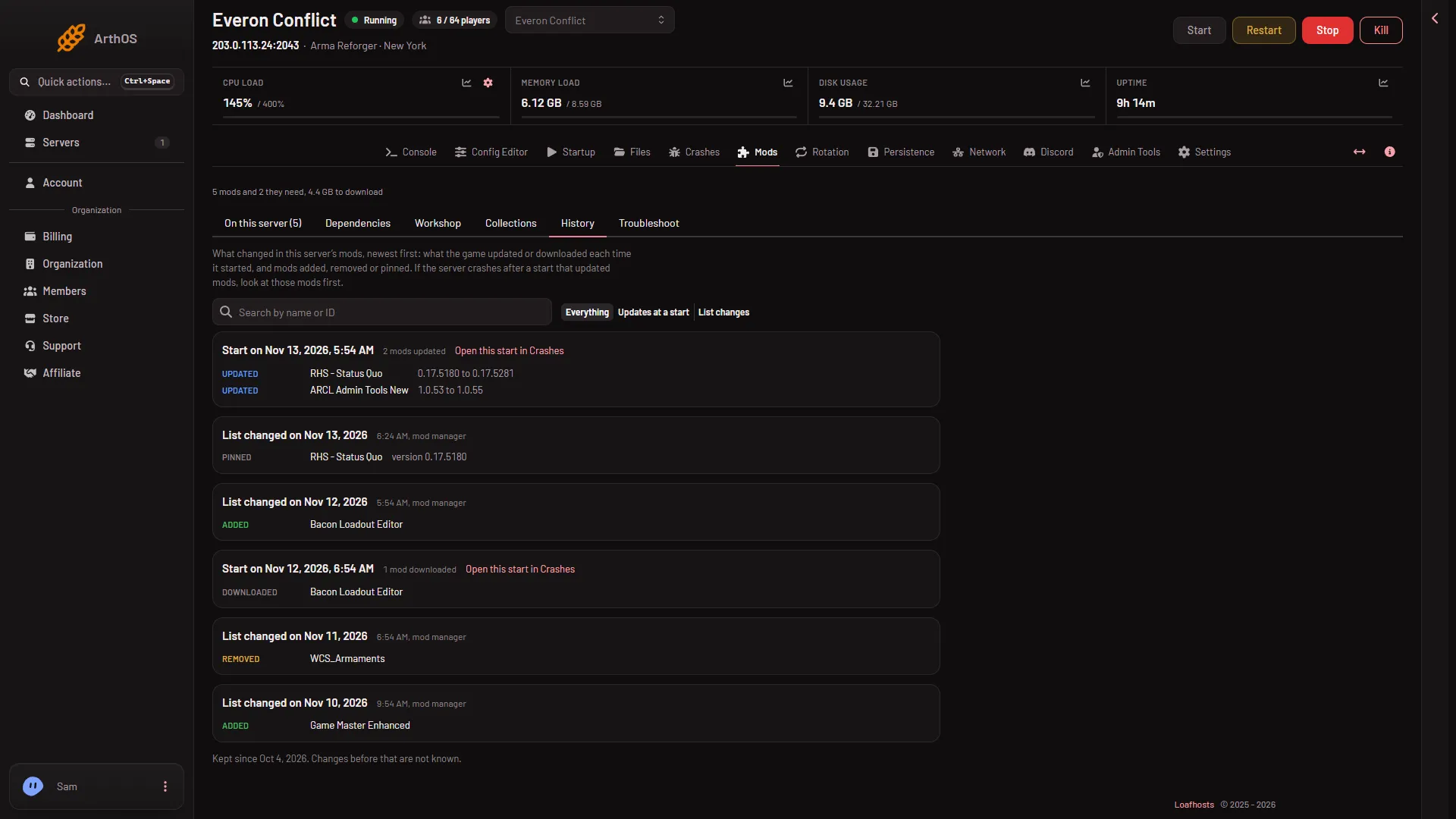
- History tab
- A start
- Open this start in Crashes
The picture shows a made-up server. Your list will have your own mods and dates.
What the cards mean
There are two kinds of card.
- Start on (date) (2). The game updated or downloaded mods when it started. The card says how many, such as “2 mods updated” or “1 mod downloaded”. Each row shows the mod and, for an update, the old and new version, such as
0.17.5180 to 0.17.5281. - List changed on (date). Mods were added, removed or locked to a version that day. Each row says where the change came from: “mod manager” (you changed it on this page), “seen in config.json” (the list changed somewhere else, such as the Config Editor, the file editor or the rotation), or just the time (the game).
The rows use these words: Added, Removed, Pinned, Unpinned, Updated and Downloaded. Pinned and Unpinned mean a mod was locked to a version, or set back to Latest. This is not Keep first or Keep last. See lock mod versions.
A start card can also carry a chip that says how that start went: Crashed, Failed to start, Froze while stopping, Ended early or Running now. Choose Open this start in Crashes (3) to read that start in the Crashes tab. See crashes.
Find the mod that broke the server
- Look for a start card with a chip such as Crashed or Failed to start.
- Read the mods it updated. Look at those mods first.
- Choose Open this start in Crashes to see what the panel found.
- To go back to the old version, lock it. See lock mod versions. A locked version shows up here as Pinned.
- If nothing looks wrong here, the Troubleshoot tab searches for the mod that stops the server.
Narrow the list
- Search the history finds a mod by name or ID.
- What to show has three choices: Everything, Updates at a start and List changes.
What to know
- The game’s changes are read from each start’s log, a few minutes after the start. Starts the game no longer keeps and the panel never read are not on the list.
- The list is kept for 180 days. The page shows at most 300 rows. At the bottom it says “Kept since (date). Changes before that are not known.” History begins on the day the panel first saw your mod list.
- Moving a mod in the load order is not a history entry.
- A disabled mod leaves the list the game reads. It may show as Removed, and as Added when you turn it on again.
- Seeing the page needs a role that may read the server’s files.
If it does not work
- “Nothing has changed in this server’s mods since the panel began keeping track.” No change has happened yet. Come back after the next update.
- “Nothing here matches” your search. Clear the search box or choose Everything.
- The tab does not show. Your role may not be allowed to read files on this server.
- A change you made in the file editor shows as “seen in config.json”. That is correct. The panel noticed the list changed.
More about the game: Arma Reforger servers. To update mods, see update mods.