
















Building decay is controlled by one switch, Disable Building Abandonment. In ConanSandbox/Saved/Config/LinuxServer/ServerSettings.ini, under [ServerSettings], its key is DisableBuildingAbandonment (the time multiplier is BuildingDecayTimeMultiplier). Funcom says: “If flagged, disables decay on buildings over time.” Funcom’s default is On, which means buildings do not decay. Turn it Off and buildings decay, and the timer rows below start to matter. This switch needs a restart.
The switch
Open the Config Editor, choose Server settings, and find the Building and decay group.
- Disable Building Abandonment On: no decay. This is the default.
- Disable Building Abandonment Off: decay is allowed.
The description ends with “Takes effect at the next start.” After you save, the panel says that this row applies at the next start. Choose Restart now, or restart the server yourself. Restarting drops everyone who is on; the Players page has Restart with a warning, which tells them first (only while the game answers the panel).
The timer rows
Funcom’s reference marks these rows as depending on the switch being Off. While Disable Building Abandonment is On, they are not meant to do anything. The panel does not grey them out, so check the switch first when a timer seems to have no effect.
Times are in seconds, as Funcom lists them. The values are Funcom’s defaults.
| Row | Default | What it does |
|---|---|---|
| Building Decay Time Multiplier | 1 | Raising it makes buildings take longer to decay. Lowering it shortens the time. |
| Building Decay Time Per Score | 5400 | Decay time grows with a building’s size. Each piece adds to a score, and the score is multiplied by this many seconds. |
| Decay Bonus Time Rate | 600 | Added to the timer, whatever the building’s size. |
| Decay Cleanup Time Multiplier | 2 | Applied to the score once a building is in the first decay state. |
| Max Building Decay Time | 1296000 | The longest decay time for a building before decay has started. That is 15 days. |
| Max Decay Time To Auto Demolish | 604800 | The longest time left once decay has started. That is 7 days. |
| Override Decay Max Building Pieces | empty | A building with this many pieces or fewer uses the next row as its maximum. |
| Override Decay Time | empty | The maximum seconds for those small buildings. |
| Decay Show Building Score | Off | Shows the building score. |
Change Building Decay Time Multiplier first. It is the simplest way to make decay slower or faster. The other rows are for fine tuning.
Thrall decay is separate. Its rows are in Thralls and pets. Its time row is labelled Days, so do not assume it uses the seconds above.
In the panel
- Open the Config Editor and choose Server settings.
- In Building and decay, set Disable Building Abandonment and any timer rows.
- Choose Save.
- Restart the server so the switch takes effect. The panel saves timer rows to the running game; whether the game re-reads each one while it runs was not checked.
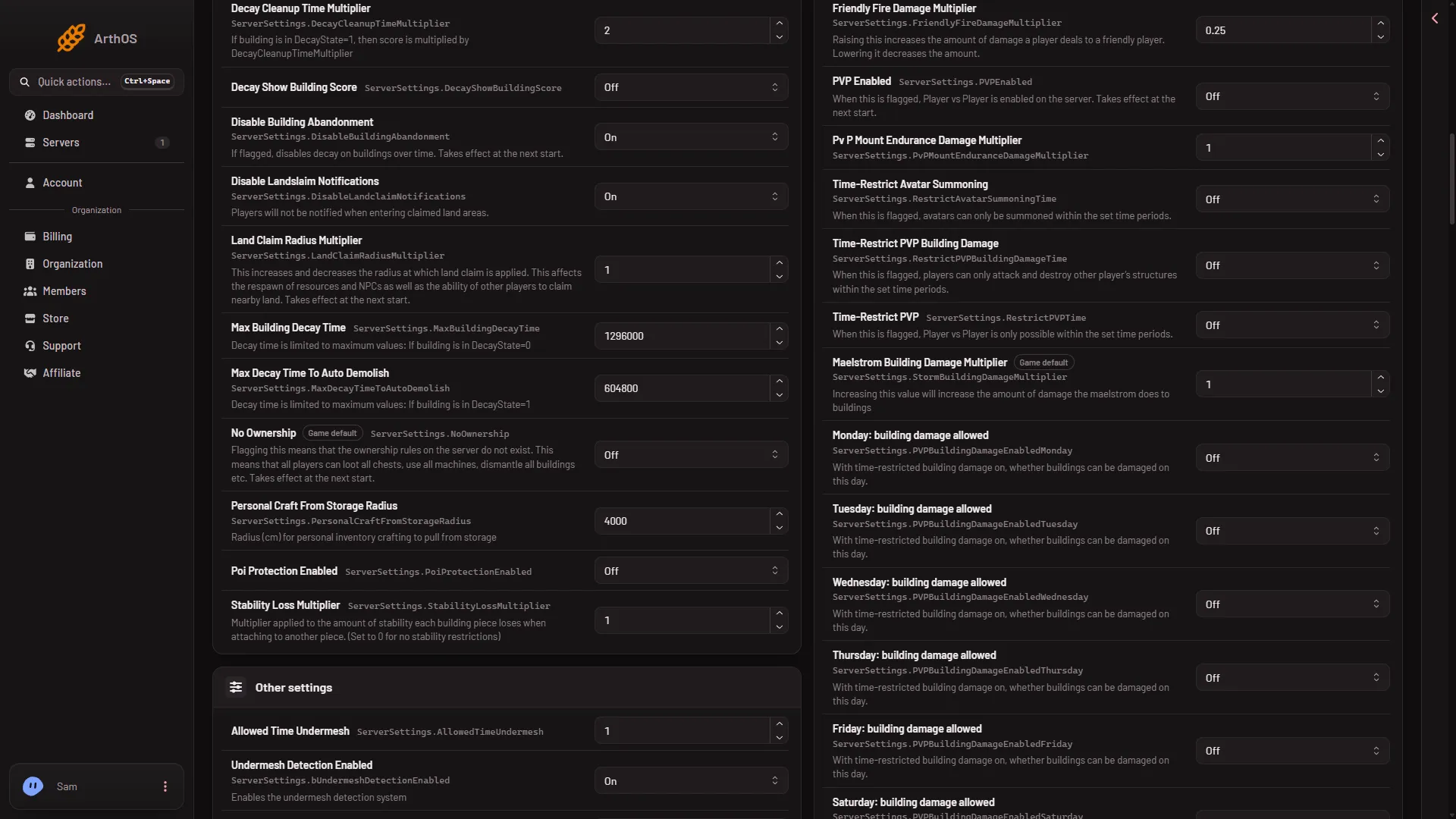
- Disable Building Abandonment
The switch is the row marked (1). The picture shows it On, the value that stops decay.
If it does not work
- Buildings still do not decay. The switch is still On, or the server has not restarted since you turned it Off.
- A timer row has no effect. Check that Disable Building Abandonment is Off.
- The panel says the server is starting or stopping. Wait until it has finished, then save.
- A row is missing. Type its name in the search box.
More about the game on Loafhosts: Conan Exiles servers.