
















Four server settings control chat in Conan Exiles: whether there is a global channel, how far local chat carries, how long a message may be, and whether voice chat exists. They sit together in the Chat group of the Config Editor. The group has a fifth row, Disable Chat Formatting, which is not covered here: its help is empty and it was not checked.
What each setting does
These are Funcom’s own descriptions, and the defaults Funcom lists.
| Row in the panel | What it does | Funcom’s default |
|---|---|---|
| Chat Has Global | “The in-game chat has a global channel all players can speak in” | On |
| Chat Local Radius | “Determines how far local chat will broadcast around a player.” | 5000 |
| Max Message Length | “Sets the max number of characters in a chat message.” | 512 |
| Server Voice Chat | “Select if the server should have an in-game voice chat or not” | Enabled |
Turn Chat Has Global off and players can only talk in local chat. Then Chat Local Radius decides who hears them: a smaller number means a smaller circle around the speaker.
Change them in the panel
- Open Config Editor and choose the file Server settings.
- Find the Chat group, or type “chat” in the search box.
- Change the row you want. Switches read On and Off. Numbers are plain numbers.
- A bar reading “Unsaved changes: (n)” appears. Choose Save on it.
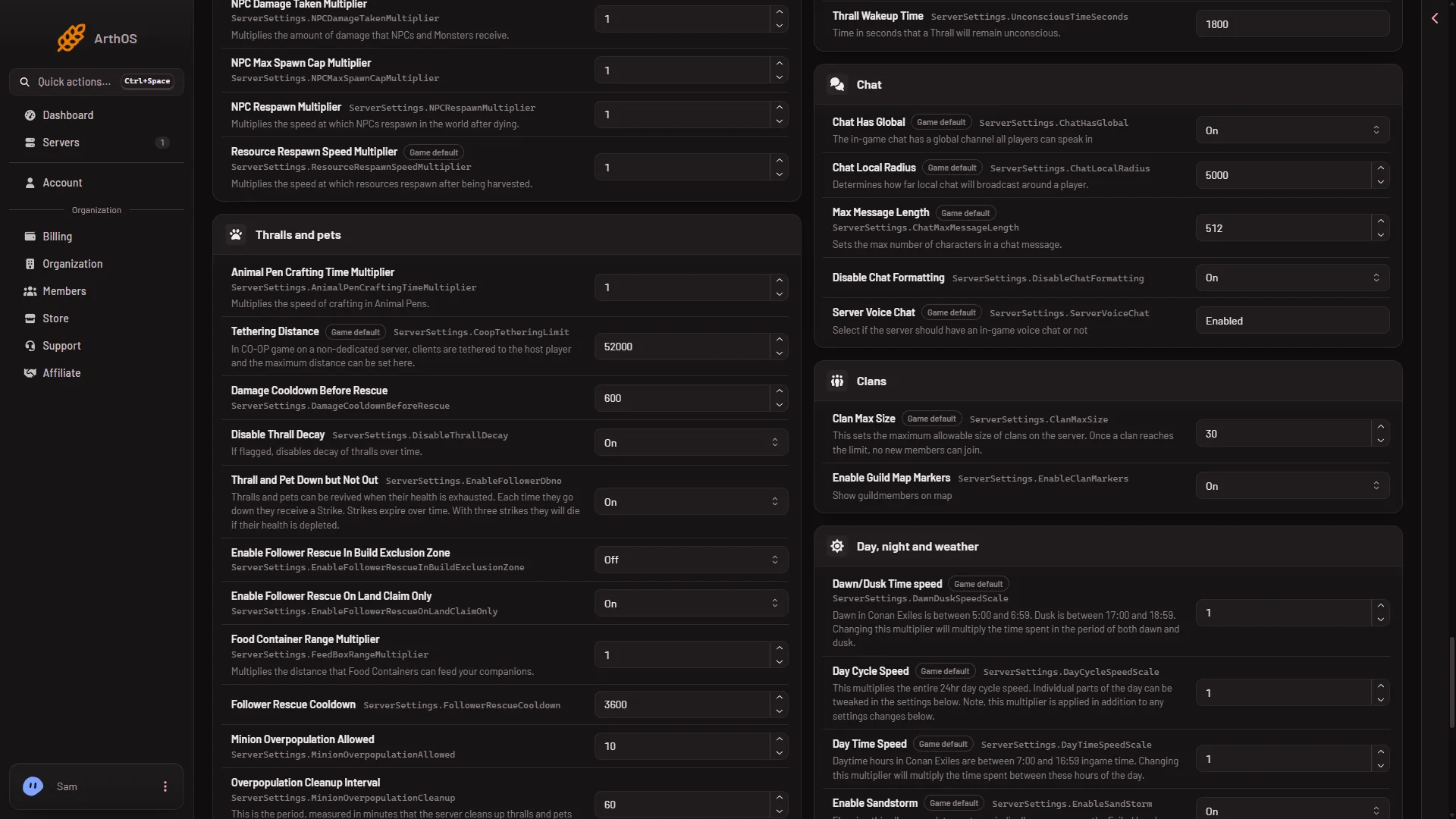
- Chat Has Global
- Chat Local Radius
- Max Message Length
Change the switch (1), the radius (2) or the length (3) in the picture, then choose Save.
While the server runs, the panel saves each change to the running game and the file is written at once. The panel then says “Saved and in use now.” Funcom marks six settings as needing a start, and none of these four is one of them. Whether the game uses each of the four live is not checked one by one. If the server is stopped, the panel says “Saved. The changes apply when the server starts.” and the game reads the file at its next start.
A row the file has no line for yet shows Funcom’s default, so you can see what the game uses today.
Voice chat
Server Voice Chat is a text row, not a switch. It shows the word Enabled, which is Funcom’s default. A test server’s ServerSettings.ini holds the line serverVoiceChat=1. Look at what your row shows before you change it, and change it only to a value the game accepts.
Not checked on Enhanced, server build 25792439 as of 13 November 2026: which values the game takes for voice chat (the word Enabled and the number 1 both appear), and what the radius number measures.
By hand
The settings are lines under [ServerSettings] in ConanSandbox/Saved/Config/LinuxServer/ServerSettings.ini. The names are the Funcom keys: ChatHasGlobal, ChatLocalRadius, ChatMaxMessageLength and ServerVoiceChat. The voice chat line in the test server’s file reads serverVoiceChat=1. Stop the server first. The game rewrites this file when it stops, over anything changed while it runs. Then save the file and start the server.
If it does not work
- The game did not take a row. The panel says so and names the row. Stop the server, save again, and start it.
- The server is not answering yet. Right after a start the game cannot take changes. Wait until the world has loaded, about half a minute, or stop the server and save. A restart drops everyone who is on, so warn them first with Restart with a warning on Players (it works only while the game answers the panel).
- The file changed since you opened it. Reload the page, then make the change again.
More about the game: Conan Exiles servers.