
















Conan Exiles has settings that decide who gets onto a busy server and who is removed for standing still. Five of them are in the Server and joining group of the Config Editor: two for AFK kicks, one for the login queue, one for the disconnection grace time, and one for family-shared accounts. While the server runs, the panel saves each change to the running game.
The rows
| Row | Funcom’s file key | On a test server |
|---|---|---|
| Kick AFK Time | KickAFKTime | 2700 |
| Kick AFK Percentage | KickAFKPercentage | 80 |
| Enable Login Queue | EnableLoginQueue | On |
| Disconnection Grace Time | DisconnectionGraceTime | 180 |
| Allow Family Shared Accounts | AllowFamilySharedAccount | On |
The last row has a description from Funcom: “When this is flagged, accounts with family sharing enabled are allowed”. Funcom’s default is on. Turn it off and accounts that play through Steam family sharing are not let in.
The other four rows have no description in Funcom’s settings list. The values in the table are the ones a test server holds. They are a starting point to read, not a recommendation.
Not checked on Enhanced, server build 25792439 as of 13 November 2026: the unit of the AFK time, what the AFK percentage is a percentage of, what the queue does, and what the grace time counts. Funcom’s list shows Disconnection Grace Time depends on the login queue.
Change them in the panel
- Open Config Editor and choose the file Server settings.
- Open the Server and joining group, or type the row name in the search box.
- Change the row. Switches read On and Off.
- A bar reading “Unsaved changes: (n)” appears. Choose Save on it.
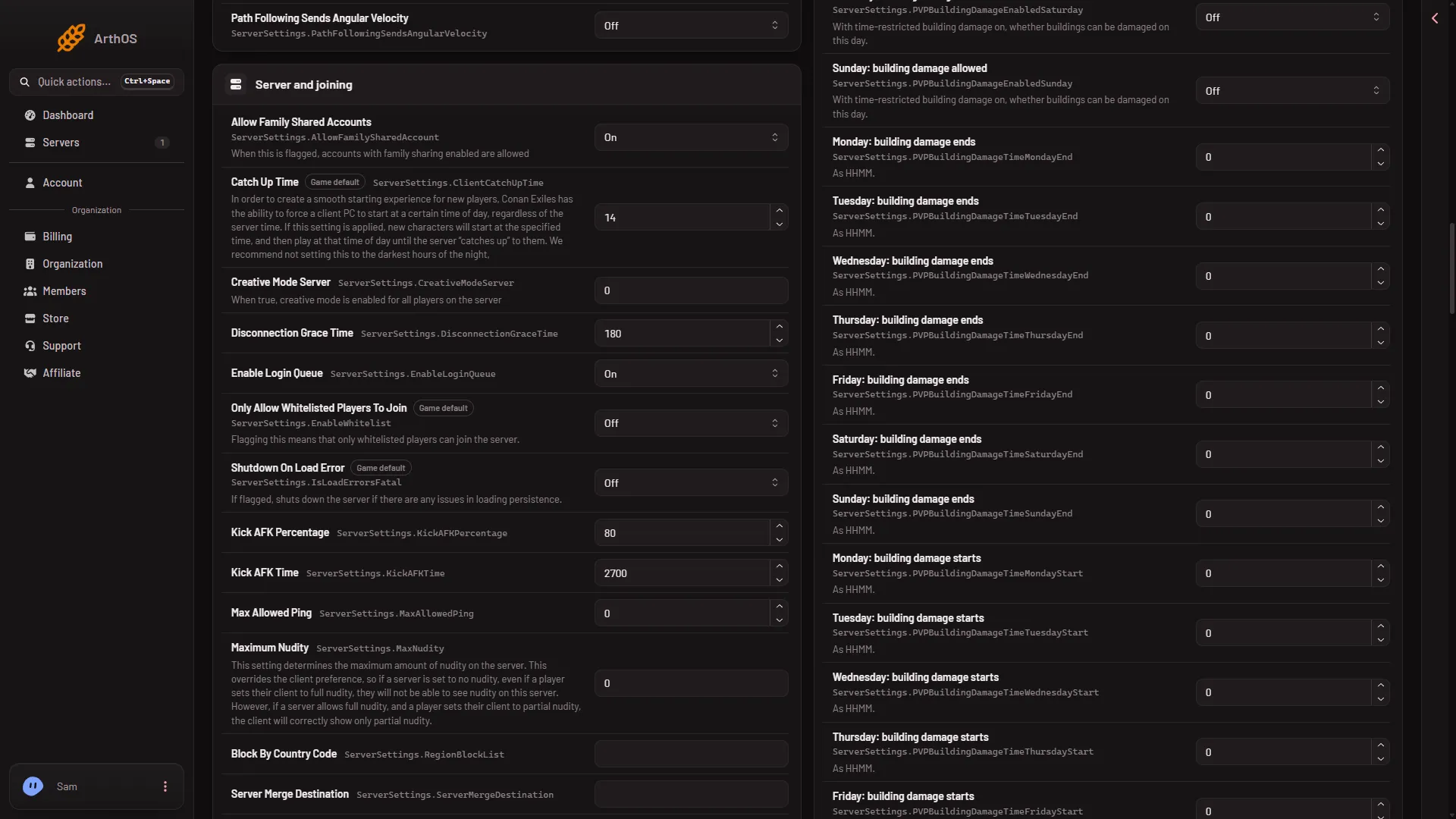
- Allow Family Shared Accounts
The family sharing row is the first one (1). The grace time, login queue and AFK rows follow it in the same group.
While the server runs, the panel saves each change to the running game and the file is written at once. The panel then says “Saved and in use now.” Funcom marks six settings as needing a start, and none of these five is one of them. Whether the game uses each of the five live is not checked one by one. If the server is stopped, the panel says “Saved. The changes apply when the server starts.” and the game reads the file at its next start.
By hand
The lines are under [ServerSettings] in ConanSandbox/Saved/Config/LinuxServer/ServerSettings.ini:
[ServerSettings]
AllowFamilySharedAccount=False
Stop the server first. The game rewrites this file when it stops, over anything changed while it runs. Save the file in Files, then start the server. The other four keys are in the table above.
If it does not work
- The game did not take a row. The panel says so and names the key. Stop the server, save again, then start it.
- The server is not answering yet. Wait until the world has loaded, about half a minute after the start, or stop the server and save. A restart drops everyone who is on, so warn them first with Restart with a warning on Players (it works only while the game answers the panel).
- The file changed since you opened it. Reload the page and make the change again.
- A player is still turned away. Check the other reasons in players cannot connect: a join password, a full server, a version or mod mismatch.
More about the game: Conan Exiles servers.