
















Four settings control how fast things are made and how long they last: Crafting Time Multiplier, Crafting Cost Multiplier, Fuel Burn Time Multiplier and Item Spoil Rate Scale. They sit in the Config Editor, in the World and NPCs group. None of them is one of the six settings Funcom marks as needing a start. While the server runs, the panel saves a change to the running game. Not checked on Enhanced, server build 25792439 as of 13 November 2026: whether the game re-reads each one live.
The keys in the file
In ConanSandbox/Saved/Config/LinuxServer/ServerSettings.ini, under [ServerSettings]:
| Row | Key |
|---|---|
| Crafting Time Multiplier | ItemConvertionMultiplier (the game spells it this way) |
| Crafting Cost Multiplier | CraftingCostMultiplier |
| Fuel Burn Time Multiplier | FuelBurnTimeMultiplier |
| Item Spoil Rate Scale | ItemSpoilRateScale |
Edit the file by hand only while the server is stopped: the game writes it again when it stops.
What each setting does
All four start at 1, which is Funcom’s default. 1 means no change.
- Crafting Time Multiplier. Funcom’s words: it “multiplies the speed at which items can be crafted”. A higher number crafts faster. A lower number crafts slower.
- Crafting Cost Multiplier. Raising it raises the materials a craft costs. Lowering it lowers the cost.
- Fuel Burn Time Multiplier. Raising it makes each unit of fuel burn for longer. Lowering it makes fuel burn out sooner.
- Item Spoil Rate Scale. Funcom says it “affects the length of time that foods will last before spoiling”. The reference does not say whether a higher number makes food last longer or spoil faster, so change it in small steps and watch real food.
Crafting at animal pens, thrall crafting and XP for crafting have their own rows in other groups. These four do not replace them.
In the panel
- Open the Config Editor for the server.
- Choose the source Server settings.
- Find the World and NPCs group. To jump to a row, type its name in the search box.
- Change the number in each row you want. A changed row is marked Changed.
- A bar reads “Unsaved changes: (n)” with Discard and Save. Choose Save.
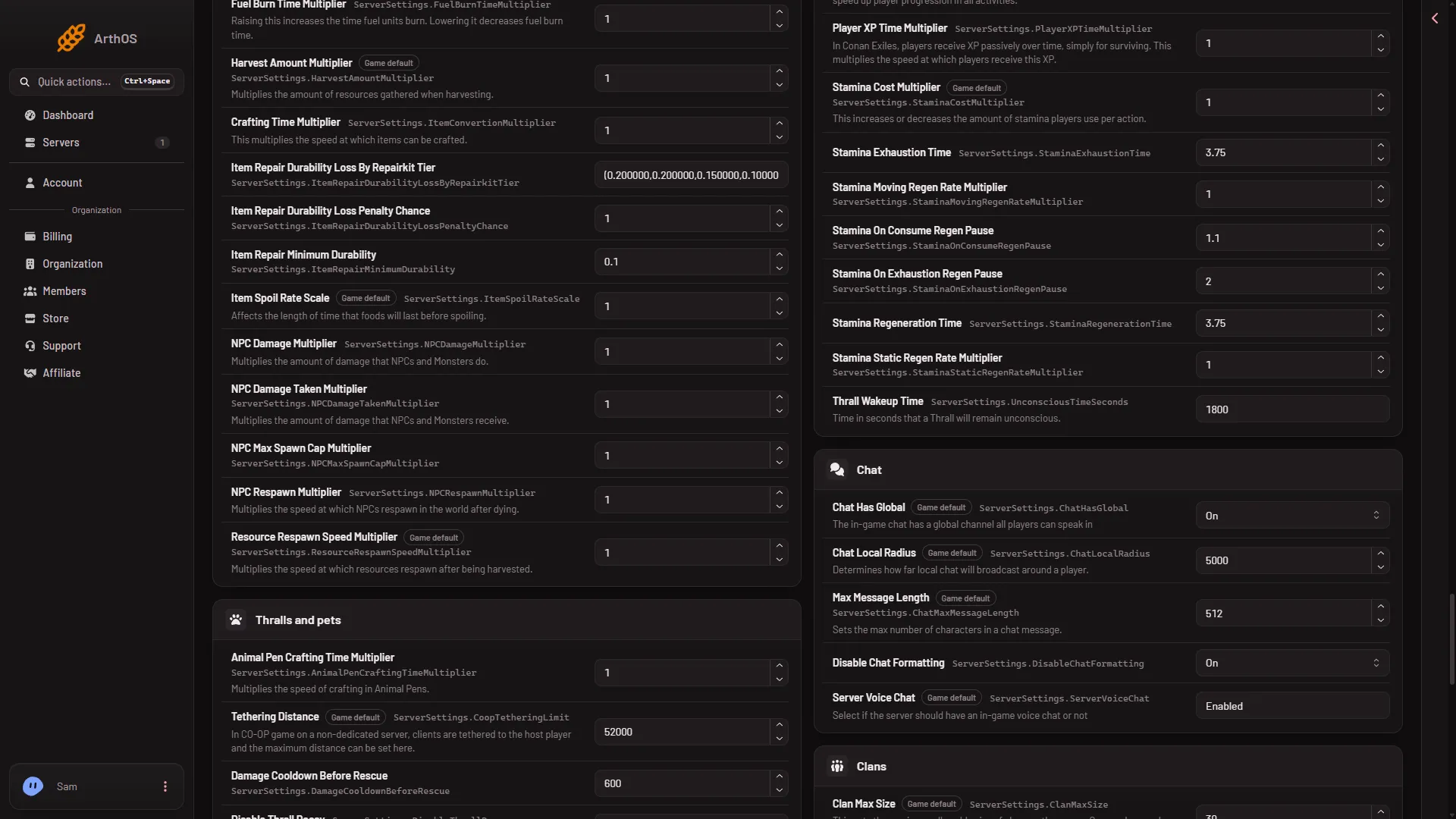
- Crafting Time Multiplier
- Fuel Burn Time Multiplier
- Item Spoil Rate Scale
The picture shows three of the four rows (1 to 3). Crafting Cost Multiplier is in the same group, so scroll or search for it.
If the server is running, the panel sends each change to the game and the page says “Saved and in use now.” or “Saved and in use now, except (names): those apply at the next start.” If the server is stopped, it says “Saved. The changes apply when the server starts.”
Use a decimal for a fraction, such as 0.5 to halve a value or 2 to double it. The panel shows decimals without extra digits. The game itself may write a value like 0.100000001. That is normal.
Example: fast crafting, normal cost
Set Crafting Time Multiplier to 2. Leave Crafting Cost Multiplier at 1. Players craft at double speed and pay the same materials. Set Fuel Burn Time Multiplier to 2 as well if forges and fires should burn twice as long on the same fuel.
Take a setting back
Set the row back to 1 and save.
If it does not work
- The panel says the server is starting or stopping. Changes can be saved once it has finished. Wait, then save again.
- The panel says the server is not answering yet. Try again once it has finished starting, or stop the server and save.
- A row is missing. Clear the search box. The rows are in World and NPCs, not in Players or Thralls and pets.
- Save says some rows apply at the next start. The panel names them. If one of these four is named, restart the server. A restart drops everyone who is on: Restart with a warning on the Players page tells them first.
More about the game on Loafhosts: Conan Exiles servers. Every change in the Config Editor is explained in Conan Exiles Config Editor.