
















If a page says “the game is refusing commands from the panel for now (too many in a short time); it takes them again within a few minutes”, the game has locked the panel out for sending too many commands. Wait a few minutes. The panel takes its commands back up by itself. You do not need to change anything.
What the limit is
Conan Exiles guards its remote console (RCON) against spam and password guessing. Every command an address sends adds 1 to a count. About 1 wears off each second. When the count passes the limit, the game refuses that address’s commands and also its new connections. The limit is 60 unless the file says otherwise. The Conan Exiles wiki describes it as “a protection against brute force attacks or spam”.
The game locks the panel’s address for minutes. In a measured case it lasted about 7 minutes while commands kept arriving.
The panel is one address for every page and every person who has the server open. So the panel spaces its own commands to stay under the limit: a burst of up to 40, then fewer than one a second. If it has no room, a page says “the panel is pacing its commands to this server so the game does not lock it out; try again in a minute”. That message is the panel being careful. It is not a fault.
What to do
- Wait a few minutes. The page works again when the game takes commands from the panel.
- Close the Players, Map and World pages while you wait. Each open page asks the game for things.
- Do not press the same action again and again. Each press is a command.
Whether a restart of the server clears the lock is not checked on Enhanced, server build 25792439 as of 13 November 2026. Waiting is the way that is known to work. A restart also disconnects players.
The RCON command limit setting
The limit is a setting you can see and change.
- Stop the server. The game rewrites this file when it stops, so the Game file can be saved only while the server is stopped.
- Open the Config Editor and choose the Game file (1).
- Find RCON command limit. It takes a number from 1 to 1000.
- Save, then start the server. The change applies at the next start.
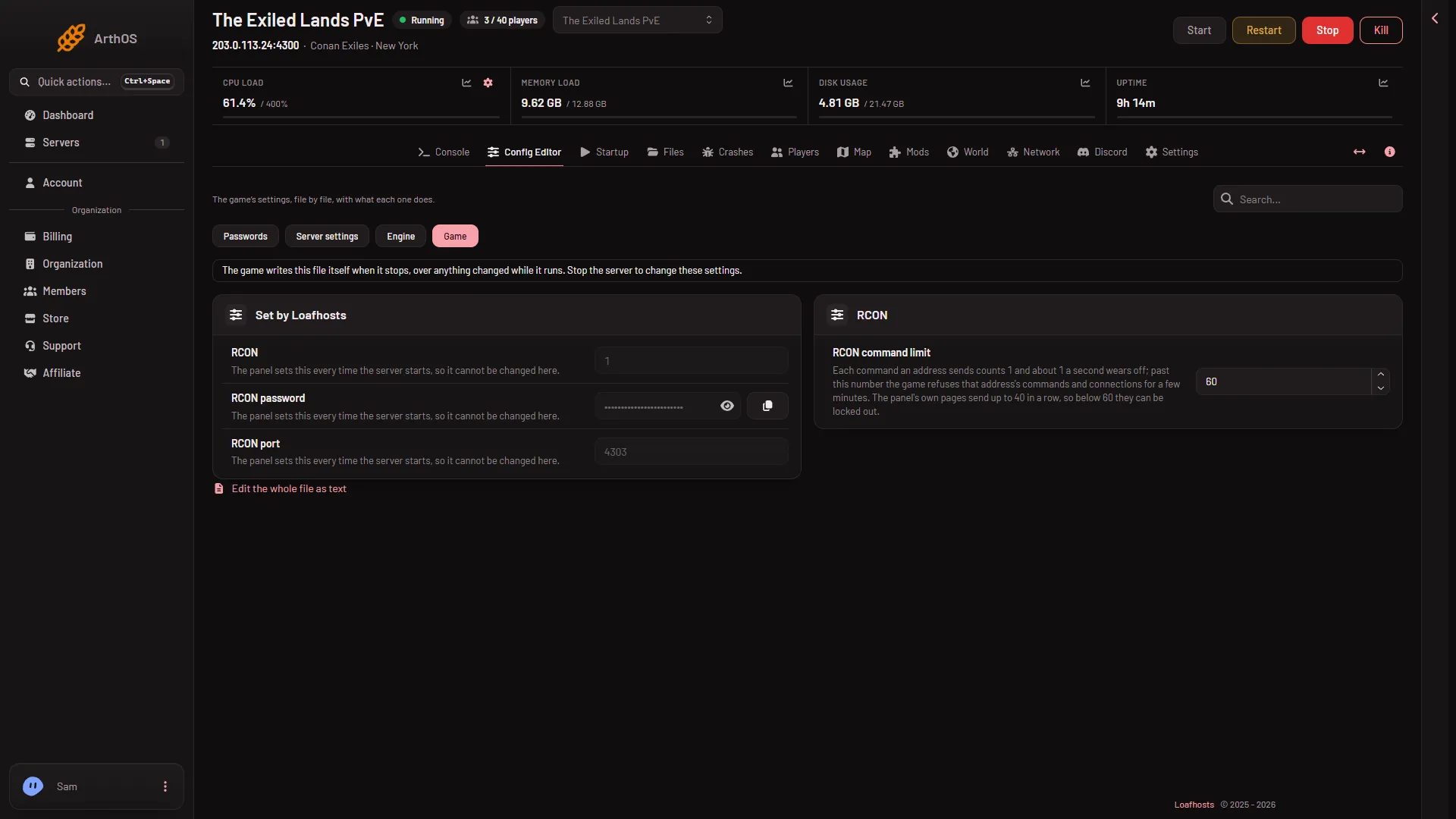
- Game file
The help text on the row reads: “Each command an address sends counts 1 and about 1 a second wears off; past this number the game refuses that address’s commands and connections for a few minutes. The panel’s own pages send up to 40 in a row, so below 60 they can be locked out.”
Leave it at 60 if you are unsure. The panel writes 60 when the row is missing. Raise it only if you see the lock often, and by a little.
If it does not work
- The message comes back every few minutes. Something keeps sending many commands. Close extra browser tabs on the server and try again.
- The page says the game refused the panel’s RCON password. That is not the limit. See remote console password refused.
- The page says the game is not answering yet. The game is still loading. See the Players page says not answering.
- Game file will not save. The server is running. Stop it first.
More about the game: Conan Exiles servers.
Sources: conanexiles.fandom.com: Rcon