
















The Mods page is where you add, remove and order the mods on your Conan Exiles server. You build a list, then apply it. Nothing changes on the server until you apply. This guide walks through the page from top to bottom.
The three tabs
- On this server shows the mods the server has now, with a count.
- Workshop finds mods on the Steam Workshop and adds them.
- Collections saves your own list of mods under a name so you can use it again. It is not where you paste a Steam Workshop collection link: that goes in Add by link or ID on the Workshop tab.
A role that can read the startup can see the page. Adding mods and applying changes needs a role that can change the startup. Without it the page says “You can see the mods here; adding them needs permission to change the startup.”
On this server
The list is the load order, top first. Drag a row, or type its number, to move it. The panel says: “Players need the same mods to join.”
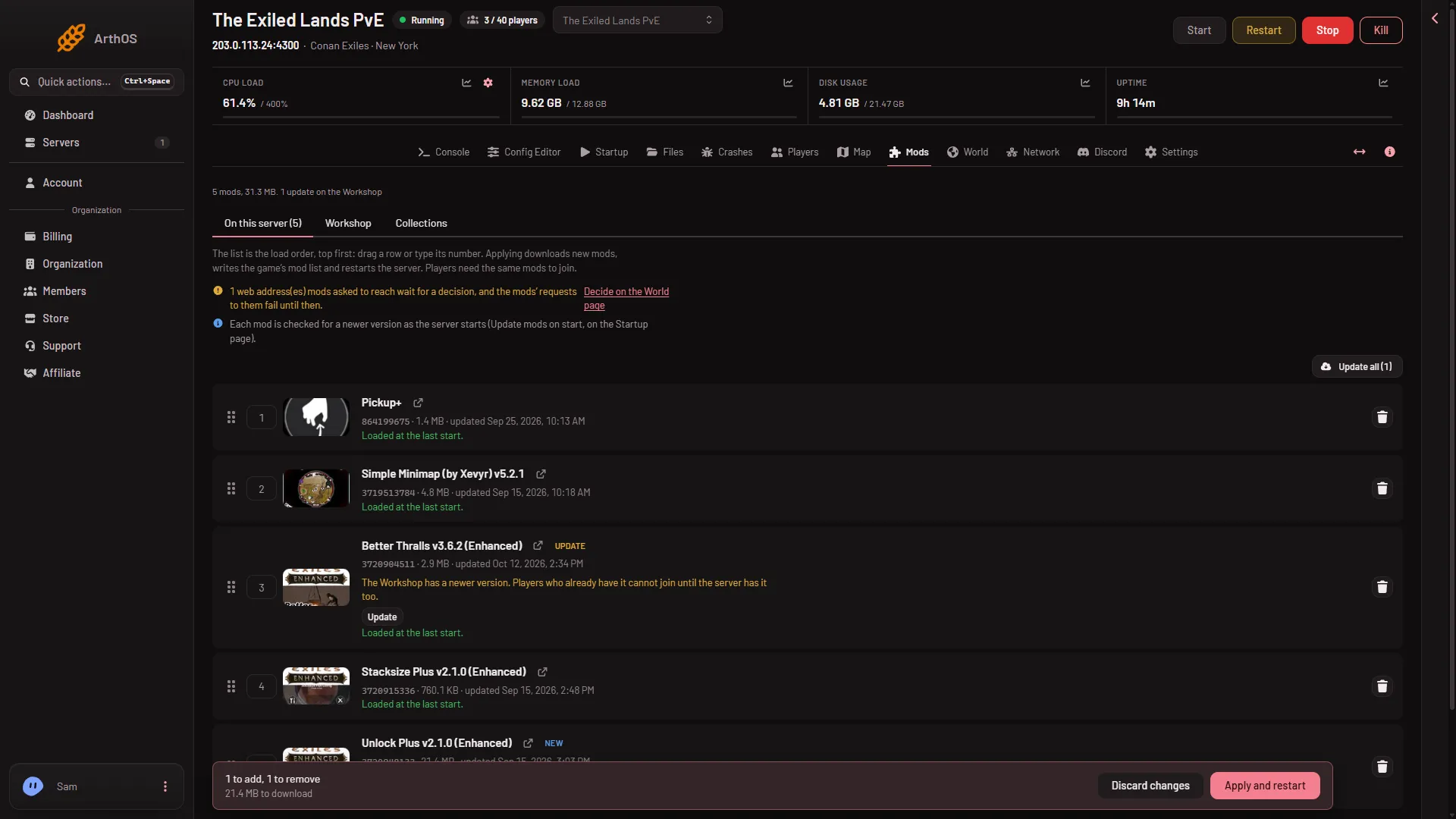
- On this server
- Workshop
- Collections
- Drag a row
- Apply and restart
The three tabs are at the top (1, 2, 3). Each row has a handle to move it (4), a link to open the mod on the Workshop and a button to take the mod off the list. The apply bar (5) sits at the bottom. A row can show a note:
- “Loaded at the last start.” The game loaded the mod.
- “Loads at the next start.” The game will load the mod when the server next starts.
- “Made for the old Conan Exiles: it never loads on Enhanced.” Take it off. See legacy mods.
- “On the list, but the game did not load it at its last start.” A link opens the log from that start, which may say why.
Chips on a row show New, Update, Not downloaded or Not on the Workshop. Update all and Update none mark every update at once.
Workshop
Paste a link or an ID into Add by link or ID and choose Look up. Or use Search the Workshop and sort by Most subscribed, Trending, Recently updated or Newest. The search lists only mods made for Enhanced. Choose Add on a mod. A link to a Steam Workshop collection adds every mod in it. That is not the same as the panel’s own Collections tab below, which holds lists you save yourself.
A mod made for the old Conan Exiles is refused. A server can load at most 150 mods.
Collections
The page offers “Keep this list of (mods) as a collection”: give it a Name and choose Save collection. Add to my list adds a collection’s mods to your draft, and Replace my list swaps your list for it. A public collection can be used by anyone with a Conan server, but only its own organization can change or delete it. Using one fills the draft only. The server does not change until you apply.
Apply
Any change shows a bar at the bottom. It counts what you will add and remove, such as “1 to add, 1 to remove”, and the size to download. The buttons are Discard changes and Apply on a stopped server, or Apply and restart on a running one.
The box Apply the mod changes? warns you. On a running server, it stops now, downloads and starts again, and players online are disconnected. If a download fails, the copy the server had stays. On an offline server it downloads and stays offline. The panel checks disk space first and tells you if a download will not fit.
Apply writes the game’s mod list in ConanSandbox/Mods/modlist.txt, and the list players’ games download from, ServerModList. Mod files keep the name Steam gave them. Do not rename them: Funcom says a renamed mod file fails to load.
Updates and web addresses
The line under the list says whether mods update as the server starts. That is the Update mods on start variable on the Startup page, and it is on by default. A server with an older mod turns away players who have a newer one.
A mod that wants to reach the internet needs each address approved. A dedicated server has no menu to ask, so mods cannot make web requests until you decide. The Mods page tells you how many are waiting and links to World, where you choose Allow or Refuse.
If it does not work
- You cannot apply. The bar says “Applying needs permission to change the startup and to restart the server.” Ask the owner for a role that allows it. If the list has no change, the panel says there is nothing to apply.
- A mod will not add. It may be for the old game, for another game, or over the limit of 150.
- A mod is on the list but not loaded. Open the log link on its row.