
















You can join a Conan Exiles server without the server list. Use Direct Connect in the game and type the server’s address. The list is only a convenience. If your server is missing from it, check three things in order: the server is ready, the name is the one you search for, and the Steam query port is set.
Join now with Direct Connect
- Open the Players page in the panel.
- In the Joining card, choose Copy (1) next to the address.
- In Conan Exiles, choose Direct Connect, paste the address and join.
- If the server has a join password, the game asks for it. The password is under Passwords in the Config Editor.
The card says it the same way: “In the game’s server list, use Direct Connect with this address, or search for (name).” Players need Conan Exiles Enhanced. This server runs Enhanced only.
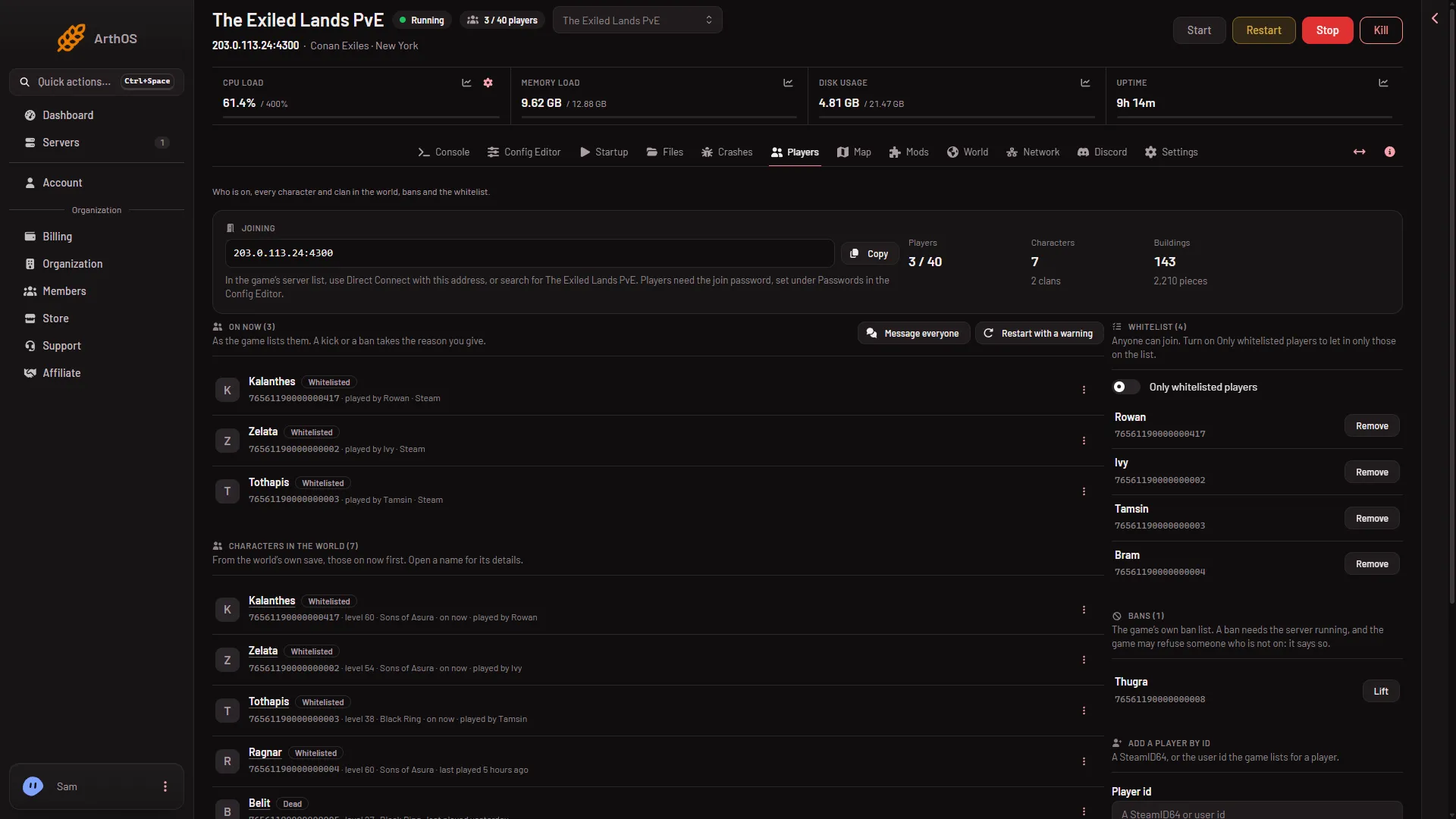
- Copy the address
- Direct Connect line
Check the server is ready
The list shows a server only when the game answers the list’s questions. That happens after the world has loaded.
- Open the Console.
- Look for the line
Started SourceServerQueries.
It appears 16 to 25 seconds after the game’s files load. The first start of a new server takes longer. Until then, the server is not in the list, and that is normal.
Check the name
Search the list for the exact name from the Server name field on the Startup page. A new server is named “Hosted By Loafhosts.com”. Other new servers carry the same name, so give yours its own name.
- Open the Startup page.
- Change Server name. It can be up to 60 characters.
- Choose Save.
- Restart the server.
The panel writes the name into the game’s settings every time the server starts. A change on the page reaches the game at the next start.
Check the Steam query port
Direct Connect uses the game port. The server list uses a different one, the Steam query port. So Direct Connect working says nothing about the query port.
- Open the Startup page.
- Find Steam query port. Its help says: “The UDP port the Steam server list asks. Set by the panel.”
It is a UDP port, not TCP. The panel sets it when it starts the server, so there is nothing for you to open or forward. If the name does not show in the list but Direct Connect works, the list is the problem and not your server. See server ports for the other ports.
If it does not work
- Direct Connect also fails. The server is not running, or it is still loading. Look at the Console for
Started SourceServerQueries. If the server will not start, see the Crashes page. - The game says the versions differ. Players need the same build as the server. See version mismatch.
- A friend sees it and you do not. Both of you need Conan Exiles Enhanced. Search for the exact name, then use Direct Connect.
- The name looks old. Restart the server after you change Server name. Not checked on Enhanced, server build 25792439 as of 13 November 2026: how soon the list shows a new name.
More about the game: Conan Exiles servers.
Sources: conanexiles.com: Dedicated servers