
















Thrall and pet rules are in the Config Editor, under Server settings, in the group Thralls and pets. You can cap how many a clan owns, decide whether thralls decay, change how hard they hit, and turn off Down but Not Out. None of these is one of the six settings Funcom marks as needing a restart. While the server runs, the panel sends the change to the game and the file is written at once; whether the game re-reads each one live is not confirmed one by one. In ConanSandbox/Saved/Config/LinuxServer/ServerSettings.ini, under [ServerSettings], the keys are UseMinionPopulationLimit, MinionPopulationBaseValue, MinionPopulationPerPlayer, DisableThrallDecay, ThrallDecayTime and EnableFollowerDbno (the key for Down but Not Out).
Find the settings
- Open Config Editor and choose the source Server settings.
- Open the group Thralls and pets, or search for
Thrall. - Change the values.
- Choose Save. The panel says “Saved and in use now.”
- Population base value
- Thrall decay time
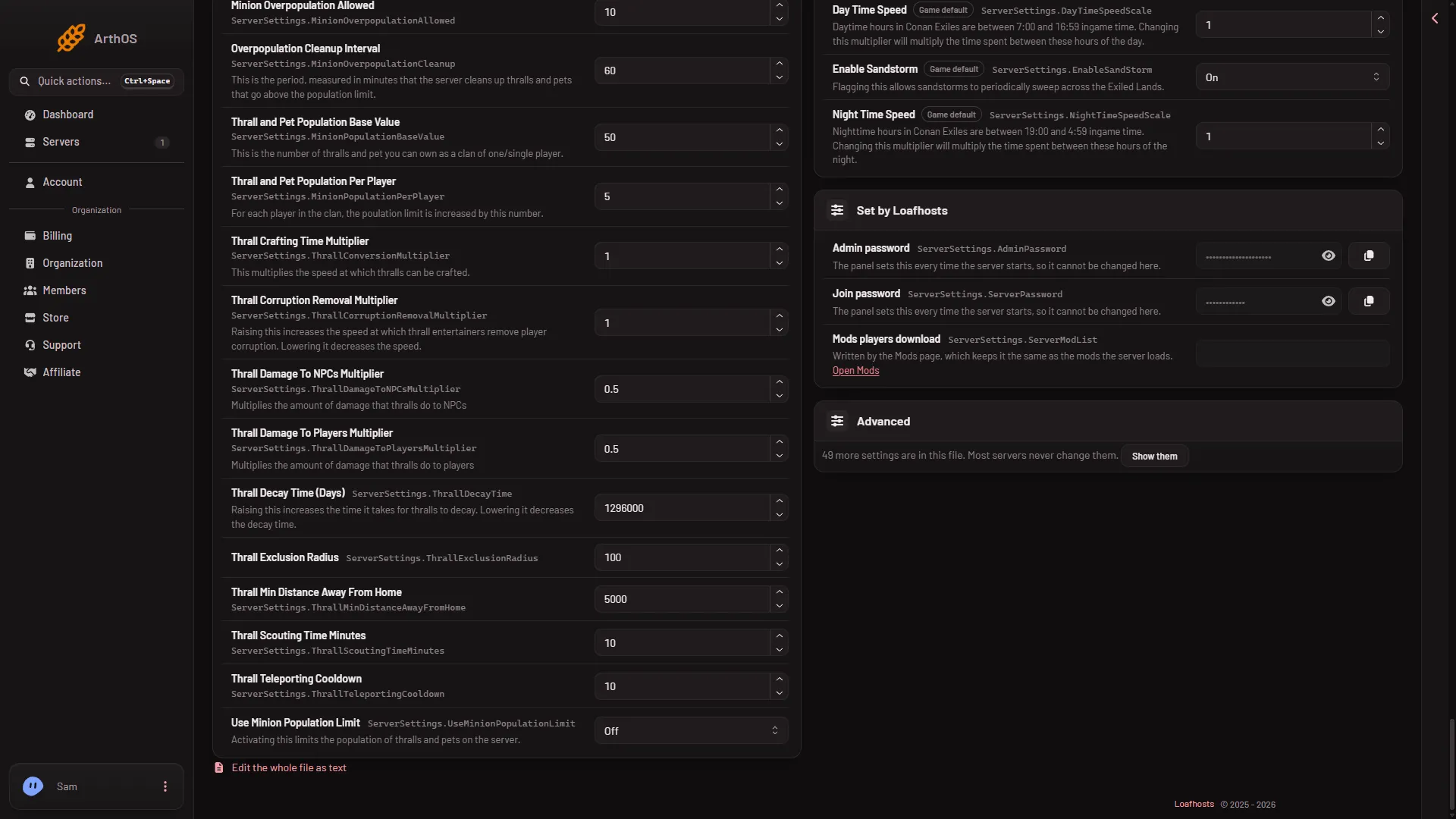
The population rows (1) and the decay time (2) are in this group. The picture shows Use Minion Population Limit at the bottom of the group, Off.
Limit how many thralls and pets there are
The panel calls the switch Use Minion Population Limit. The game’s default is Off. The game says that turning it on “limits the population of thralls and pets on the server.” Three more settings set the size of the limit. They matter only when the switch is On.
- Thrall and Pet Population Base Value: the number a clan of one player can own. The game’s default is
50. - Thrall and Pet Population Per Player: added to the limit for each player in the clan. The game’s default is
5. - Overpopulation Cleanup Interval: how often the server removes thralls and pets above the limit, in minutes. The game’s default is
60.
The panel’s help says the base value is the number you can own as a clan of one, and that for each player in the clan the limit is increased by the per-player number. How these combine for a larger clan was not checked, so no worked sum is given.
Right under these rows sits Minion Overpopulation Allowed (10 in the picture). The panel gives it no help text, so what it does was not checked.
Thrall decay
The switch Disable Thrall Decay is On in the game by default, so thralls do not decay. The game says that when it is On it “disables decay of thralls over time.”
To make thralls decay, turn Disable Thrall Decay Off. Then set Thrall Decay Time (Days). The row says Days, but it shows 1296000 in the picture; Funcom’s help gives no unit and the unit was not checked. The game says raising it increases the time it takes for thralls to decay, and lowering it decreases the decay time. This setting has an effect only while Disable Thrall Decay is Off.
How hard thralls hit
- Thrall Damage To Players Multiplier: multiplies the damage thralls do to players. The game’s default is
0.5. - Thrall Damage To NPCs Multiplier: multiplies the damage thralls do to NPCs. The game’s default is
0.5.
At 1 thralls deal full damage. At 0 they deal none. Raising the player number makes thralls more dangerous in PvP. The panel saves these two to the running game.
Thrall and Pet Down but Not Out
The game’s text: “Thralls and pets can be revived when their health is exhausted. Each time they go down they receive a Strike. Strikes expire over time. With three strikes they will die if their health is depleted.”
The switch is Thrall and Pet Down but Not Out. It is On by default. Turn it Off if you want thralls and pets to die when their health runs out, with no revive.
If it does not work
- A setting shows no effect. Thrall Decay Time (Days) needs Disable Thrall Decay Off. The population numbers need Use Minion Population Limit On.
- Save is refused with “the server is not answering yet”. The game has not finished starting. Wait, then save again, or stop the server and save.
- You want to put a value back. Type the game’s default number from this guide into the row, then choose Save.
More about the game: Conan Exiles servers.