
















Open the Mods page, choose the Add a mod tab, search for the mod and press Install. The panel downloads the mod and every mod it needs from the factorio.com mod portal. The server stops, takes them, and starts again if it was running. The server needs its own factorio.com account for the download.
Before you start
- The server needs a factorio.com username on Startup and a token under Passwords. See the mod portal account. The page reminds you: “Downloads from the mod portal need a factorio.com account: the username on Startup and its token under Passwords in the Config Editor.”
- The account must own Factorio, and the token is on your profile at factorio.com. It is not your password.
- Installing restarts the server. It drops everyone who is on. Pick a quiet time and warn them first with Message everyone on the Players page.
- Players need the same mods as the server to join.
Install a mod
- Open the Mods page.
- Choose Add a mod.
- Under What to find, choose Mods, or Modpacks for a pack. A modpack is a mod that brings a set of others: installing it installs them all.
- In Search the mod portal, type a name, an author or what it does.
- If you like, set Category and Order. The orders are Most downloaded, Recently updated, Trending and Name.
- Choose Search. The page shows 24 results at a time. Use Next and Previous to move between pages.
- Choose Install on the mod you want.
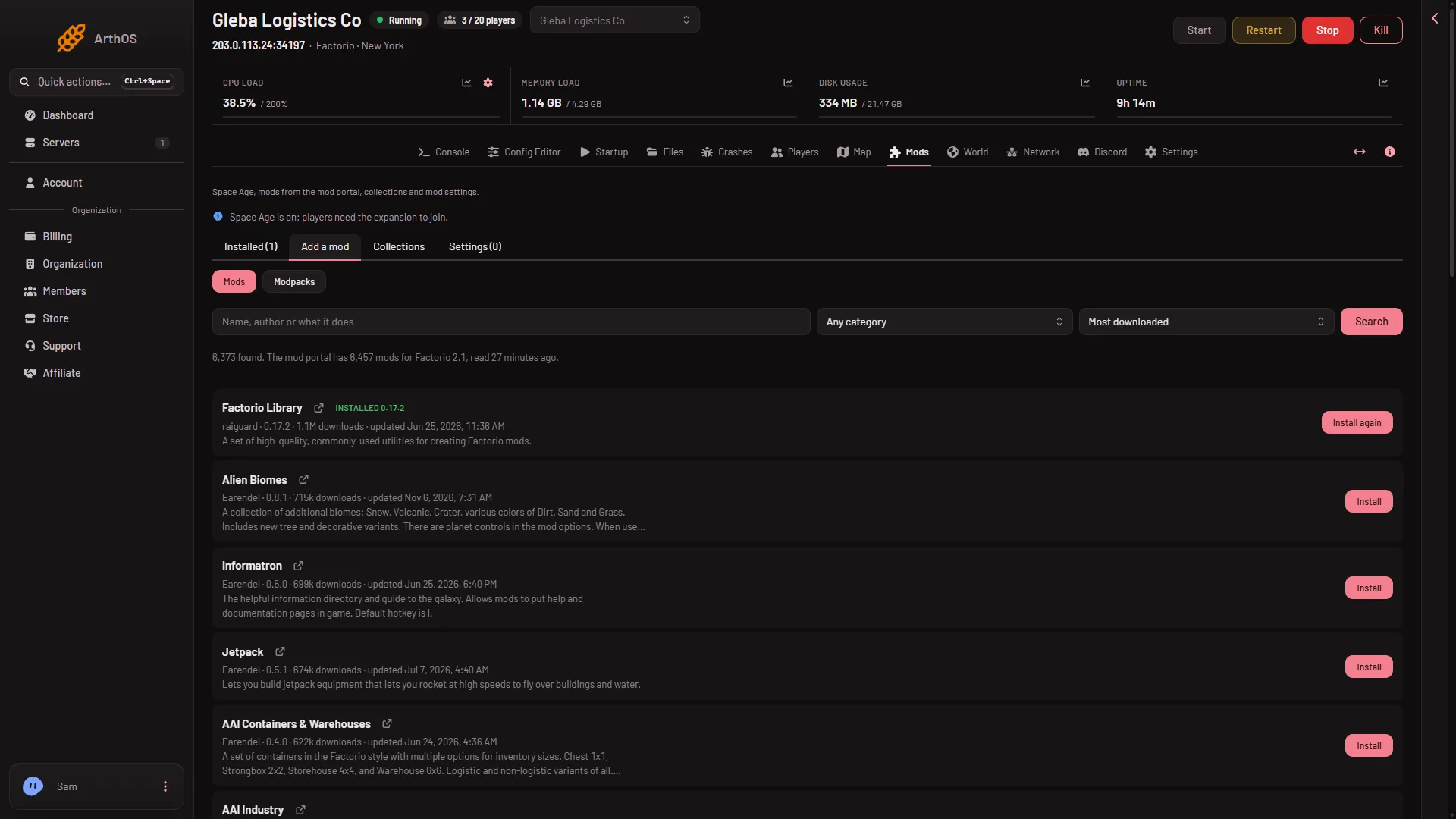
- Install a mod
The first search takes a few seconds: “Reading the mod portal. It takes a few seconds the first time.” The page lists only mods made for the server’s game version. It says how many there are: “The mod portal has (count) mods for Factorio (version).”
Read the window that opens
A window titled Install (mod name)? shows what will happen.
- “Downloads (count) mods:” lists the mod and every mod it needs. Mods another mod needs are marked “needed by another”.
- “Turns on: (names).” lists mods the install turns on.
- “Turns off: (names).” lists mods the install turns off.
- “The mod portal has no release of these for this game version, so they are left out: (names).” Those are skipped.
The box ends: “The server stops, the mods are checked and put in place, and it starts again if it was running.” Choose Install. The panel says: “Installing. The server stops, takes the mods and starts again.”
Each download is checked before it is put in place. One install can bring up to 200 mods at once.
After the install
Go back to Installed. The new mods show Not started yet until the server has started. After the start they show Loaded. A mod another mod needed is listed under “Installed because another mod needs them”.
Updates later
A mod with a newer release shows it in Installed. Use Update to (version) in the row menu More for (mod name), or Update all. Updating downloads from the mod portal too, so it needs the same factorio.com account.
If it does not work
- “Downloads from the mod portal need a factorio.com account”. Set the username and token. See the mod portal account.
- “(mod) has no release for Factorio (version) yet”. Only releases made for the server’s version, such as 2.1, are used. See mods for the wrong version.
- “(mod) cannot run together with (other); turn that one off first”. Turn the other mod off in Installed, then install.
- “(mod) needs Wube’s (name) turned on”. Turn it on in Wube’s own. See Space Age on a server.
- “The mod portal’s list is still loading; try again in a minute”. Wait and try again.
- “Nothing to change: every mod is already as asked”. The mod and what it needs are already on the server.
More about mods: the Mods page. More about the game: Factorio servers.
Sources: wiki.factorio.com: Multiplayer, wiki.factorio.com: Mod portal API, mods.factorio.com