
















On the Players page, open the menu on a player’s row. Choose Make admin to promote them, or Take admin away to demote them. A box asks you to confirm. The change applies at once on a running server.
What an admin can do
The box says it plainly: an admin “can use admin commands in the game, kick and ban players, and pause the game”. An admin can also always join, even when only whitelisted players can.
Give admin only to people you trust. An admin can ban players, and can remove other admins with /demote.
Make a player an admin
- Open the Players page.
- Find the player under Online or Everyone who has played.
- Open the menu on their row, More for (name), and choose Make admin.
- The box asks “Make (name) an admin?”. Choose Make admin.
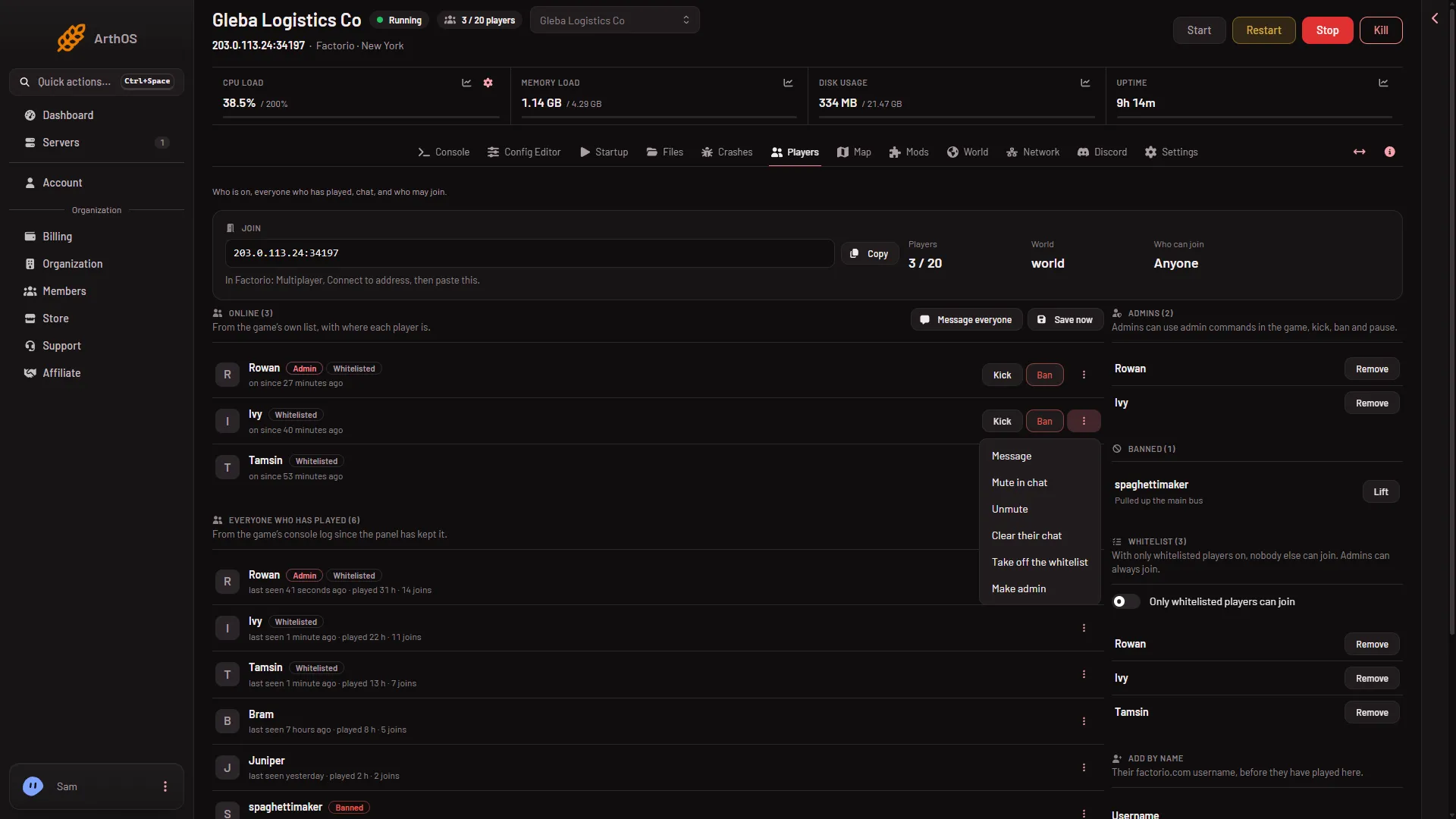
The row gets the tag Admin. The name is in the Admins list. The What happened feed shows “(name) was made an admin by (who did it)”.
For someone who has never joined, use Add by name. See make yourself admin.
Take admin away
- Open the menu on the admin’s row and choose Take admin away.
- The box asks “Take admin away from (name)?” and says “(name) plays as everyone else does.” Choose Take it away.
The tag goes, and so does the name in the Admins list. The Admins list also has Remove on each name, which asks the same question. The feed shows “(name) was taken off the admin list by (who did it)”.
When it applies
- Server running: at once. The page asks the game to promote or demote, then reads the game’s list back to check.
- Server stopped: the page changes the list. The game reads it at its next start.
A player who is in the game when you promote them may need to rejoin to see new rights. Not checked on 2.1.24 as of 13 November 2026.
The same with commands
In the game’s chat, an admin can type:
/promote Builder_Oneto make a player an admin./demote Builder_Oneto take admin away./adminsto print the list of admins. Anyone can use this one.
These admin commands need only the admin tag. The setting Who may use console commands controls Lua commands (/c) only and does not affect them. See the admin commands.
The game keeps the list in server-adminlist.json, in the main folder in Files. It writes the file at once when a command or the panel changes the list.
More about the game: Factorio servers.
If it does not work
- Make admin or Take admin away is missing. Your role on the panel may not allow changing admins.
- The page says “the game did not change its list; the console says why”. The game refused. Open the Console tab and read the line after your action.
- The player is not on the list yet after a stopped-server change. The list is read at the next start. Start the server.
- A promoted player cannot use admin commands. Check that the name is in the Admins list. The setting Who may use console commands does not control admin commands, only Lua commands (
/c).
Sources: wiki.factorio.com: Console, wiki.factorio.com: Multiplayer