
















Admin commands start with /. An admin types them in the game’s chat box, and the server does what they say. The main ones are /kick, /ban, /unban, /promote, /demote, /whitelist, /config and /players. On Loafhosts the Players page sends the same commands for you.
Who may type commands
The admin-only commands (/kick, /ban, /unban, /promote, /demote, /config and the others marked Yes below) need only one thing: the player must be an admin. See make yourself admin.
The setting Who may use console commands is separate. It controls Lua commands only (/c, /command, /sc, /silent-command). On a new server it is Admins only. The other choices are Everyone and Nobody. Change it in the Config Editor under Playing. See who may use commands.
Players who are not admins can still use the harmless commands such as /players, /admins, /seed and /version.
How to type a command in the game
- Join the server as an admin.
- Press the key to the left of 1 (the grave key,
`). The chat box opens. On some keyboard layouts that key is elsewhere. - Type the command, then press Return.
Text that does not start with / is chat, not a command. To change the key, use the game’s Settings, Controls, Toggle chat (and Lua console).
Commands that manage people
| Command | What it does | Admin only |
|---|---|---|
/players | Lists players. Add online or o for only those on, count or c for only the number. | No |
/admins | Lists the admins. | No |
/bans | Lists banned players. | No |
/kick (player) (reason) | Disconnects a player. They can join again. | Yes |
/ban (player) (reason) | Bans a player. | Yes |
/unban (player) | Lifts a ban. | Yes |
/promote (player) | Makes a player an admin. | Yes |
/demote (player) | Takes admin away. | Yes |
/mute (player) and /unmute (player) | Stops or allows a player’s chat. | Yes |
/purge (player) | Clears that player’s messages from the chat log. | Yes |
/whitelist add (player) | Puts a player on the whitelist. Also remove, get and clear. | No |
The player is the factorio.com username. An example: /kick Builder_One idle for a day. When the whitelist is empty, anyone can join. Once it has a name, only listed players and admins can.
Commands about the game
The tables hold the main commands. The Factorio wiki lists more, such as /shout, /mutes and /banlist.
| Command | What it does | Admin only |
|---|---|---|
/seed | Prints the map seed. | No |
/time | Prints how old the map is. | No |
/evolution | Prints the enemy evolution. | No |
/version | Prints the game version. | No |
/server-save | Saves the game on the server in a multiplayer game. | Yes |
/config get (option) | Reads a server setting. | Yes |
/config set (option) (value) | Changes a server setting. | Yes |
The options for /config are afk-auto-kick, allow-commands, allow-debug-settings, autosave-interval, autosave-only-on-server, ignore-player-limit-for-returning-players, max-players, max-upload-speed, only-admins-can-pause, password, require-user-verification, visibility-lan and visibility-public. The two time options are in minutes.
To change a setting and keep it in the file, use the Config Editor instead. It applies most settings to a running server at once and writes them to server-settings.json. The server name, the join password, the factorio.com username and token are written into the file again at every start from Startup and Passwords, so a /config set password does not last past a restart. See set a server password.
Commands for the server console only
/save (name) saves the game under a name. /quit ends the server. They work only in the server’s own console, not in the game’s chat. Use the panel instead:
- Save a copy now on the World page does what
/save (name)does. - Stopping the server from the panel saves the world and exits cleanly, so
/quitis not needed.
Lua commands: read this first
/c, /command, /sc and /silent-command run Lua code. The first one on a save ends Steam achievements on that save for good. The game warns once and asks you to repeat the command. Read Lua commands and achievements before you use one.
The same jobs in the panel
The Players page sends these commands while the server runs, then reads the game’s lists back to check:
- Kick sends
/kick. Ban sends/ban, with a reason the player sees. - Lift the ban sends
/unban. - Make admin sends
/promote. Take admin away sends/demote. - Add to the whitelist and Take off the whitelist send
/whitelist.
If the server is stopped, the page writes the list files instead, and the game reads them at its next start. If the game refuses a change, the page says “the game did not change its list; the console says why”.
Not checked on 2.1.24 as of 13 November 2026: whether a command typed in the Console tab’s box reaches the game. Use the Players page for these jobs.
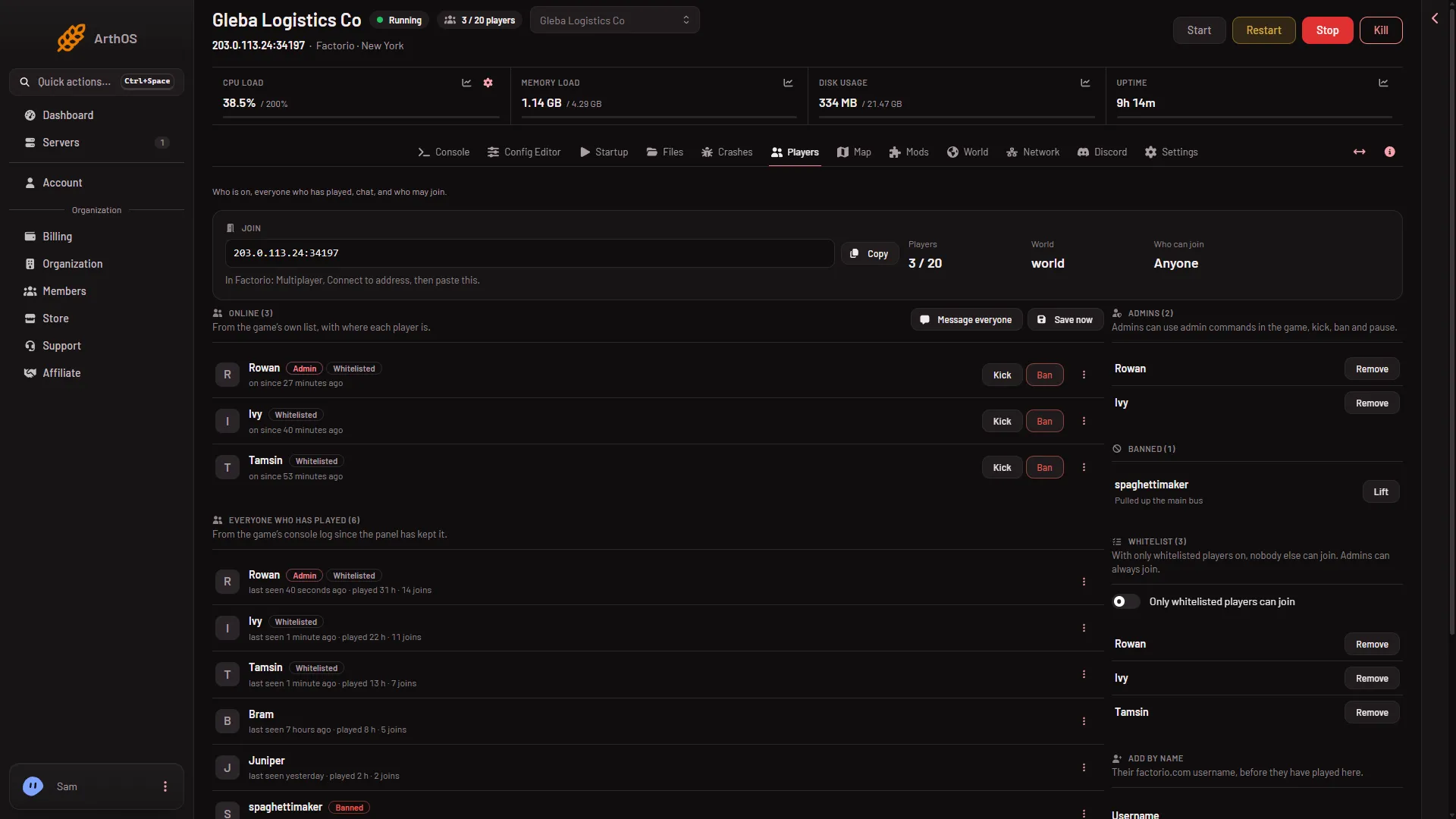
- Kick
- Ban
- Admins
- Banned
Kick (1) and Ban (2) sit on each row under Online. Admins (3) and Banned (4) are the lists the game keeps.
More about the game: Factorio servers.
If it does not work
- “Unknown command” or nothing happens. You are not an admin. Check the Admins list on the Players page. A Lua command (
/c) is also refused when Who may use console commands is Nobody. - A player name is not found. Use the factorio.com username exactly. The game may not know a name that has never played here. On the Players page, Add by name works before they join.
/kickdoes nothing from the panel. The server is stopped, or the player already left.- A setting reverted after a restart. The name, password, username and token come from Startup and Passwords.
- The first
/cprinted a warning and did nothing. That is the game asking you to repeat it. Repeat only if you accept losing achievements on that save.
Sources: wiki.factorio.com: Console, wiki.factorio.com: Multiplayer