
















You can change how much iron, copper, coal, stone, uranium and crude oil a Factorio world has. You do it in the Config Editor, and it only counts for a new world. The world your server runs now keeps the resources it was made with.
What the three values mean
Each of the six resources has three settings:
- How often. How many patches there are in a given area. It does not change how big or how rich a patch is.
- Patch size. How much ground each patch covers. 2 means about double the area.
- Richness. How much each ore tile, or each oil field, holds. 2 means about double.
The panel’s numbers run from 0 to 6. 1 is the game’s own setting. 0 leaves that resource out of the world, except iron, copper, coal and stone, which always keep at least one patch at the start. Richness also grows by itself the further you go from the start.
Two things the game always does, whatever you set:
- The start area always holds iron, copper, coal and stone.
- Uranium and crude oil never appear in the start area. You have to go and find them.
Change them in the panel
- Open Config Editor.
- Choose the file New world map (1).
- Find the group Resources for new worlds, on the right.
- Change the values you want. The names read like Iron ore: how often, Iron ore: patch size and Iron ore: richness. The same three exist for Copper ore, Coal, Stone, Uranium ore and Crude oil.
- A bar reads “Unsaved changes: (n)” with Discard and Save. Choose Save.
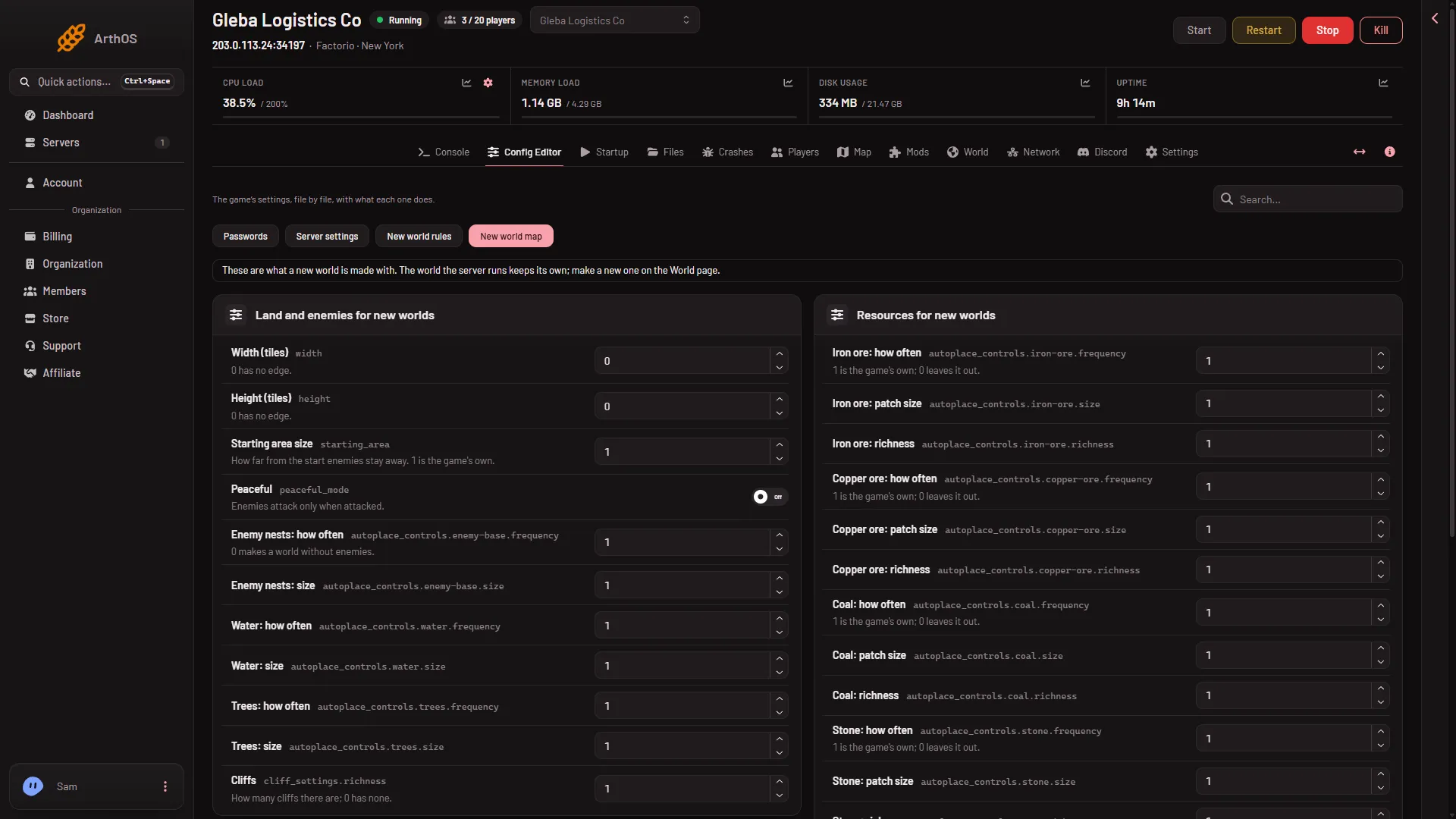
- New world map
The page says “Saved. A new world made on the World page uses these; the world the server runs keeps its own.” Nothing changes in the running world.
Make a world that uses them
- Open World.
- In New world, type a Name that no save has yet.
- Set Preset to Your own, from the Config Editor. This is the choice that uses your values, and the one the box starts on.
- Leave Map exchange string empty. A pasted string sets the whole map, so it replaces your settings.
- Choose Make the world and confirm. This drops everyone who is on, so warn them first with Message everyone on the Players page.
The server stops, a backup is taken, and the new world is made. It runs from the next start. The old world stays as a save, so you can go back to it. See start a new world.
Some starting points
- Rich ores, fewer trips. Raise richness on the six resources, for example to 2. Patches stay where they are but give more.
- Spread out for trains. Lower how often and raise patch size. You get fewer, larger patches far apart.
- A hard world. Lower how often and richness. Ore runs out sooner and you must expand.
- No oil or uranium. Set the how often of that resource to 0. Iron, copper, coal and stone cannot be left out this way: they always keep a patch at the start.
If it does not work
- The running world looks the same. The settings are only read when a world is made. Make a new world on the World page.
- The new world ignores my values. Check that Preset is Your own, from the Config Editor, and that Map exchange string is empty.
- A resource is missing. Its how often is 0, or you are looking near the start, where uranium and oil never spawn.
- The Save button does nothing. A value is outside its range. Resource values go from 0 to 6.
More about the game: Factorio servers.
Sources: wiki.factorio.com: Map generator