
















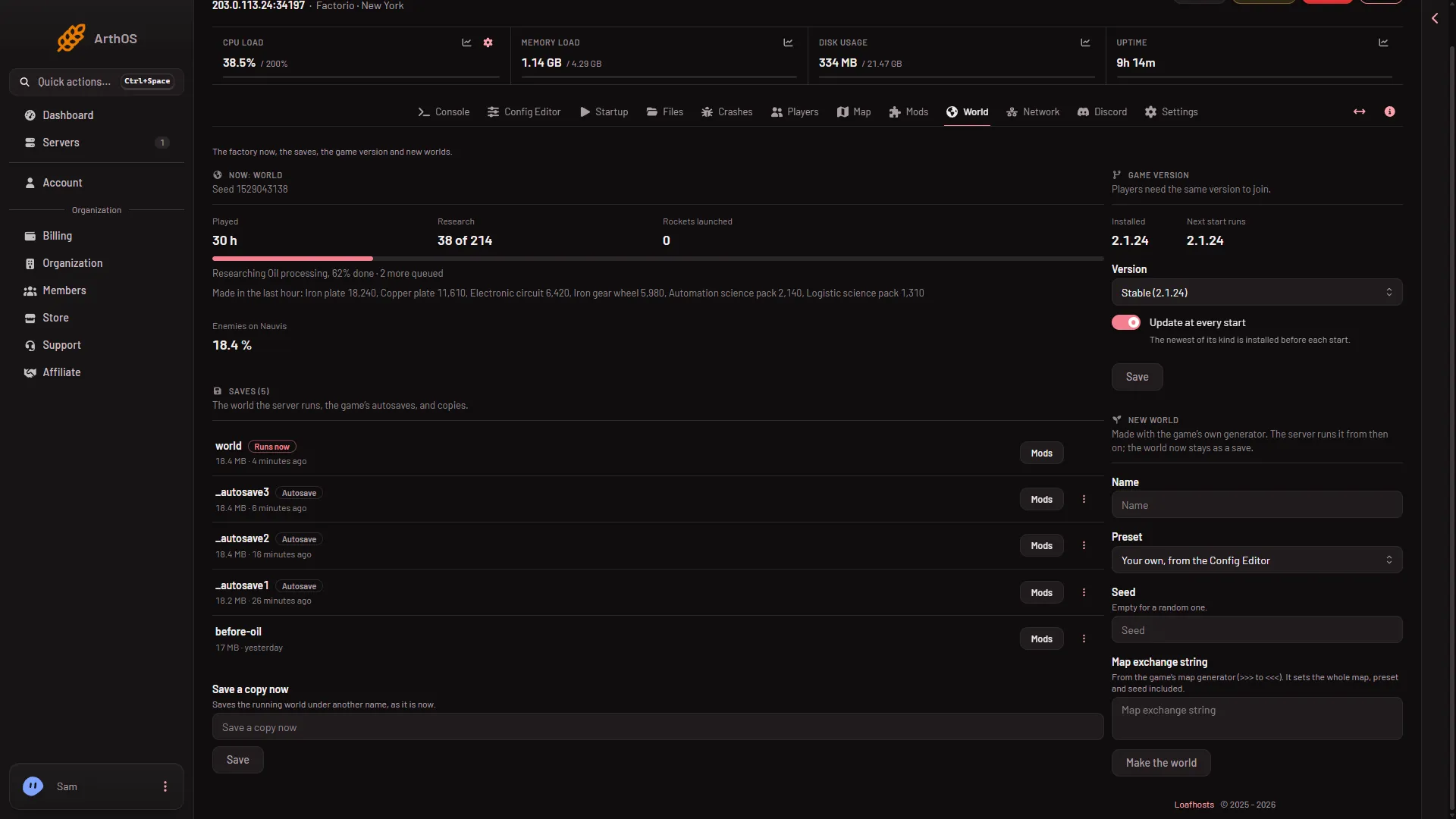
Open the World page, fill in the New world card and choose Make the world. The server stops, takes a backup, makes the world with the game’s own map generator, and runs it from then on. Your old world stays on the server as a save, so you can go back to it.
A Factorio server runs one world at a time. The world it runs is the World value on the Startup page, and a new world changes that value for you.
Before you start
- Nothing is lost. The panel takes a backup first, and the current world stays in the Saves list. If a backup cannot be taken, the panel says why and asks you to confirm. Only tick Go ahead without a backup when one cannot be taken when you accept that.
- Old saves stay. Deleting one is a separate choice, made in the Saves list.
Make the world
- Open the World page.
- In the New world card, type a Name. Use letters, digits, dots, dashes and underscores, and do not start with an underscore or a dot. If a save already has the name, the page says “A save has this name.” Pick another.
- Choose how the map is made: a preset, a seed or a map exchange string. A string sets the whole map, preset and seed included. What wins when you fill in more than one is not checked on 2.1.24 as of 13 November 2026.
- Preset: one of the game’s own presets, such as Default or Rich resources. See the presets. The box starts on Your own, from the Config Editor, which uses the values in the Config Editor under New world map, not the game’s normal settings. Choose Default for those.
- Seed: a whole number. Leave it empty for a random one. See the seed.
- Map exchange string: a string copied from the game’s map generator. See the exchange string.
- Choose Make the world. A box asks Make the world (name)? It repeats that the server stops, a backup is taken, and the old world stays as a save. Choose Make the world again to agree.
- New world card
- Pick a preset
- Paste an exchange string
Fill in the card (1), pick a preset (2) or paste a string (3).
The panel shows that the world is being made. When it is done, the server starts again if it was running. If it was stopped, the new world runs at the next start. In both cases the new world is the one that runs from then on.
What the new world uses
The game makes the world from the map settings of the server. The Config Editor holds two of them, New world map and New world rules. They are used only when a world is made. Changing them later does not change a world that already exists. See settings used only for new worlds.
By hand
On your own server the game makes a world with --create: factorio --create saves/name.zip. The options --map-gen-settings, --map-settings, --map-gen-seed and --preset go with it. The wiki says the two settings options work only with --create. That is why changing the settings later does not change a world that exists.
Go back to the old world
- On the World page, find the old world in Saves.
- Open the menu More for (name) and choose Run this from the next start.
- Restart the server.
More about this: switch worlds.
If it does not work
- A save has this name. Pick another name.
- That is not one of the game’s presets. Choose a preset from the list.
- That is not a map exchange string. Copy the whole string again from the game, from the first
>>>to the last<<<. - A backup cannot be taken first. The panel gives the reason. Fix it, or tick Go ahead without a backup when one cannot be taken when you accept the risk.
- The world could not be made. The panel shows the last lines the game printed. Read them, change the name, preset, seed or string they point to, and try again.
Sources: wiki.factorio.com: Map generator, wiki.factorio.com: Command line parameters