
















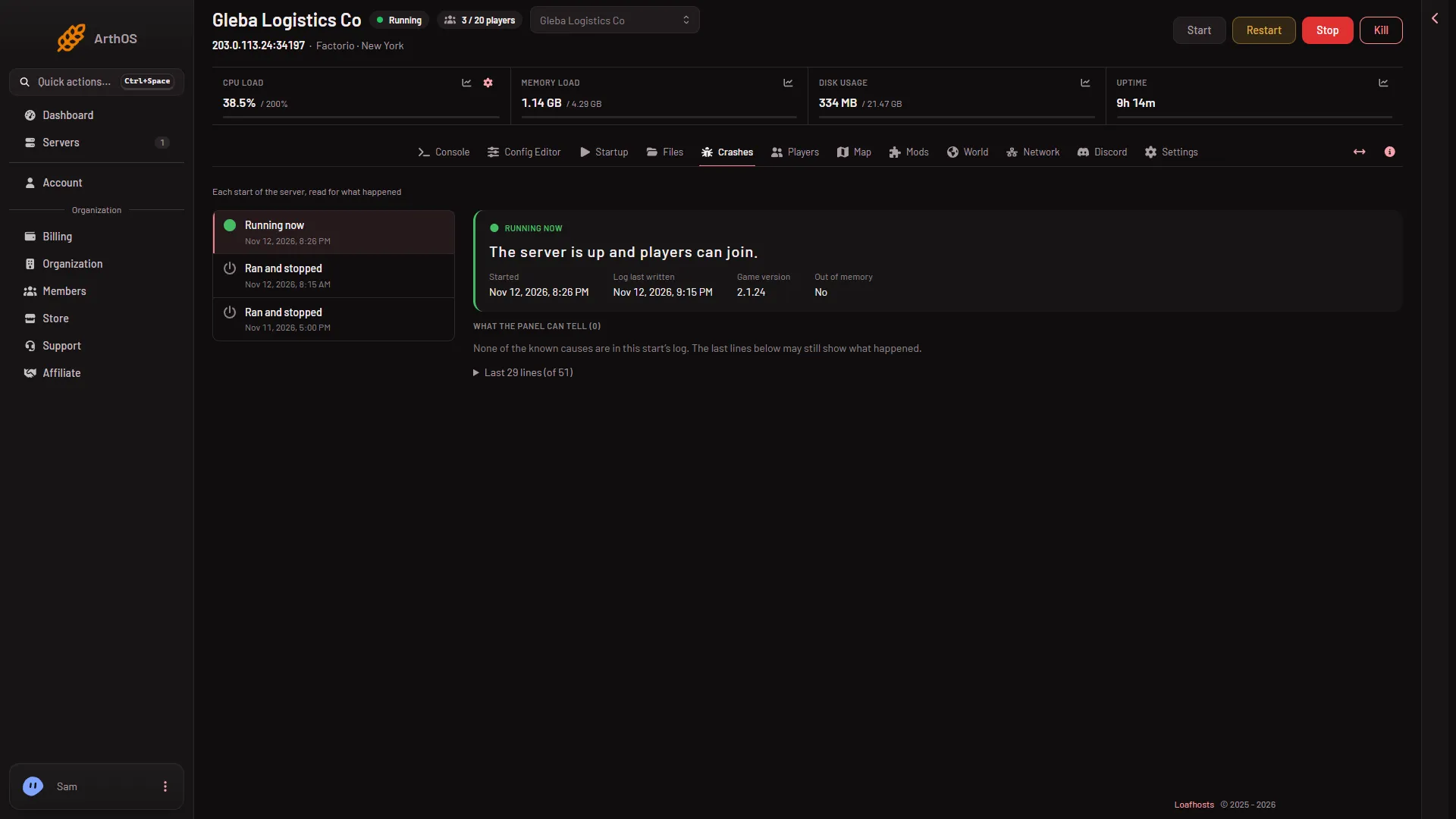
Open Crashes on your server. It lists each start of the server and says how that start ended. For a start that went wrong, it names the cause it found in the game’s log and tells you what to do.
The Starts list
The list is on the left of the page, newest first. Each row shows how the start ended:
| Outcome | What it means |
|---|---|
| Running now | The server is up and players can join. |
| Starting | The server is still starting. |
| Ran and stopped | The server started, ran and stopped normally. |
| Crashed | The game stopped without being asked to. |
| Failed to start | The server never got as far as letting players in. |
| Ended early | The log ends without saying how the server stopped. |
A stop you ask for, from the panel or a schedule, reads Ran and stopped. The game saves the world as it stops. A clean stop has no findings. A Kill, an auto-kill or a stop from outside the panel gives the game no time to say goodbye, so it reads Ended early.
The page reads the game’s own log of each start. The game keeps the newest ten.
- Game version
The start’s Game version (1) shows which Factorio ran. A start with no cause found says so under What the panel can tell.
Open a start
Choose a row. The top shows:
- Started: when that start began.
- Log last written: the last time the game wrote to its log.
- Game version: the Factorio version that ran, when the log names it.
- Out of memory: Yes or No.
Below, What the panel can tell lists each cause it found, with the lines of the log that say so. Under Last (count) lines you can read the end of the log yourself.
What each finding means
- A mod crashed the server. The game names the mod. Turn that mod off on the Mods page, or update it, then start. See a mod crashed the server.
- A mod could not load, so the server did not start. A mod made for another game version, or one that needs a mod the server does not have. The Mods page installs what is missing or turns the mod off.
- A mod’s prototypes did not load. The log line names the mod after “Modifications”. Update it or turn it off.
- The world is newer than the game. A save made by a newer Factorio cannot load in an older one. Pick that version, or stable, on the World page. See the world is newer than the game.
- The world could not be loaded. Load an autosave or another save on the World page, or put back a backup. See the world could not be loaded.
- The server ran out of memory. See out of memory.
- A port the game needs was in use. Restart the server.
- The game crashed. Restart it. If it happens at the same moment again, the last mod you added is the first to try without.
- The server could not list itself. Not a crash. The game runs on, unlisted. A public server needs a factorio.com username on Startup and its token under Passwords.
- A player desynced. Not a crash. One player’s game no longer matched the server’s and they were sent back to rejoin. It is often a mod’s fault.
Turning a mod off applies at the next start, and a save that used it may lose what the mod added. Choose Save a copy now on the World page first. A restart drops everyone who is on: warn them first with Message everyone on the Players page.
A start that shows no findings
The page says: “None of the known causes are in this start’s log. The last lines below may still show what happened.” Read the last lines. For the full log, see the server logs.
Get the world back
The server runs the save named under World. The game writes autosaves as separate files, so after a crash that save can be older than the newest autosave.
- Open World and compare the times under Saves.
- On the autosave you want, open the row menu More for (name) and choose Run this from the next start.
- Restart the server.
If it does not work
- The list is empty. The server has not started yet.
- The server keeps stopping after a start. Look at the newest start’s findings first. Then turn off the last mod you added.
- A crash with no finding. Read the last lines. A server stopped from outside the panel can show only that.
Not checked on 2.1.24 as of 13 November 2026: a native game crash on a Loafhosts Factorio server. The finding texts above are the panel’s own.
More about the game: Factorio servers.
Sources: wiki.factorio.com: Multiplayer