
















Open Files and you see the folder the server runs in. Saves are in saves, mods in mods, logs in logs, and the settings and player lists are files at the top. This guide says what each one is and which are safe to change.
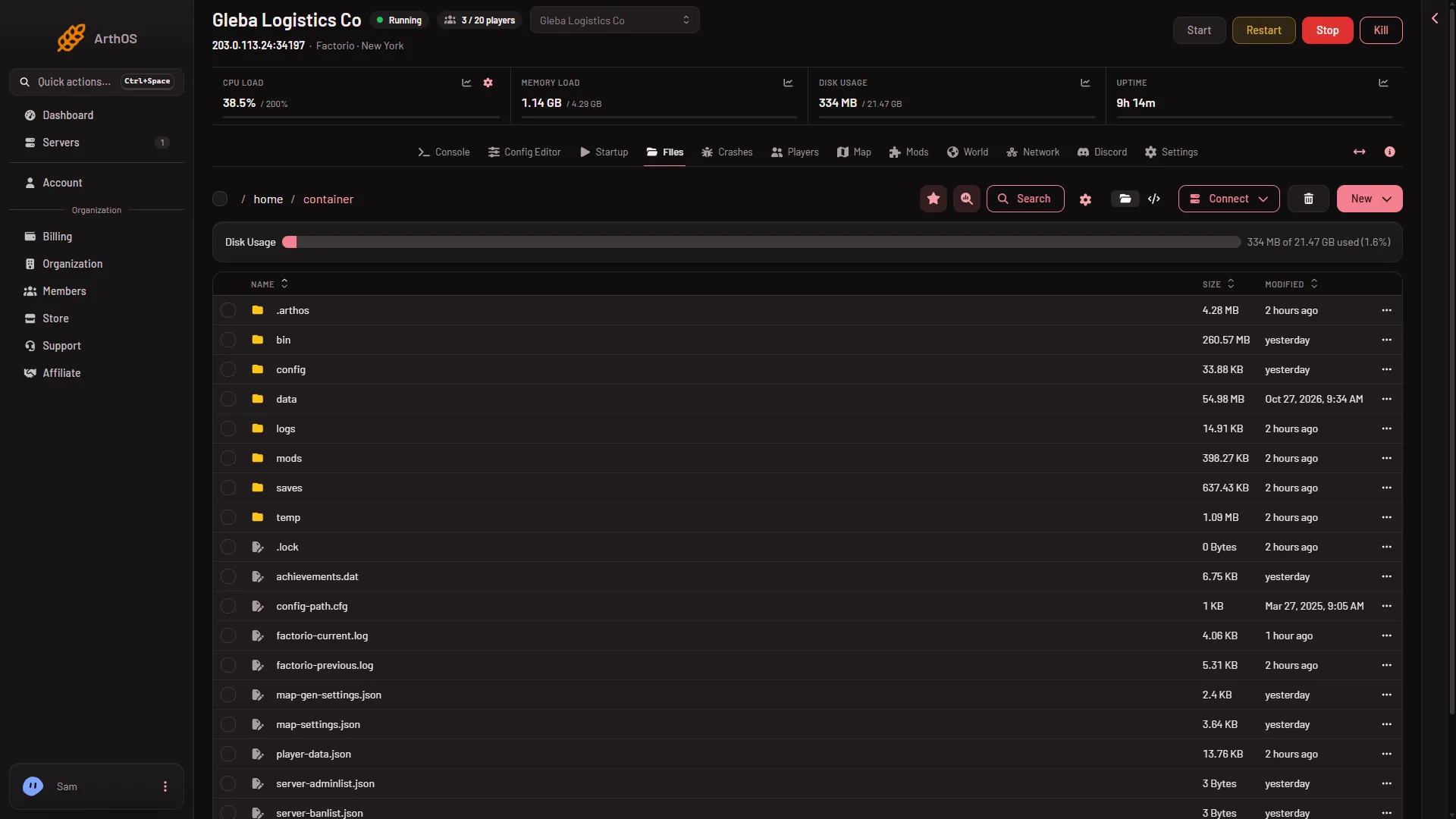
- The saves folder
- The mods folder
- New menu for uploads
The saves folder (1) and the mods folder (2) are the two you will open most. The New menu (3) is where you upload.
The files at the top
server-settings.json: the server’s settings. Most are best changed in the Config Editor. Four values in it do not stay if you edit them here: the server name, the join password, the factorio.com username and the factorio.com token. The panel writes them again from Startup and Passwords at every start. The game’s ownpasswordentry is emptied at every start.map-gen-settings.jsonandmap-settings.json: the rules for a new world. They are used only when a world is made. Changing them does not change the world that is running.server-adminlist.json: who is an admin.server-banlist.json: who is banned.server-whitelist.json: who is on the whitelist.factorio-current.logandfactorio-previous.log: the game’s log for the start that is running now and the one before.player-data.json,achievements.dat,config-path.cfgand.lock: the game’s own bookkeeping. Leave them alone.
The three lists are made as empty lists ([]) at the first start. When you change a list on the Players page while the server runs, the game writes the file at once. A hand edit of a list is read at the next start.
The folders
saves: the world files, asworld.zipand so on. The world the server runs is named by World on the Startup page. The game writes its own autosaves here as_autosave1.zipand so on; they do not rewriteworld.zip, which is written at a stop, at Save now and at Save a copy now. See saves and autosaves.mods: the mods as zip files, plusmod-list.json(which mods are on) andmod-settings.dat(the mods’ settings). With nomod-list.json, every official mod is on. The game writesmod-settings.datat every start. Use the Mods page rather than editing these by hand.logs: oneconsole_file for each start, named with the start time in UTC. The newest 10 are kept. It holds joins, leaves, chat, kicks and bans. Previous starts’ game logs are here asgame_files, and the newest 9 are kept. See server logs.config: holdsconfig.ini, the game’s own file. Leave it as it is.dataandbin: the game itself. They are replaced when the game version changes. Do not edit them.temp: the game’s scratch space. Leave it..arthos: the panel’s own notes, such as the version it wants and the drawn map ground. Do not edit them.
Change a file
- Stop the server if you are editing a settings file by hand. The game reads it at the start.
- Open the file in Files and edit it.
- Save and start the server.
To put a file on the server, use the New menu and choose File from Upload. For a whole folder, choose Directory from Upload.
Take files out
A file row has a menu with Download. A folder has no direct download: choose Archive on it first, then download the archive. You can also use Connect, then via SFTP, which shows SFTP Details.
A deleted file goes to the Trash, a button on the Files page. Deleted files are kept for a time before they are removed for good. Choose Restore to… to bring one back.
If it does not work
- A setting you edited went back. It was the server name, join password, username or token. Change it on Startup or under Passwords in the Config Editor.
- A new-world rule changed nothing. It is read only when a world is made.
- No
mod-list.json. Every official mod is on until the file exists. - A save is missing. Check
saves. If the name in World has no save, a new world is made at the next start. - An old log is gone. Only the newest 10 console logs and 9 game logs are kept.
More about the game: Factorio servers.