
















The whitelist is a list of names. When Only whitelisted players can join is on, only those names can join, and admins. When it is off, anyone who can reach the server can join. You set both on the Players page.
The game’s own wiki says: “An empty whitelist disables the whitelist functionality allowing anyone to join.” The panel is more careful than that, and asks before you turn the switch on with nobody listed.
Add players, then turn it on
Fill the list first, so you do not shut out your friends.
- Open the Players page.
- For a player who has played on your server, find them under Everyone who has played. Open the menu on their row (three dots) and choose Add to the whitelist. For someone who has never joined, use Add by name below.
- Find the Whitelist card on the right (1). Its text says: “With only whitelisted players on, nobody else can join. Admins can always join.”
- Turn on Only whitelisted players can join (2).
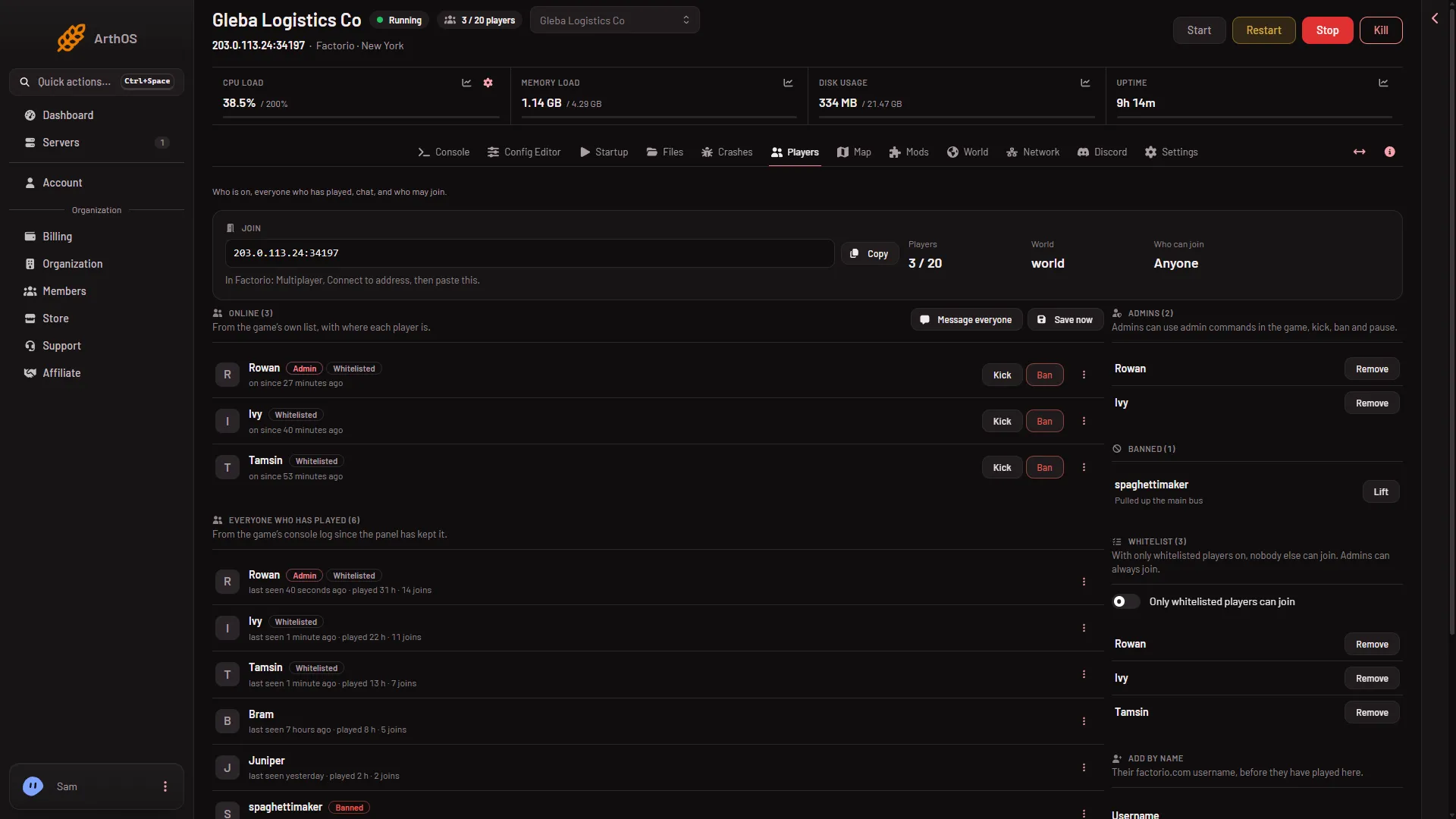
- Whitelist card
- Only whitelisted players can join
- Add by name
The top of the page now says Whitelist only under Who can join. The panel confirms with “Only whitelisted players can join now.” The change applies at once on a running server.
Add by name
Use this for a friend who has not played yet.
- In Add by name (3), type their factorio.com username in Username.
- In Add to, choose Whitelist.
- Choose Add.
Names may use letters, digits, dots, dashes and underscores only.
If you turn it on with an empty list
A box asks “Keep everyone out?”. It says the list is empty, so nobody but admins could join. Choose Turn it on only if you mean it, and add players straight after. Or cancel and add players first.
Adding a first name while the switch is already on asks too. The box says that player is the only one who can join, besides the admins.
Remove a player
In the Whitelist list, choose Remove next to the name, then confirm in the box that asks to take the name off the whitelist. Or open the player’s row menu and choose Take off the whitelist. To disconnect someone who is on now, kick them.
Turn it off
Turn off Only whitelisted players can join. The panel says “Anyone can join now.” The names stay on the list for later.
When the server is stopped
You can change the list and the switch while the server is stopped. The panel says the change applies “from the next start”. The game reads the list when it starts.
The switch is also the Whitelist only value on the Startup page, set to 1 or 0. That page points you back to Players, so use the Players page.
Admins
Admins can always join, even when they are not on the list. To make someone an admin, see make yourself admin. The panel’s text says this. It was not measured with a second player.
A password or a whitelist
A join password lets in anyone who knows it. The whitelist lets in only the names on it. A server can have both. To set a password, see set a server password.
By hand
On a server you run yourself, the whitelist is the file server-whitelist.json, a list of names, for example ["Builder_One"]. The game uses it only when it is started with --use-server-whitelist. In the game’s console, an admin can use /whitelist add (name), /whitelist remove (name), /whitelist get and /whitelist clear. The panel does the same for you from this page.
If it does not work
- The switch is greyed out. Your role does not allow moderating players.
- A friend cannot join. Check their factorio.com username is spelled the same as on the list, and that the server runs the same game version and mods.
- You locked everyone out. Turn off the switch, or add the names you meant to add.
- The change does not show. Reload the Players page.
More about the game: Factorio servers.
Sources: wiki.factorio.com: Multiplayer, wiki.factorio.com: Console