
















The World page is where you manage the world your Factorio server runs. It shows the factory as it is now, lists your saves, lets you choose the game version and makes new worlds. A server runs one world at a time.
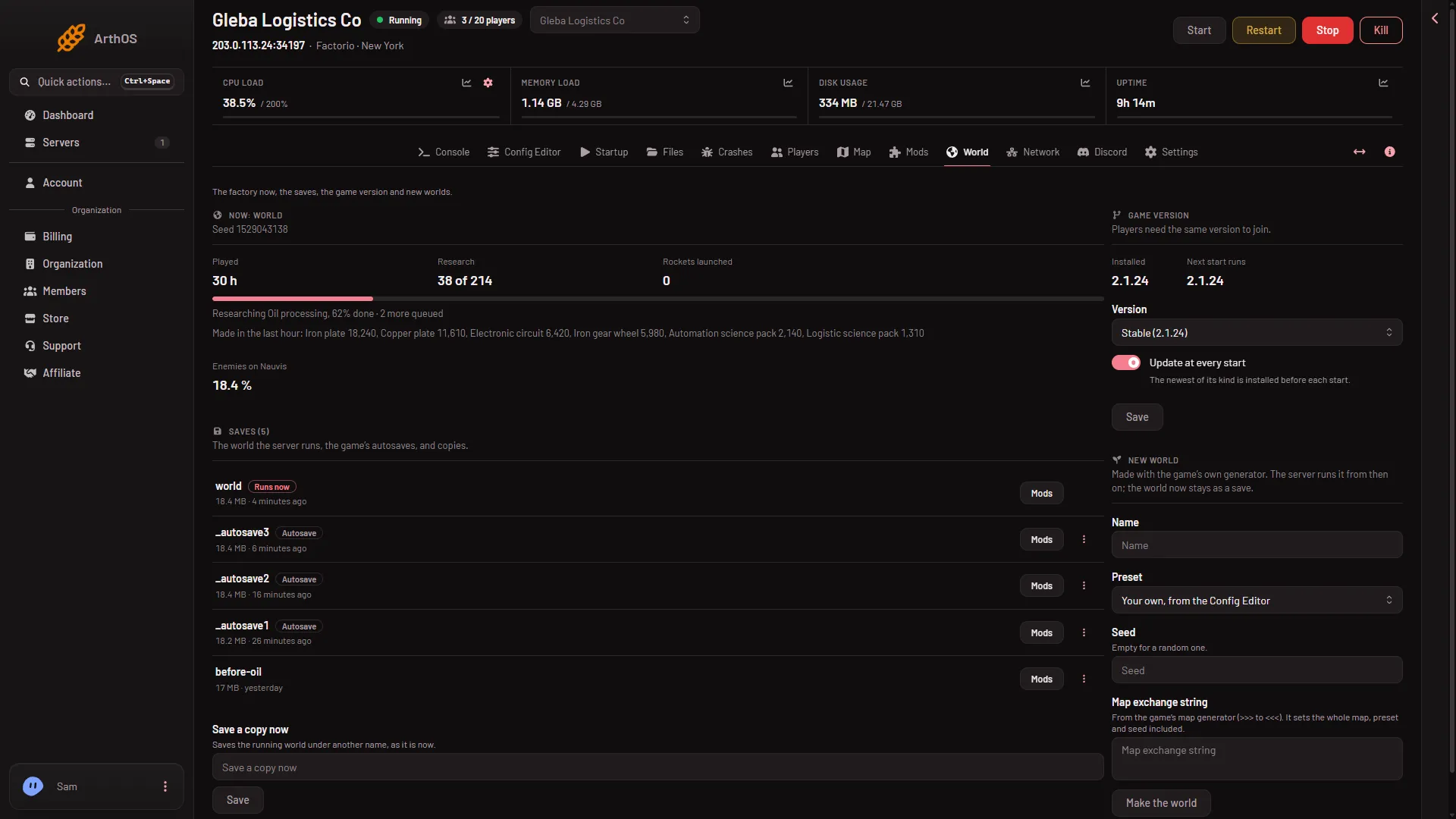
- The factory now
- Saves
- The save that runs
- An autosave
- Save a copy now
The page shows the factory now (1), your saves (2) with the one that runs (3) and an autosave (4), and Save a copy now (5).
Now
The first card is named after the running world. It gives the world’s seed and how far the enemies have evolved.
When live game details are on for this world, it also shows how long it was played, research progress, rockets launched, game speed, and what is being researched. Those details are off until you turn them on from the Map or Players page. Turning them on ends Steam achievements on that world for good, because the panel reads the game with its own short scripts.
When the server is stopped, the card says “The server is stopped.”
Saves
Saves lists the world the server runs, the game’s autosaves, and copies. Tags tell them apart:
- Runs now: the save the server runs. This is
saves/world.zip, the World value on Startup. - Autosave: a save the game made itself, in its own
_autosavefile. By default it saves every 10 minutes. An autosave does not rewriteworld.zip. That file is written when the server stops, and by Save now and Save a copy now.
Every row has a Mods button. It opens a box named Mods of (name) that says whether the server has the mods the save was made with, and has Install these mods.
Open the menu on a row for More for that save:
- Run this from the next start makes it the world the server runs. Restart to load it.
- Delete removes the save from the server. The save that runs now cannot be deleted: load another first. Backups taken before keep their copy.
Save a copy now saves the running world under another name, as it is now. It needs the server to be running. Names use letters, digits, dots, dashes and underscores, and cannot start with an underscore or a dot.
Game version
Players need the same version as the server to join. This card shows the version Installed and the one the Next start runs. You choose Stable, Experimental, or one fixed version, and a switch called Update at every start decides whether the newest version of that kind is installed before each start. A change applies at the next start.
A warning appears when a world was saved by a newer version than the one you pick. That world will not load in the older game. The server starts again only with an older save or a new world.
New world
New world makes a fresh world with the game’s own generator. You give a Name, and choose a Preset, a Seed, or paste a Map exchange string from the game’s map generator. The exchange string sets the whole map, preset and seed included.
Choose Make the world. The panel asks you to confirm: the server stops, a backup is taken, and the new world runs from the next start. The old world stays as a save, so you can go back to it.
The Preset box starts on Your own, from the Config Editor, which uses the values under New world map. Choose Default for the game’s normal settings. A world that already exists does not change when you edit those settings. Full steps: start a new world.
What needs a restart
- A new world runs from the next start.
- A save chosen with Run this from the next start loads at the next start.
- A new game version installs at the next start.
If it does not work
- The Now card says the server is stopped. Start the server to see its details.
- A new world is refused. A save with that name already exists. Pick another name.
- Delete is refused. The save runs now. Run another save first.
- Save a copy now is refused. Start the server first.
More about the game: Factorio servers.