











To be an admin on your VEIN server, put your SteamID64 on the admin list on the Players page, then start the server again. In the game, press backslash (\) to open the admin menu. The game reads its admin lists only when it starts, so a change made while the server runs waits for the next start.
Super admin or admin
VEIN has two kinds of admin.
- Super admins can use the admin menu and can also make and remove admins in the game.
- Admins can use the admin menu.
Make yourself a super admin. Then you can make friends admins from inside the game later, without the panel. To add a plain admin from the panel, use Make admin on a row, or Add by Steam id with Admins.
If you have played on the server before
- Open the Players page.
- Find your name under Online or under Everyone who has played.
- Open the menu on your row (the three dots, “More for” your name).
- Choose Make super admin. For a plain admin, choose Make admin.
Your id appears in the list Super admins (or Admins) with the note Next start while the server is running. If the server is stopped, the change is saved at once.
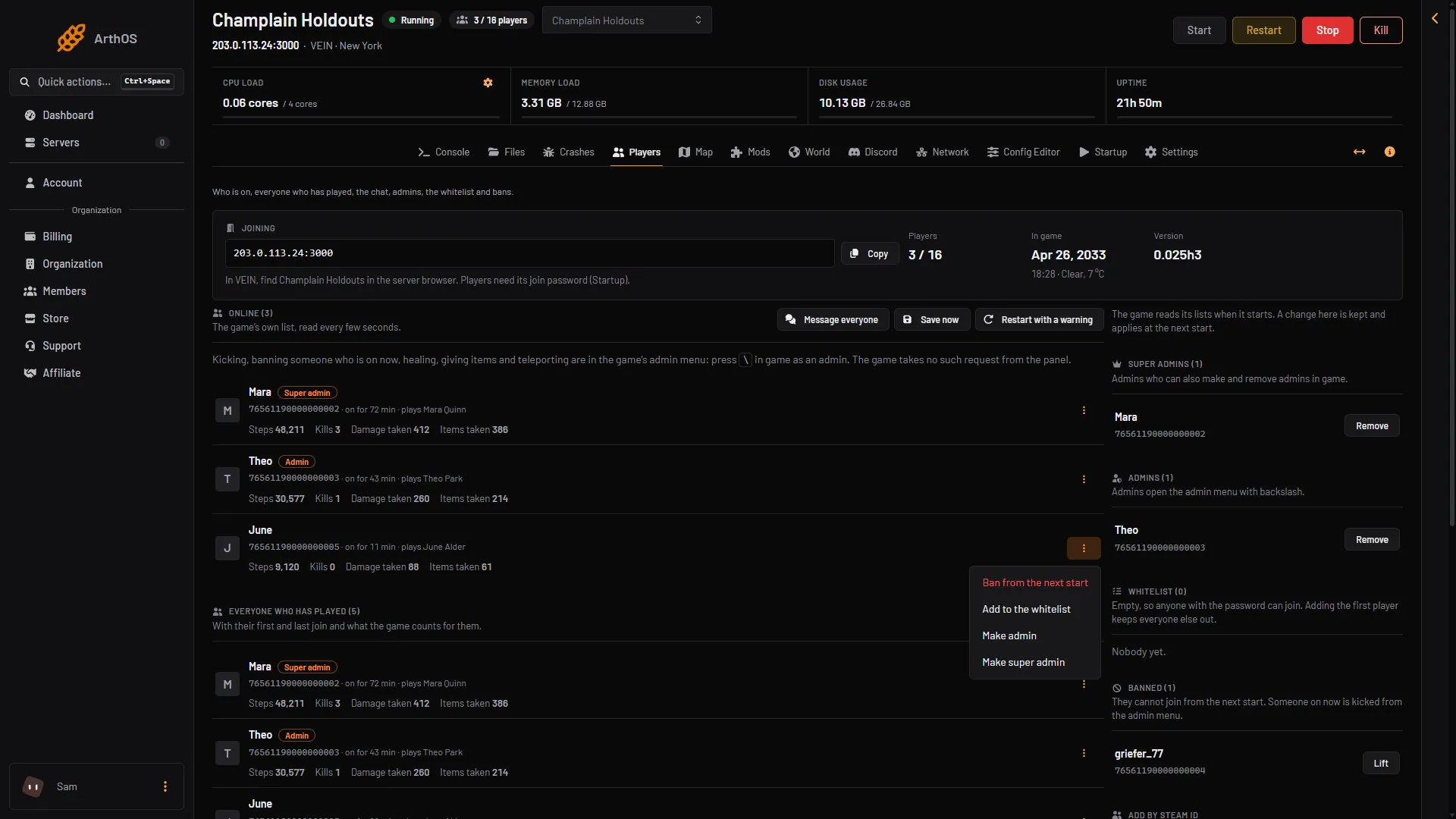
- Make super admin
- Make admin
If you have not joined yet
- Open the Players page.
- In the card Add by Steam id, type your SteamID64 in SteamID64 (1). It is 17 digits and starts with 7656. See find your Steam id.
- In Add to, open the list (2) and choose Super admins.
- Choose Add.
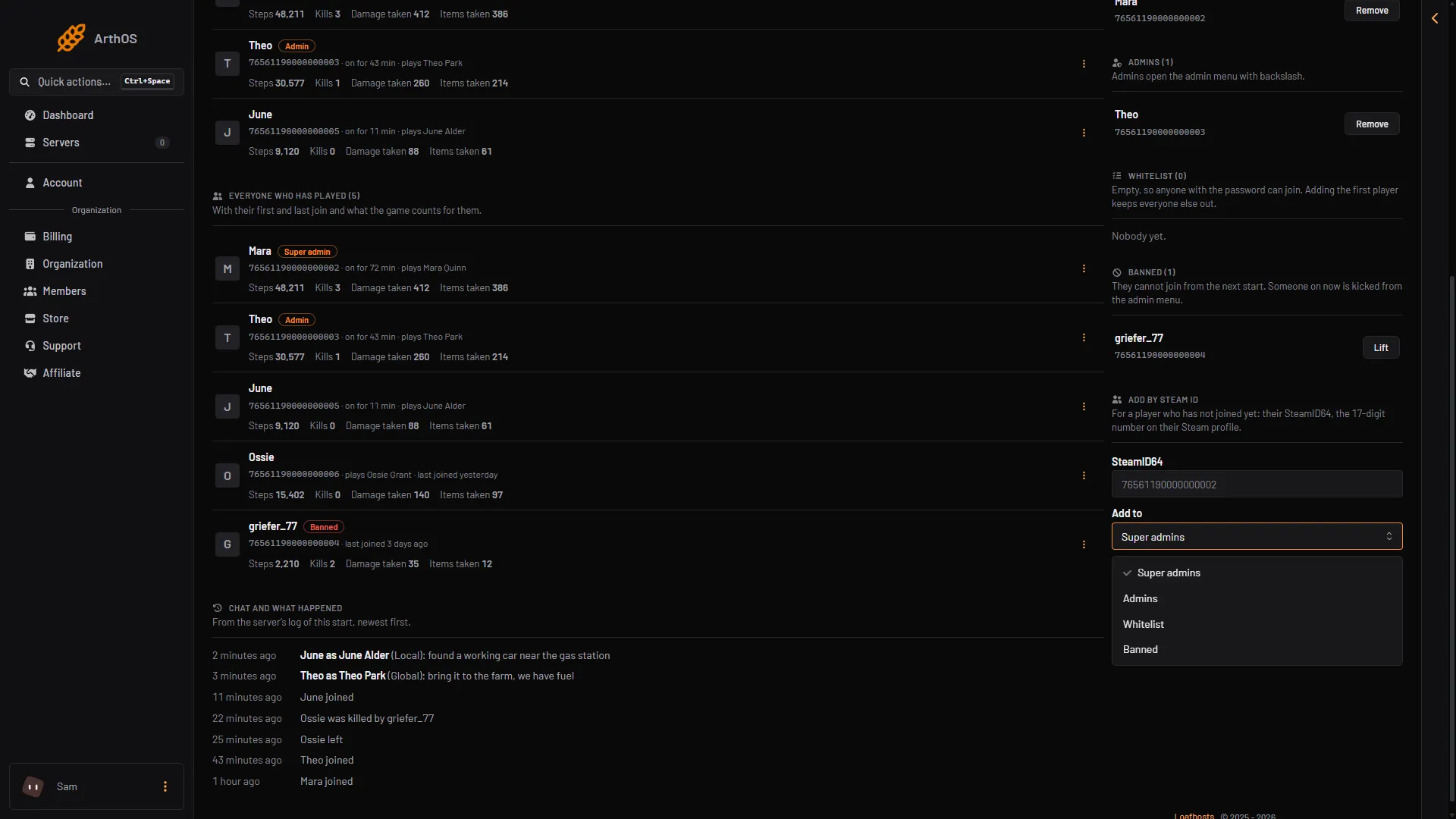
- Type the SteamID64
- The list choices
The panel refuses an id that is not 17 digits starting with 7656.
Start the server again
The game reads the lists as it starts. If the server is running, choose Restart at the top right of the server page. The panel saves the world before it restarts.
When the server has started, look at the Super admins list. A name marked Not loaded at this start is on the list but the game did not take it up at this start. Check that the id is right, then choose Restart once more.
Open the admin menu
- Join the server in the game.
- Press backslash (
\).
The menu is the game’s own. See the VEIN admin menu for what it does.
By hand
The lists are in Game.ini, in Files at Vein/Saved/Config/LinuxServer/Game.ini. Change it only while the server is stopped, because the game rewrites the file when it stops. A Windows server’s folder: Not checked on 0.025 as of 27 October 2026.
[/Script/Vein.VeinGameSession]
SuperAdminSteamIDs=76561190000000101
+SuperAdminSteamIDs=76561190000000102
AdminSteamIDs=76561190000000103
The first id of a list has no plus sign. Every other id of that list starts with a plus. A single line that starts with a plus is ignored by the game, with no message (measured on a Loafhosts staff server). The panel writes the file this way for you.
If it does not work
- The menu does not open. Your id is not on the list the game loaded. Look for Not loaded at this start and restart.
- Make super admin is missing. Your role on the panel may not allow making admins.
- The change did not apply. The game reads the lists at the next start only.
More about the game: VEIN servers.