






A Minecraft server loads one world at a time. To switch, change World folder in the Config Editor to the name of another world folder and restart. The server loads that folder. If no folder has that name, it makes a new world there. The old world stays on disk, so you can switch back.
What a world folder holds
On Minecraft 26.1 and newer, one world folder holds everything for that world:
- the Overworld, the Nether and the End, under
dimensions/minecraft:overworld,the_netherandthe_end - the players’ inventories, statistics and advancements, under
players level.dat, which stores the world’s settings, such as its game rules
So when you switch, the Nether and the End switch with the world. They are not shared between worlds. Older Paper servers keep the Nether and End in separate folders next to the world. See upload or download a world for the older layout.
Some things belong to the server, not to a world, and stay when you switch: server.properties, the operator list, the whitelist and the ban list.
In the ArthOS panel
Take a backup first. See back up your server.
- Open Console and stop the server. A world should not change while it runs.
- Open Files. Each world is a folder in the main folder, for example
worldandsurvival2. Check the exact spelling of the one you want. - Open Config Editor and type “world” in Search….
- In the World group, set World folder (1) to the folder name. The panel’s help says: “The world folder. A name with no folder yet creates a new world on the next start.”
- Choose Save, then start the server.
- The server loads that world. To go back, stop the server, set World folder to the first name and start it again.
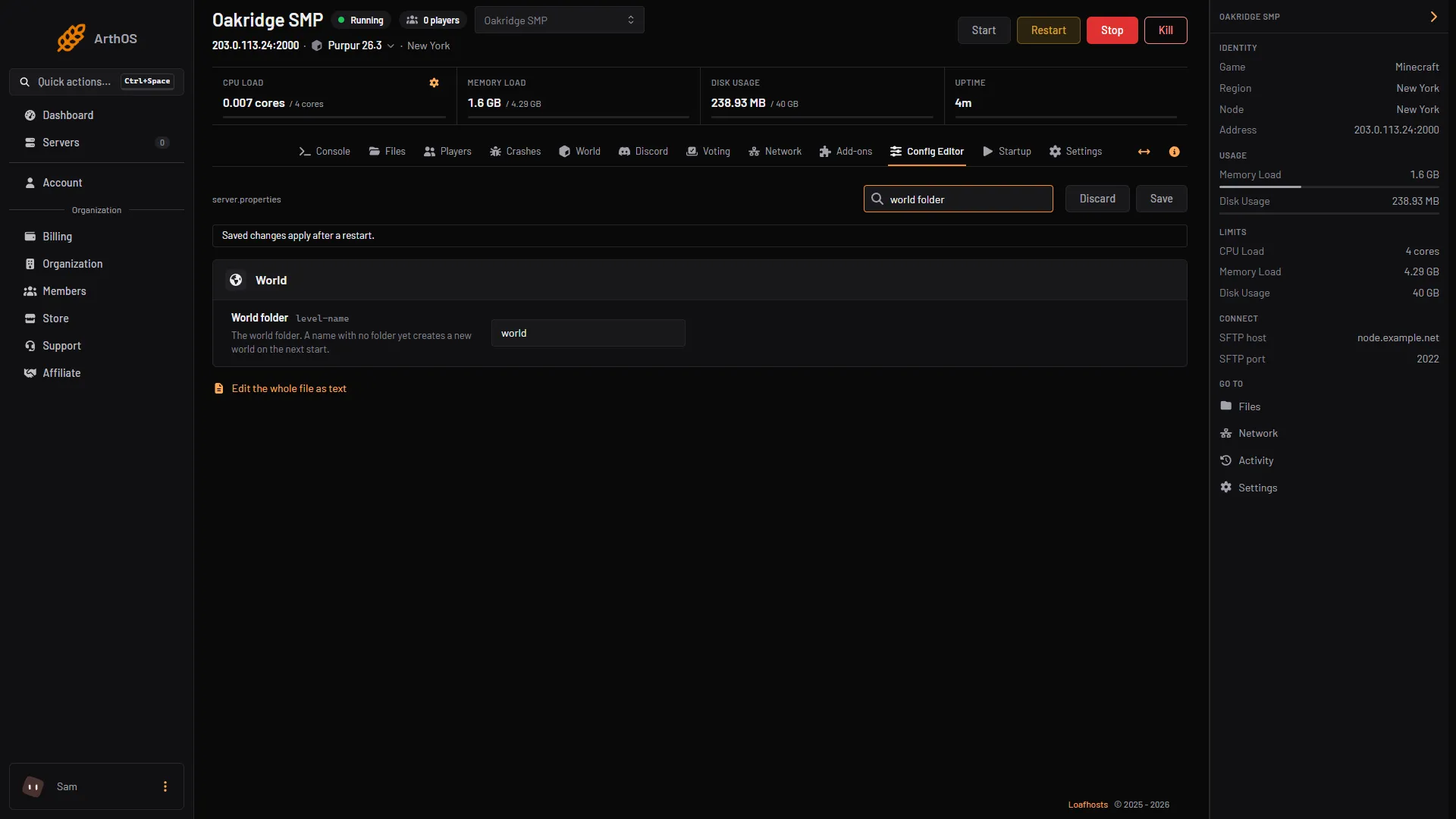
- Type the folder name
Make a new world for the new name
A name with no folder makes a new world on the next start. Set World seed and World type first if you want a particular map. They only apply when the world is made. They change nothing for a world that exists.
A game rule belongs to the world, so the new world starts with the default value of each rule. Set again any rule you changed, for example PvP.
By hand
- Stop the server.
- Open
server.propertiesin Files. - Set
level-nameto the folder name, for examplelevel-name=survival2. - Start the server.
The Minecraft Wiki says: if a directory at that path exists and is a valid world, the server loads it. Otherwise it makes a new world in that directory.
To remove a world you no longer use
Only delete a world you have backed up. See reset the world for how to delete a folder, and for what a reset does to player data.
If it does not work
- The server made a new empty world instead of loading mine. World folder names a folder that is not there. The name must match the folder exactly. Check it in Files.
- The old world loaded again. The name was not saved before the restart. Check World folder and restart.
- Players find their items gone. Player data is stored inside the world folder, so a different world has different inventories. Switch back to see the old ones.
- The Nether or End is empty after the switch. Each world has its own Nether and End, so the ones from another world are not there.
- The world will not load. It may have been saved by a newer Minecraft version than the server runs. Check the version in the World tab and see change the server version.
More on the game: Minecraft servers.
Sources: minecraft.wiki: Server.properties, minecraft.wiki: Java Edition level format, docs.papermc.io: Migration