






Plugins only run on Paper and software built on it, such as Purpur. To get there, open Add-ons, choose Versions, pick Paper or Purpur, pick a version and press Switch now. The panel stops the server, takes a backup when it can, and swaps the server jar. Your world, settings and player data stay.
Vanilla, Paper or Purpur
| Vanilla | Paper | Purpur | |
|---|---|---|---|
| What it is | Mojang’s own server | A server that runs plugins and fixes game bugs | Paper with many more settings |
| Plugins | No | Yes | Yes |
| Mods | No | No | No |
- Vanilla is the server Mojang makes. The panel lists it as “No add-ons”.
- Paper runs plugins and fixes many game bugs. Because of those fixes, the game can behave a little differently from Vanilla. Paper’s own guide says a 100% Vanilla experience is not possible on Paper.
- Purpur is built on Paper. It runs plugins made for Bukkit, Spigot and Paper, and adds more settings you can change.
If you only want plugins, take Paper. If you want Paper plus extra settings, take Purpur. Either one runs the same plugins.
In the ArthOS panel
- Open your server and choose Add-ons. Press the Versions button (1). The Running now card shows what the server runs today.
- Under Choose software, find Paper (2) in the Recommended group or Purpur (3) in the Established group. Find software (4) searches by name.
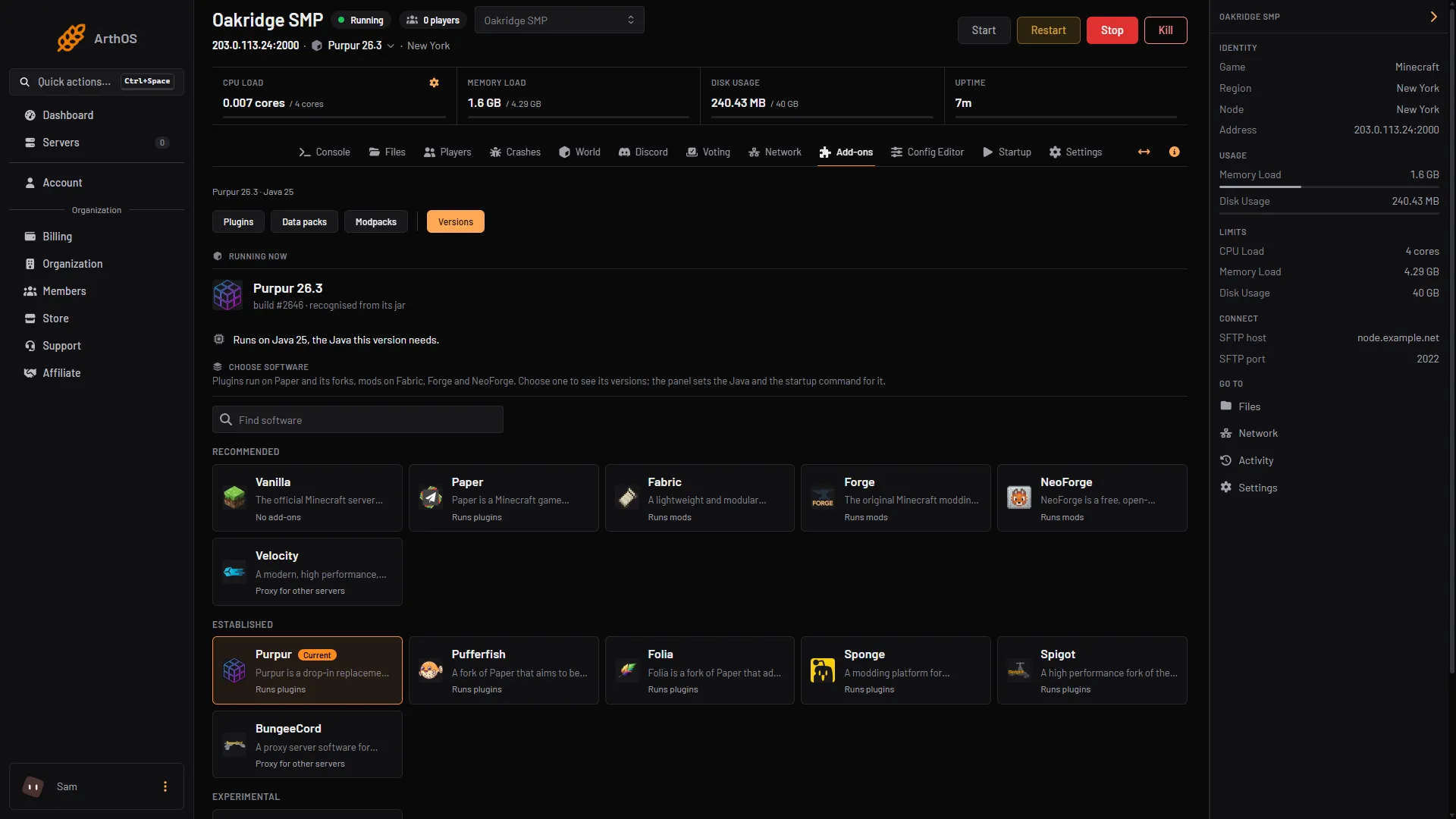
- Versions button
- Paper card
- Purpur card
- Find software
- Pick the Minecraft version. Use the version your players use now, unless you plan to change it. Each card shows the Java it needs. Press Choose (1).
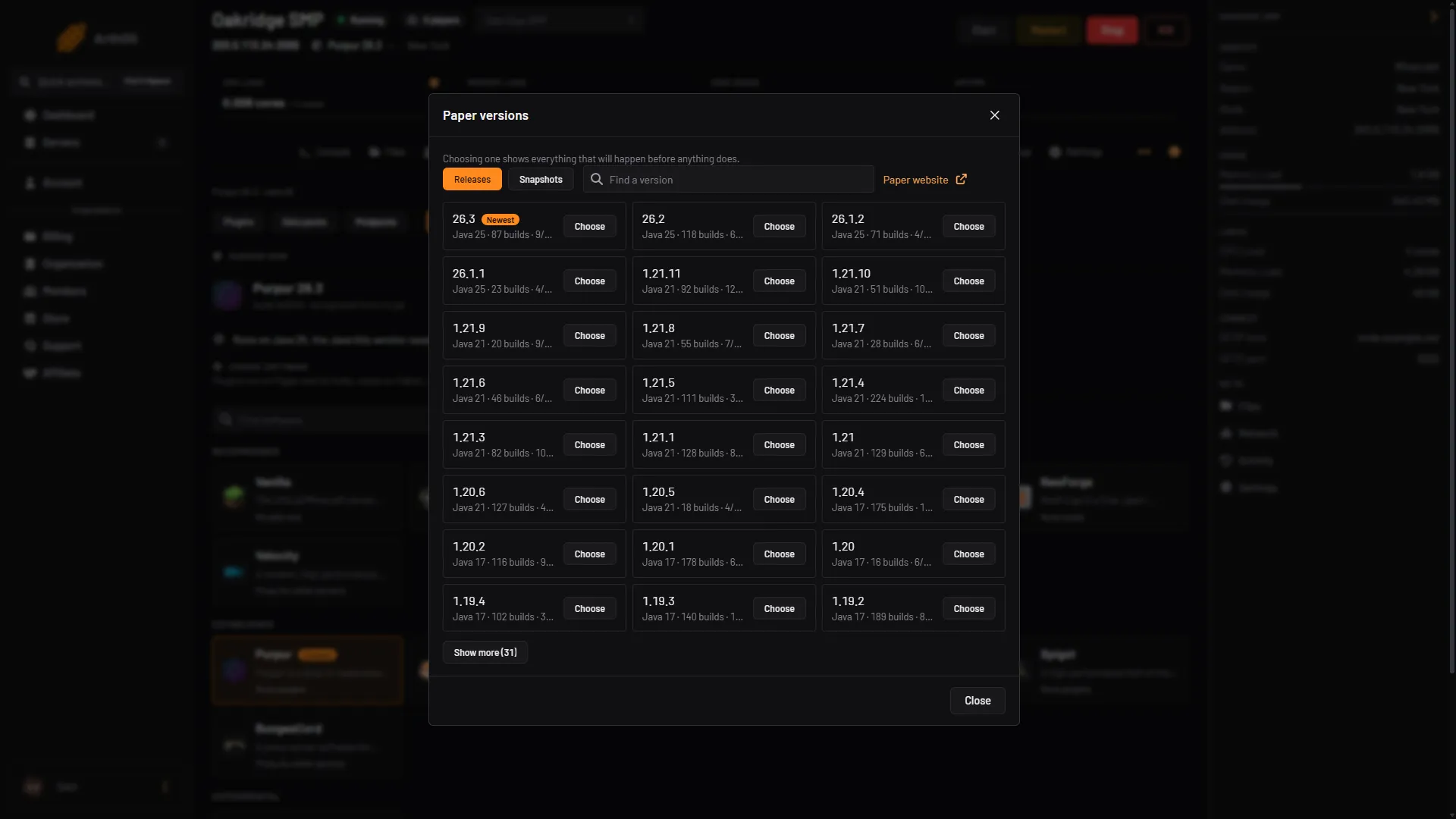
- Choose a version
- The “Switch to” dialog lists what will happen before anything does. Read it. It says the server is asked to save and stop, that a backup is taken first, and that the software is replaced while “Worlds, settings and player data stay.” Below the list are Build, Clean install, Cancel and Switch now.
- Check the dialog for these lines:
- Mods. “N mods in the mods folder will not load” means your mods stop working on Paper.
- An older world. If the world was saved by a newer version, you must tick a box named for the version you chose before you can go on.
- Java. “It moves from … to …, the Java this version needs.” The panel sets the Java for you.
- EULA. If the dialog asks you to accept the Minecraft EULA, read it first.
- Leave Build on the newest. Leave Clean install off. Clean install deletes files, and you do not need it to go to Paper.
- Press Switch now. The server is unavailable while this runs. Progress shows at the top of every page. When it finishes, start the server and watch the Console.
The panel takes a backup first when it can. If it cannot, the dialog says why, and you must tick Continue without a backup to go on. Do not skip a backup on a world you care about. See Minecraft server backups.
After the switch
Open Add-ons again. The header now reads something like “Purpur 26.3 · plugins and data packs”, and the Plugins button is there. Install plugins from it: install plugins.
A plugin installs from the panel only when its source has a build for your exact Minecraft version. Some well-known plugins have no build for the newest version yet, so check before you rely on one.
By hand
- Stop the server and back up the whole folder.
- Download the Paper
.jarfrom the PaperMC downloads page. Paper 26.1 and newer needs Java 25. - Replace
server.jar, or rename the download to the name your start command uses. - Start the server. Put plugin
.jarfiles in thepluginsfolder and restart.
Paper’s guide says that from Fabric or Forge you follow the same steps. Blocks and items that mods added cannot load on Paper. A Spigot or CraftBukkit server cannot move straight to Paper from 26.1: Paper’s guide says to go through Vanilla first.
If it does not work
- The plugin does not load. Open the Console and read the lines when the server started. Paper’s guide lists the common causes: a missing plugin it depends on, a file that is not a plugin (for example a mod), and a download that did not finish.
- No Plugins button in Add-ons. The server is not on Paper or a fork. Check Running now in Versions.
- The server hangs when it starts after a switch to an older version. The world was saved by a newer version. Restore the backup, or choose a version at least as new as the world.
- Mod blocks are gone. Paper cannot load blocks or items from mods. Restore the backup if you need them.
More on the game: Minecraft servers.
Sources: docs.papermc.io: Migration, docs.papermc.io: Vanilla, docs.papermc.io: Adding plugins, docs.papermc.io: Getting started, purpurmc.org