












The setting is PalCaptureRate. In the panel it is called Capture chance. The default is 1. A higher number makes wild Pals easier to catch. A lower number makes them harder. A change applies when the server starts next.
Pocketpair describes the setting as a “capture rate multiplier”. The panel’s help text says: “How easily wild Pals are caught. Higher catches more often.” Nothing more is documented about the exact maths, so treat the number as a dial: try a value, play, and adjust.
What it changes
It changes how often a throw at a wild Pal succeeds. The game’s own default is 1, and a new server starts there.
What it does not change
It does not change how many wild Pals appear. That is Wild Pals. It does not change experience (see experience rate). It does not change what you can build or craft.
Change it in the panel
- Open the Config Editor page of your server.
- At the top, choose the source Game settings (1).
- In the World group, find Capture chance (2).
- Type a new number. For example,
2for easier catching. - Choose Save.
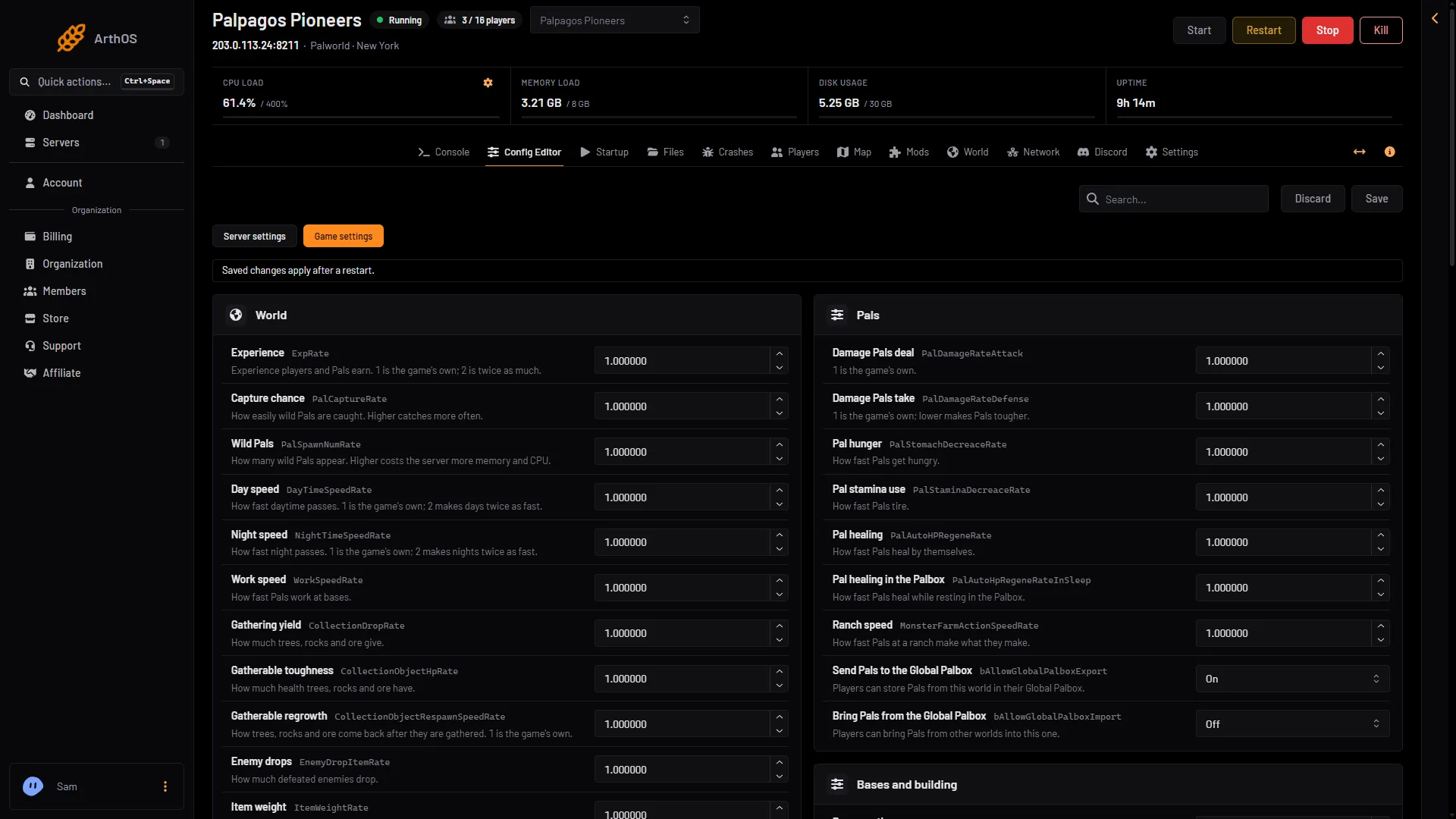
- Game settings
- Capture chance
If the server is running, the panel says “Saved, waiting for the next restart: (names).” and the change waits. Choose Restart now to apply it at once. Players on the server leave for the restart, so warn them first.
If the server is stopped, the change is written at once and the game uses it from its next start.
To go back, set the row to 1 again.
By hand
The setting is in Pal/Saved/Config/LinuxServer/PalWorldSettings.ini. The file has one OptionSettings=(...) line. Inside that line, change this pair and keep the commas between pairs:
PalCaptureRate=2.000000Stop the server first: the game writes the file again when it stops, so an edit made while it runs is lost. With server mods on, this file is in another folder under Pal/Saved/Config. Open Config in Files and use the folder that holds it. The Config Editor page finds it for you, and Edit the whole file as text there is safer than editing in Files.
If it does not work
- Nothing changed in the game. The server has not restarted since you saved. The panel shows “Saved, waiting for the next restart” until it has.
- The row says it cannot be saved. The number must be in the range the panel allows, from 0 to 100.
- The world has its own settings. A world that has a
WorldOption.savfile ignores this setting if that file holds it. Read WorldOption.sav in that case.
More about the game: Palworld servers.
Sources: docs.palworldgame.com: Configuration