












The setting is DeathPenalty. In the panel it is What players drop when they die. The default is Items, not equipment (Item): a player who dies drops their items but keeps what they wear. Two more settings decide who can pick up the drops and whether Pals are lost for good. All of them apply at the next start.
The four choices
Pocketpair describes them like this. The panel’s name is first.
| Panel | Value | What happens |
|---|---|---|
| Nothing | None | No drops. |
| Items, not equipment | Item | All items drop except equipment. This is the default. |
| Items and equipment | ItemAndEquipment | All items drop. |
| Everything, Pals in the party too | All | All items and all Pals on the team drop. |
What drops is left where the player died, to be picked up again.
Who can pick the drops up
Pick up others’ death drops (bCanPickupOtherGuildDeathPenaltyDrop) is Off by default. The panel’s help text says: “Players can take what another guild’s player dropped when they died.” Turn it On and players can loot another guild’s dead. It sits in the Guilds group, not next to the death penalty.
Pals lost on death
Pals lost on death (bPalLost) is Off by default. Pocketpair describes it as “Permanently lose Pals on death.” The panel’s help text says the same in Pocketpair’s words.
Not checked on 1.0.5 as of 4 November 2026: whether this means a Pal that falls in battle, or the Pals of a player who dies. Make a backup before you try it. See hardcore mode, which has a setting of its own for characters.
Change them in the panel
- Open the Config Editor page.
- Choose the source Game settings.
- In the Death and PvP group, set What players drop when they die (1) and, if you want it, Pals lost on death (2).
- In the Guilds group, set Pick up others’ death drops.
- Choose Save.
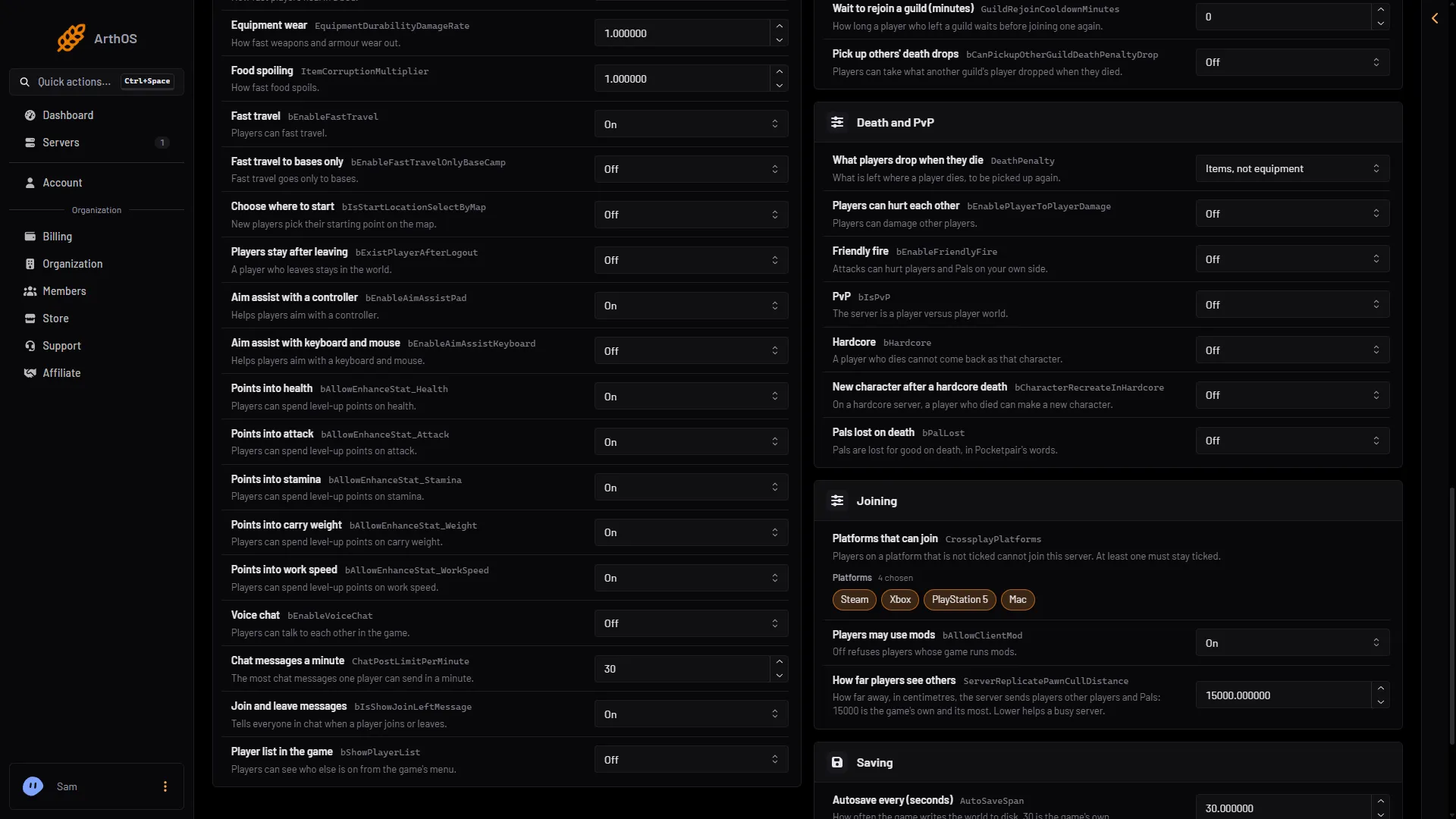
- What players drop
- Pals lost on death
If the server is running, the panel says “Saved, waiting for the next restart: (names).” and the change waits. Choose Restart now to apply it at once. Warn players first. If it is stopped, the change is written at once and used from the next start.
A common setup for PvP
Pocketpair’s PvP page uses DeathPenalty=All and bCanPickupOtherGuildDeathPenaltyDrop=True. It says: “Death causes all Pals and items to be dropped, making them available for others to loot.” See PvP on a server.
By hand
The settings are in Pal/Saved/Config/LinuxServer/PalWorldSettings.ini. The file has one OptionSettings=(...) line. Inside that line, change these pairs and keep the commas between them. The first pair changes the default, which is Item:
DeathPenalty=ItemAndEquipment,bCanPickupOtherGuildDeathPenaltyDrop=FalseStop the server first: the game writes the file again when it stops. With server mods on, this file is in another folder under Pal/Saved/Config. Open Config in Files and use the folder that holds it. The Config Editor page finds it for you, and Edit the whole file as text there is safer than editing in Files.
If it does not work
- Nothing changed. The server has not restarted since you saved.
- The world has its own settings. A
WorldOption.savfile in the world ignores these if that file holds them. See WorldOption.sav.
More about the game: Palworld servers.
Sources: docs.palworldgame.com: Configuration, docs.palworldgame.com: Pvp